
How to Mail 1,000 Letters at Once: A Practical Guide
Mailing 1,000 letters isn’t mainly a postage problem. It’s a production workflow problem. If you’re figuring out how to mail 1000 letters at once, printing, folding, stuffing, stamping, and sorting the batch by hand can take staff away from other work. A small address or assembly mistake can also create extra cleanup.
The most practical approach depends on how much each letter varies and how much production work you want to handle in-house. Start by preparing clean recipient data, checking which USPS mail class fits the mailing, and planning how each piece will be assembled and posted. Settling those details early makes a thousand-piece job easier to manage.
This guide covers the key decisions, from preparing files and comparing workflows to addressing letters and applying postage. You’ll see when in-house production makes sense and how online print-and-mail fulfillment can bring printing, folding, stamping, and mailing into one workflow. Postal Methods accepts documents through its web portal, email, or RESTful API, reducing the manual steps between digital files and physical mail.
Key Takeaways
- Before planning how to mail 1000 letters at once, decide whether every recipient gets the same letter or an individualized document.
- Run a proof batch to catch name mismatches, page-break issues, margin problems, and envelope-window alignment before full production.
- Compare in-house control with the staff time, equipment, assembly, and data handling an outsourced workflow can take off your team’s plate.
- Assign a reviewer to reconcile piece counts, match documents to recipients, and verify addresses and mailing instructions before release.
- Postal Methods accepts mailing jobs through its web portal, email, or RESTful API, then handles printing, assembly, and mailing in one workflow.
How to Mail 1,000 Letters at Once: Start with the Mailing Type
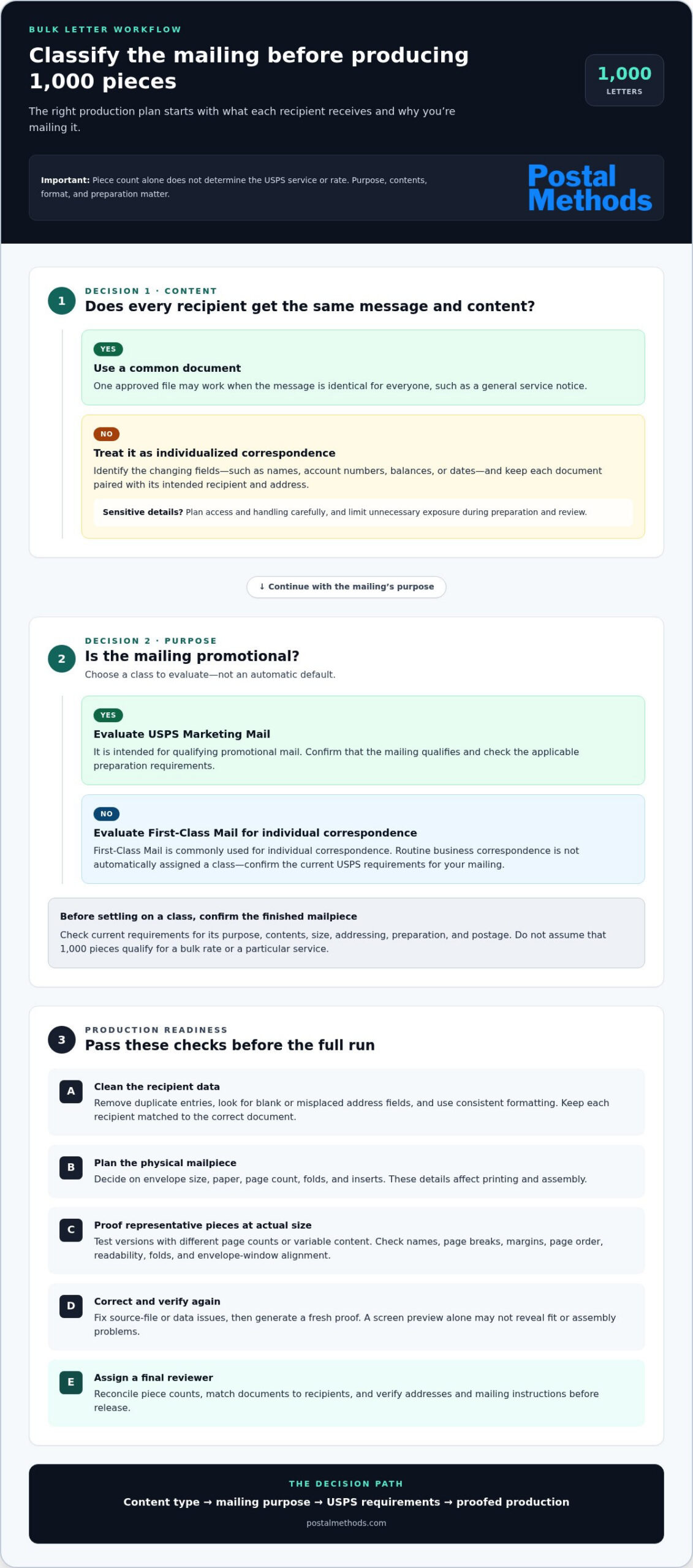
A bulk letter mailing is a coordinated process for preparing and dispatching many addressed letters as one job. It can involve organizing recipient data, matching documents to addresses, producing envelopes, applying postage, and handing off the batch. A thousand pieces can be one mailing operationally, but the count alone doesn’t determine which USPS service or rate applies. The mailing’s purpose, contents, format, and preparation all matter.
Start by defining what each recipient will receive. One notice going to every customer has different production needs from invoices with unique balances or legal correspondence with recipient-specific details. The purpose matters, too: routine business correspondence and promotional mail aren’t automatically treated the same way. This distinction helps you scope how to mail 1000 letters at once before finalizing files, postage, or assembly.
Identical letters or personalized correspondence?
Use one common document when the message and content are the same for everyone, such as a general service notice. If names, account numbers, balances, dates, or other details vary, treat the batch as individualized correspondence. Keep the recipient list and document data organized so each letter stays paired with the correct address. For sensitive personal information, plan access and handling carefully, and limit unnecessary exposure during preparation and review.
Which USPS mail class fits the purpose?
First-Class Mail and USPS Marketing Mail are options to evaluate, not interchangeable defaults. First-Class Mail is commonly used for individual correspondence, while Marketing Mail is intended for qualifying promotional mail. Eligibility and preparation rules depend on the mailing’s purpose and specifications. A broad overview of Bulk Mail explains the general concept, but use current USPS guidance to confirm requirements for your batch.
Before choosing a class, write down what the mailing contains and what you need it to accomplish. Is it a payment notice, a personalized account letter, or a promotion sent to a defined audience? Then confirm applicable USPS requirements for the content, size, addressing, preparation, and postage. Don’t assume that 1,000 pieces qualify for a bulk rate or a particular service. Quantity is only one part of the decision.
- Common content: One approved file may work when the message is identical for every recipient.
- Variable content: Identify the fields that change, then confirm each personalized document matches its intended recipient.
- Sensitive content: Decide who can access the files and how the materials will be handled during production.
Once the mailing type and class requirements are clear, choose a production workflow that fits the job. This prevents a common bottleneck: preparing a thousand pieces before discovering that the documents, addresses, or planned postage require a different setup. Next, prepare the files and recipient data for proofing and production.
Prepare the Letter Files, Addresses, and Postage Before Production
After identifying the mailing type, finalize the materials and workflow before producing the full batch. A reliable sequence is to approve the letter, validate recipient data, test the output, produce the pieces, assemble them, and dispatch the mailing. Assign an owner to each step, especially if different people or systems handle documents, envelopes, and postage.
Plan around the physical mailpiece, not just the digital file. Envelope size, paper choice, page count, folds, and inserts can affect how each letter must be printed and assembled. A one-page letter that fits an envelope window is a different production job from a multi-page document that needs folding and careful page matching. Make these decisions before setting up the full run.
Format and test the documents
Keep the page layout consistent and check that every file renders as intended. For personalized letters, confirm that each recipient record maps to the correct document. A proof run can reveal misspelled names, unexpected page breaks, clipped margins, incorrect page order, or addresses that don’t line up with envelope windows. Test representative pieces, including versions with different page counts or variable content.
Review the printed proof at actual size. Check that text is readable, key details aren’t cut off, and the document folds cleanly into its envelope. Correct the source file or data before full production, then generate a fresh proof to verify the fix. Don’t rely on a screen preview alone, because it won’t show every fit or assembly issue.
Validate recipient addresses and postage assumptions
Address hygiene means checking recipient records for completeness, consistency, and avoidable errors before mail production. Remove duplicate entries, look for blank or misplaced address fields, and use consistent formatting. For personalized mail, verify that the recipient and document stay paired from the data file through final assembly.
USPS addressing and preparation standards can vary by mail class. Before estimating postage or choosing a workflow, verify the current rules for your intended class, including any permit, sorting, preparation, and acceptance requirements. Don’t base the final plan on piece count alone. Confirm the finished mailpiece’s size, weight, and contents against the applicable requirements as well.
- Finalize: Approve the letter content, page layout, envelope, and assembly plan.
- Validate: Check recipient records, remove duplicates, and confirm personalized document matching.
- Test: Print representative pieces and inspect names, margins, page order, folds, and envelope fit.
- Produce and dispatch: Release the full batch only after the proof and mailing instructions are approved.
This preparation makes how to mail 1000 letters at once a controlled sequence rather than a last-minute assembly scramble. To move digital documents through printing, folding, stamping, and mailing in one workflow, explore online print-and-mail services.
DIY or Outsourced Mailing: Compare the Work Behind 1,000 Letters
The choice isn’t simply about who prints the letters. It’s about who coordinates the steps between an approved file and a completed mailing. In-house production gives your team direct control, but also makes it responsible for equipment, assembly, quality checks, postage, and handoff. Online print-and-mail fulfillment brings printing, folding, stamping, and mailing into one coordinated workflow.
Work area
DIY in-house: Your team assigns staff time to printing, envelope preparation, assembly, postage, sorting, and final checks.
Outsourced: Production and mailing tasks are handled through the fulfillment workflow after you submit the documents and instructions.
Equipment and assembly
DIY in-house: You organize the printing and postage equipment, then manage folds, inserts, and envelope preparation.
Outsourced: Printing, folding, stamping, and mailing are grouped into one service process.
Data and process control
DIY in-house: Your team maintains direct oversight of recipient data and each production step, including access controls and accurate piece matching.
Outsourced: You submit the documents and mailing instructions for processing. Prepare files and recipient information in a consistent format to support a clear handoff.
Handoff
DIY in-house: Your team prepares the finished batch for acceptance under the applicable mailing requirements.
Outsourced: The mailing moves from digital submission into print-and-mail fulfillment, reducing the need for your staff to handle each piece.
When handling the mailing in-house makes sense
When online print-and-mail fulfillment reduces friction
Outsourcing can make sense when producing the batch internally would pull staff away from other work or require coordinating several manual steps. Postal Methods accepts submissions through its web portal, email, or RESTful API, then handles printing, folding, stamping, and mailing in one workflow. For recurring work, an API can connect document delivery to an existing business process.
Choose based on personalization, internal capacity, and whether this is a one-time batch or recurring work. When deciding how to mail 1000 letters at once, compare the full workload, not just time at the printer. If your team has the capacity and process controls, in-house handling may suit the job. If assembling and dispatching the batch would create friction, an online print-and-mail workflow can shift those production tasks out of your hands.
Follow This Checklist to Send the Batch Without Avoidable Rework
A final review works best when it has a clear owner and a consistent sequence. Assign one reviewer to compare the approved files with the recipient list, inspect finished pieces, and confirm the mailing instructions. That person should be able to pause the job if counts don’t match or a sample shows a production issue. A defined checkpoint can prevent a small mismatch from spreading across the batch.
Use a controlled production and quality-check sequence
Freeze the approved document and recipient data before generating the full batch. If a correction is needed, make it in the source files, record the new version, and regenerate the affected output before continuing. Avoid last-minute edits to a production copy, which could leave some pieces with old content and others with the revision.
Inspect samples from the start, middle, and end of production. Compare names and variable details, page order, print quality, and envelope addressing. After printing and assembly, reconcile the expected count against the actual count. If a personalized letter is missing or paired with the wrong envelope, pause and resolve the discrepancy before handoff.
Batch checklist
- Approve: Confirm the final document and recipient list, including the version to be used.
- Assign: Name the reviewer responsible for count checks, document matching, envelope addressing, and mailing instructions.
- Freeze: Lock the approved files and data so production uses one controlled version.
- Inspect: Review samples from the beginning, middle, and end of the run for consistent output.
- Reconcile: Compare the expected piece count with the printed and assembled totals, then investigate any difference.
- Verify: Check that documents match recipients, envelopes are addressed as intended, and instructions reflect the selected mailing workflow.
- Release: Confirm the batch is complete and ready for the planned handoff and final acceptance.
Plan the handoff and keep useful records
Record the approved file version, recipient count, completed piece count, handoff date, and job status. Note who completed the review and whether any discrepancy was corrected. This job record gives your team a practical reference if a recipient reports an issue or the same mailing needs to be repeated. For recurring work, a consistent record and review sequence can make the next run easier to organize.
If you want to reduce the manual production steps involved in how to mail 1000 letters at once, submit documents to Postal Methods for printing, folding, stamping, and mailing through one workflow. Submit documents for print-and-mail fulfillment.
Send 1,000 Letters Through Postal Methods’ Online Mailing Workflow
Once your files and mailing instructions are ready, move the batch from digital documents to physical mail without coordinating each production step in-house. Postal Methods provides an online print-and-mail workflow: submit the documents, then have them printed, assembled, and mailed. Printing, folding, stamping, and mailing are connected parts of the process.
Choose a submission route that fits how your team works. A one-time batch may suit a portal or email submission. If another system generates documents regularly, an API-based workflow may fit recurring delivery. Use a method that clearly identifies which documents belong to the job and how the mailing should be prepared.
Choose the submission method that matches the job
- Web portal: Use the online portal to submit and manage a mailing job. It provides a direct route for teams preparing a batch through a browser-based workflow.
- Email: Submit documents by email when that fits your existing process for preparing and sending files.
- RESTful API: Use API integration for automated or recurring document delivery, such as letters generated as part of an ongoing business process.
Whichever route you use, keep the submission organized. Give the job a clear identifier, use consistent file names, and include mailing instructions with the correct documents. For personalized letters, align the submitted files and recipient data. A clear handoff makes the job easier to understand and helps your team repeat the process.
Make the next batch easier to manage
For recurring mail, standardize document formats, file naming, recipient data, and job records. Keep an approved version of the files and note which instructions apply to the mailing. Consistent inputs help staff prepare the next batch without rebuilding the workflow from scratch.
Some jobs have assembly needs beyond a basic folded letter. Inserts, multiple pages, or recipient-specific documents can affect how the batch is organized. Describe the intended finished pieces and mailing instructions clearly so the workflow can be tailored to the project. For sensitive medical documents, Postal Methods offers HIPAA-compliant options. Use these when the mailing includes protected medical information, rather than treating them as a default for every batch.
For teams deciding how to mail 1000 letters at once, an online workflow offers an alternative to printing, folding, stamping, and mailing each piece internally. Select the submission method that fits the job, organize the files, and move the work into one coordinated process. Explore Postal Methods’ online print-and-mail workflow to get your next batch moving.
Make Your Next Mailing Easier to Launch
Use this batch to establish a practical standard for future correspondence. Decide which decisions your team should retain, which production tasks can move out of its daily workload, and what information should be ready before the next mailing begins. A clear division of responsibilities can make a one-time effort easier to plan and repeat.
If you’re deciding how to mail 1000 letters at once without making every production step an in-house task, identify which parts are taking attention away from your team’s priorities. Postal Methods can handle printing, folding, stamping, and mailing through one workflow. HIPAA-compliant options are available for sensitive medical documents.
Explore Postal Methods’ online print-and-mail service and start planning a more manageable mailing process with less hands-on production work.
Frequently Asked Questions
Can I mail 1,000 letters at once through USPS?
Yes, you can send a large batch through USPS, but the applicable mail class, acceptance process, preparation, and postage depend on the job. A set of personal notices may have different requirements from an identical promotional mailing. Before producing all the pieces, identify the mail class and finished mailpiece details, then verify current USPS requirements for that batch. This helps you plan the handoff without assuming every mailing follows the same process.
Do 1,000 letters qualify for a USPS bulk-mail discount?
Not automatically. A count of 1,000 pieces alone doesn’t establish eligibility for a discount or a particular mailing service. Requirements can depend on the selected class, the mailing’s purpose, piece specifications, and preparation. Review current USPS rules for the class you’re considering, including any applicable sorting, permit, or documentation steps. Build the workflow around confirmed eligibility rather than an assumed bulk rate.
How much postage do I need for 1,000 letters?
The postage total depends on current rates and the details of each mailpiece, including class, weight, dimensions, and preparation. A batch of one-page letters may not have the same postage needs as a group of heavier, multi-page envelopes. Confirm the finished piece specifications before estimating, then use current USPS postage information or its calculation tools for the intended mailing. Recalculate if the envelope, contents, or class changes.
Can I send different letters to all 1,000 recipients in one batch?
Yes, personalized letters can be prepared as one batch if each document is reliably matched to its intended recipient. For example, a billing run might include a different balance and due date in each letter. Use a stable record identifier or another controlled matching method, and check representative records before release. A proof should confirm that variable details appear in the right documents and that no recipient receives another person’s information.
How long does it take to prepare 1,000 letters for mailing?
Preparation time varies with page count, personalization, assembly needs, available equipment, and the workflow you choose. A uniform one-page letter requires different handling from a multi-page batch with recipient-specific inserts. Allow time for file review, proofing, corrections, and any required mailing preparation. Map the steps and dependencies first, then set an internal target based on your team’s capacity.
Is it easier to print and mail 1,000 letters online?
Online fulfillment can reduce the hands-on work of printing, folding, stamping, and mailing, but accurate files and recipient data still matter. Postal Methods lets customers submit jobs through a web portal, email, or RESTful API. A portal or email can suit a one-time job, while API integration may fit recurring document delivery. Choose the route that fits your existing process and how the files are produced.
What should I check before sending a large batch of letters?
Confirm that the document version is approved and that the recipient count matches the intended job. Review address records for missing or duplicated entries, then inspect sample pieces for print quality and envelope fit. For personalized mail, verify that names and document details correspond to the right recipients. Finally, check current USPS preparation requirements for the selected class and finished mailpiece. Keep a record of the approved files and final batch count for reference.