
HIPAA Secure Document Delivery for Healthcare Teams
An API can securely transmit PHI when safeguards are built into the workflow. HIPAA secure document delivery through an API should use authenticated, encrypted endpoints, scoped tokens, payload validation, and request-ID logging. Email, SMS, and secure links can also support document exchange when access is controlled and sensitive information is protected.
Speed matters, but so does knowing who can open a document, what they can do with it, and whether delivery was recorded. A message or link alone doesn’t make a transfer secure. The surrounding process matters too.
This guide explains how to send PHI by email, text, URL, or API, and what encryption and access controls to consider. It also covers Business Associate Agreements, delivery evidence, consent tracking, and common sharing habits that can expose patient information. You’ll learn how to move documents with security and accountability in view.
Key Takeaways
- Choose the delivery channel based on the document, recipient, and level of access needed.
- Build a clear record of who accessed or received each document, and retain consent and delivery evidence where relevant.
- Reduce avoidable exposure by limiting shared information and avoiding casual file-sharing habits.
- Put appropriate agreements and safeguards in place before a business associate handles PHI.
- For communications that need to be sent on paper, use a managed printing and mailing workflow designed for sensitive healthcare documents.
Audit trails, proof of delivery, and consent tracking
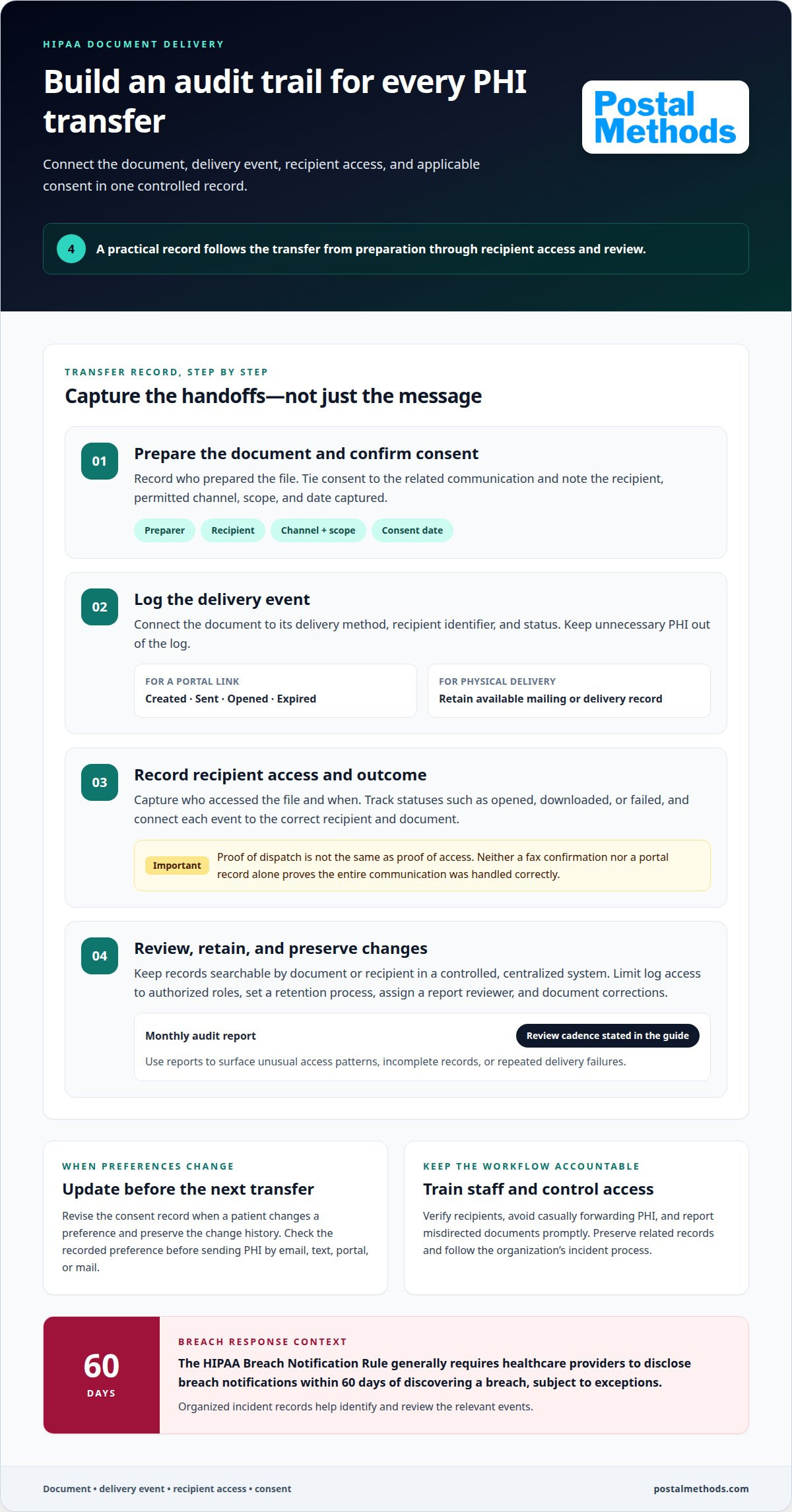
Build a record for each PHI transfer, from preparation through recipient access. Useful records connect the document, delivery event, and applicable consent.
Activity Logs and Audit History
Configure centralized logging to capture who prepared a file, who accessed it, and when each event occurred. Record the delivery method, recipient identifier, and status, such as opened, downloaded, or failed. Keep audit history searchable by document or recipient, with access limited to authorized roles. A monthly audit report can help surface unusual access patterns, incomplete records, or repeated delivery failures for review.
Keep logs and documents in a controlled, centralized system rather than scattered inboxes and shared folders. This makes it easier to connect a file-sharing event with its activity record. Set a retention process, assign an owner to review reports, and document how corrections are recorded. Train employees to verify recipients, avoid casually forwarding PHI, and report misdirected documents promptly.
Secure portals and fax services can both support compliant workflows when appropriate safeguards and procedures are in place. Portals can record account access and document activity. Fax systems may provide transmission confirmations, but neither record alone proves the entire communication was handled correctly.
Delivery Proof and Consent Tracking
Separate proof of dispatch from proof of access. For a portal link, record when it was created, sent, opened, or expired; for a physical communication, retain the available mailing or delivery record. Tie each entry to the correct recipient and document without placing unnecessary PHI in logs. These details help organizations investigate a delivery when a recipient reports a missing file.
Track consent alongside the related communication, including the recipient, permitted channel, scope, and date captured. If a patient changes a preference, update the record before the next transmission and preserve the change history. Audit reports can then show whether a message followed the recorded preference. Train staff to consult that record before sending PHI by email, text, portal, or mail.
For a service handling PHI, cost depends on the requested workflow, such as document format, volume, delivery method, and reporting needs. The price depends on the case and is given after a quote request.
Audit records also support a timely response when a breach is discovered. According to the U.S. Department of Health and Human Services, Office for Civil Rights, the HIPAA Breach Notification Rule generally requires healthcare providers to disclose breach notifications within 60 days of discovering a breach, subject to exceptions. Keep incident records organized so the relevant events can be identified and reviewed.
Common file-sharing practices that can cause violations
A familiar cloud folder can expose protected health information when access settings are too broad. A staff member might share a patient’s lab report with “anyone with the link,” then forward that link to the wrong recipient. Other risky habits include sending PHI to a personal email account, using shared passwords, and leaving old access permissions active after a role change.
Small shortcuts add up. Before sharing, confirm the recipient, remove unnecessary information, and grant access only to people who need the file. Avoid public links and personal storage accounts for patient documents. If a file goes to the wrong person, follow the organization’s incident process promptly and preserve related records rather than deleting evidence.
Cloud storage doesn’t transfer an organization’s responsibility for protecting PHI. If a vendor handles PHI on behalf of a covered entity, the parties need a Business Associate Agreement under 45 CFR 164.504(e). A cloud account alone doesn’t establish compliant use. Document the vendor’s role, limit access to approved users, and set clear procedures for sharing, retention, and removal of stored files.
Configure Microsoft or Google file-sharing tools for the specific workflow, not convenience. Restrict folders to named users, require authentication, and avoid open links. Review inherited permissions on shared folders, remove former users, and prevent PHI from being copied into personal accounts. Before sharing a patient document, test the process with a non-sensitive sample.
Choose and configure a secure document delivery vendor by assessing its access controls, authentication, audit records, PHI handling, and agreement terms. Then apply least-privilege access, define who can share files, and establish a process for ending access when it’s no longer needed.
Patients shouldn’t need a special app for every one-off document. A secure link sent through email or text can provide access without a full portal, provided the link uses appropriate protections and the message itself avoids exposing unnecessary PHI. Set an expiration, restrict access, and give the patient a clear way to open the file. For communications better handled on paper, a HIPAA-focused printing and mailing workflow can move the document out of ad hoc file sharing and into a managed delivery process.
Risk from casual file handling is not limited to a misplaced document or an overly broad permission. HIPAA non-compliance can result in fines of up to $50,000 per violation and can carry criminal penalties of up to 10 years in prison. These stakes make it important to treat each sharing choice as part of the organization’s established safeguards, rather than a convenience decision made in the moment.
Teams can make this practical by pausing before sending, checking the intended recipient and access scope, and using approved channels for patient files. When a workflow changes, revisit who can view or forward stored documents and whether access still serves a current need. Staff should know how to report a misdirected file promptly, and workflow owners should use documented procedures to address access and preserve relevant records. Consistent habits help align routine document delivery with the organization’s privacy responsibilities.
Business Associate Agreements
A Business Associate Agreement (BAA) defines how a service provider may handle health information for a covered entity. A business associate must have a BAA in place before handling PHI on a covered entity’s behalf, under 45 CFR 164.504(e). Treat the agreement as an operating document, not a signature-only form.
Start by mapping the work. For example, a vendor might receive a patient file, prepare a communication, and return delivery records. The agreement should describe the permitted work and the PHI involved. It should also set expectations for safeguards, permitted uses, reporting, and what happens to information when the relationship ends.
Make the agreement practical for the people running the workflow. Identify which party handles access approvals, incident escalation, and requests to correct or retrieve records. State how each party reports a suspected exposure and which contact receives the report. Clear responsibilities help teams respond consistently instead of searching through general policies during an incident.
Retention needs the same care. Define how records are kept during the service, what happens to PHI after the work ends, and how return or destruction is handled. Include relevant copies, exports, and operational records. Align these terms with internal retention policies so staff don’t keep an extra copy in an unapproved folder after a project closes.
Business Associate Agreements and plan eligibility
Eligibility workflows can involve sensitive health information. For example, a health plan may use an outside service to prepare or deliver a notice about coverage status. The agreement should describe that specific role and limit information use to the agreed work. Separate eligibility communications from unrelated uses, and define access for each party’s staff.
Before work begins, confirm that the agreement matches the actual data flow. List the systems and teams that receive PHI, the delivery tasks performed, and the records returned. If the workflow changes, such as by adding a document type or delivery channel, update the relevant terms and procedures before expanding access. This keeps the written agreement aligned with operations.
Review the BAA alongside security and incident policies. Confirm that staff know where to report a concern, who coordinates the response, and how records are preserved. Keep the executed agreement with vendor and workflow documentation, then make it available to employees responsible for the relationship. A concise internal summary can translate contract terms into daily steps without replacing the agreement.
For healthcare teams, the practical test is straightforward: does the agreement cover the actual task, information, systems, and people involved? A precise scope helps prevent accidental overuse, clarifies reporting, and gives both parties a shared basis for handling PHI throughout the service relationship.
Encryption in transit and at rest
HIPAA requires safeguards that protect the confidentiality, integrity, and availability of electronic health information. For HIPAA secure document delivery, assess encryption alongside access controls, authentication, and the transfer method.
The HIPAA Security Rule provides the standard for protecting ePHI. Encryption at rest is an addressable implementation specification under the current rule, so organizations should assess its suitability and document their safeguard decisions.
Encryption for Documents in Transit
Protect a document as it moves between systems, such as from a clinic’s records platform to a delivery portal. Secure email workflows should use TLS and, when needed, message-level encryption. For an API, use an authenticated, encrypted endpoint and scoped access tokens. These controls help protect PHI in transit, while authentication limits access to approved systems.
Check the full sharing path. An encrypted connection can’t prevent disclosure if a recipient forwards a message or exposes a password. For a secure link, combine encryption with controls such as password protection or an expiration date. End-to-end encryption adds a privacy layer, but isn’t always necessary for compliant file sharing. Consider recipient access and the workflow’s requirements.
Encryption at Rest
Encryption at rest protects ePHI stored in systems, including files awaiting delivery or retained in a document environment. Identify where copies may remain, such as a portal, temporary transfer folder, or download area. Assess encryption for each location and restrict access by role. Secure document exchange pairs encryption with access controls rather than relying on one measure alone.
Addressable doesn’t mean optional without evaluation. Assess whether encryption is reasonable and appropriate for the organization’s risks, then document the decision and any alternative safeguards. Revisit the assessment when storage locations or transfer processes change. For example, adding a file-sharing system changes where PHI may be stored, so safeguards should cover that system.
Encryption safe harbor can matter when assessing a breach, but encryption alone doesn’t establish that every workflow is compliant. A practical HIPAA secure document delivery process protects information in transit and at rest, limits access, and aligns safeguards with the transfer method. A suitable service should describe its encryption and access-control approach, support authenticated delivery, and manage recipient access. For APIs, include payload validation and request-ID logging in the integration design.
Healthcare organizations can use encryption and secure data handling as safeguards to protect patient information. End-to-end encryption may be incorporated into healthcare communication workflows when appropriate. A secure file exchange service should protect documents containing protected health information through encryption and access controls.
Secure document delivery by email, SMS, or URL
Email, text, and secure links can each support healthcare document workflows. The right channel depends on the document, recipient, and access needed. A lab result may require a protected link, while an appointment reminder may need only a brief message. For HIPAA secure document delivery, keep PHI out of ordinary message text when the recipient can retrieve the record through a controlled channel.
For email, use a protected workflow that secures the message and its attachment. Check the recipient address before sending, especially when names are similar or autocomplete suggests a previous contact. Send only the information needed for the task. A billing statement, for example, shouldn’t include unrelated treatment details simply because they’re available in the source record.
SMS can notify a patient that a document is ready. Keep the text minimal and direct the recipient to a protected access point rather than including sensitive details. A secure URL can provide access without requiring a full portal experience. Configure the link with an expiration date, password protection, or view-only access where appropriate.
Before sending a link, define how access works. Apply controls such as:
- Set an expiration date so an old link doesn’t remain usable indefinitely.
- Require authentication or a separate password before opening the file.
- Limit downloads when the recipient only needs to view a document.
- Restrict access to an allowed domain or network where the workflow supports it.
- Record link creation, access, and expiration in the delivery history.
Use a consistent process for each channel. Confirm the recipient and delivery preference, prepare only the necessary document, select access controls, then record the delivery outcome. If a patient can’t open a link, provide a defined support path rather than sending PHI through an unprotected channel. Clear instructions help recipients complete the workflow without exposing records.
Some communications are better delivered as physical mail. If a recipient needs a paper notice or cannot use a digital channel, route the document through a controlled print-and-mail process instead of improvising with an attachment. Treat HIPAA secure document delivery as a workflow decision shaped by the patient’s needs and the document’s purpose.
For email documents that need physical delivery, send them through an email-to-mail workflow that moves the file toward printed and mailed communication.
Postal Methods: HIPAA Compliant Printing & Mailing Services
Postal Methods provides HIPAA Compliant Printing & Mailing Services when a healthcare communication needs to reach someone on paper. Instead of coordinating printing, folding, postage, and mailing manually, teams can upload documents for processing through one online workflow.
This option suits patient notices and other sensitive communications when digital delivery isn’t appropriate or the recipient needs a physical copy. Postal Methods also provides Invoice Printing and Mailing Services, Legal Printing and Mailing Services, and Notice Printing and Mailing Services. Choose the workflow that matches the document, then submit it for printing and mailing without coordinating each production step separately.
For paper-based healthcare communications, contact Postal Methods to discuss your mailing needs.
Put Your Next Delivery Workflow in Motion
Choose a repeatable process for each document type, recipient, and channel. Assign clear ownership for preparing files, authorizing delivery, and handling exceptions. Make the workflow easy for staff to follow, so secure document delivery becomes part of daily operations rather than a last-minute task.
For communications that need a paper route, Postal Methods provides HIPAA Compliant Printing & Mailing Services. A defined handoff helps your team move from preparing a document to sending it without coordinating each production task separately. Keep the workflow aligned with your organization’s security policies and recipient needs.
Build a delivery process that fits the way your healthcare team works. Contact Postal Methods about secure delivery to discuss your mailing needs.
Frequently Asked Questions
Can APIs be used safely for transmitting PHI?
Yes. An API can transmit PHI safely when its connection and application controls protect the data and restrict access. Use authenticated, encrypted endpoints, scoped tokens, payload validation, and request-ID logging. Authentication can be part of a secure API integration. For example, a system sending a patient statement can validate the destination and log the transaction identifier, helping teams trace processing without placing unnecessary health details in diagnostic records.
How do you send HIPAA-compliant documents by email?
Use a secure email workflow that protects the message in transit and limits exposed details. Apply TLS and, when needed, message-level encryption. Keep PHI out of subject lines and notification text when a protected attachment or access link can carry the document instead. Before sending, confirm the recipient and attachment, and avoid reply-all when only one authorized person should receive a patient record.
When is a HIPAA business associate agreement required for document delivery?
A business associate must have a Business Associate Agreement before handling PHI on behalf of a covered entity, under 45 CFR 164.504(e). This applies when an outside organization performs a function involving that information, such as processing patient documents for delivery. The agreement should match the actual task and identify permitted uses, safeguards, incident reporting, and how PHI is handled when the work ends.
What are the risks and breach notification rules for misdirected or exposed documents?
A misdirected document can expose PHI to someone who wasn’t meant to receive it, creating privacy, operational, and compliance risks. Preserve relevant records and follow the organization’s incident-response process to assess what information was exposed and who received it. According to the U.S. Department of Health and Human Services, Office for Civil Rights, providers generally must disclose breach notifications within 60 days of discovery, subject to exceptions, including rules for breaches affecting fewer than 500 people.