


Print and Mail API Limitations: How to Check Your Mailing Limit
Your mailing limit isn’t one universal number: it depends on the API provider’s rules and the capacity of your workflow. To understand print and mail API limitations, distinguish how many API requests you can make from how many pieces the service can process. Check the provider’s rate limits, usage dashboard, and guidance for handling 429 responses.
It’s easy to focus on a single quota. But a workflow can also depend on address-validation services, document processing, and other API calls, so peak demand may reveal constraints that average call volumes hide. A 429 response signals that requests are being limited, making retry behavior and request pacing important parts of a reliable integration.
This article explains how to identify the limits that apply to your setup, estimate API call volumes and dependencies, and compare providers and costs without treating one provider’s quota as a universal standard. It also covers how print-and-mail services can move digital documents into physical mail with less manual handling.
Key Takeaways
- Find your actual mailing limit by separating API request quotas from the number of mail pieces a provider can process.
- Understand how rate limits and 429 responses affect busy periods, retries, and the flow of mailing jobs.
- Compare providers by looking beyond per-piece costs to the workflow factors that can add expense or friction.
- Map API dependencies and call volumes to spot bottlenecks before they disrupt document processing or mailing.
- Review file, format, and page requirements early, or use Postal Methods’ Email-to-Mail Service to send documents for printing and mailing.
API evaluation and vendor selection
Compare a provider’s request quota with its production capacity: they measure different things. A high API call allowance won’t help if the provider can’t process your mailing volume on schedule. Review the documentation for request limits, job acceptance, processing status, and supported mail services. Together, these details define the practical print and mail API limitations for your workflow.
Address validation begins with the required fields, such as the recipient’s name, street address, city, state, and ZIP Code. Check how the provider handles missing fields, formatting errors, and addresses it can’t validate. For example, decide whether an invalid record should stop a batch or go to an exception queue. Validation can flag problems, but it doesn’t guarantee delivery.
USPS classes and available mail services vary by API. Most print-and-mail APIs offer USPS Certified Mail with tracking numbers, return receipt requests, and delivery confirmation. Check the documentation for each service’s eligibility, data requirements, and status events. Don’t assume every class or add-on is available through every endpoint.
Mailpiece limits depend on the provider and selected service. Before designing a document template, review the rules for dimensions, weight, color printing, and double-sided pages. A file may upload successfully but still produce a piece that doesn’t meet your requirements. Test a sample with a representative page count, layout, and print settings, then inspect the rendered proof.
Tracking features answer different questions. An API response may confirm that a job was accepted, while a later event can show production or mailing progress. USPS Certified Mail may provide tracking, return receipt requests, and delivery confirmation. Confirm which events the API returns and how the provider distinguishes proof of mailing from delivery confirmation.
Assess operational fit alongside technical features. Compare expected volume and peak bursts with documented quotas and processing capacity. Check how errors are reported, whether job status can be retrieved, and what the documentation says about retries or duplicate submissions. For enterprise workflows, map dependencies such as address validation and internal systems, so an unavailable service doesn’t silently stall the mailing process.
Use a controlled integration test before routing live jobs:
- Read the API documentation and identify authentication, required fields, supported services, and error responses.
- Submit a small test job with a valid address and representative document.
- Test an invalid address and malformed request to observe validation and error handling.
- Follow the job through available production and tracking events, then test retry behavior without creating duplicate mail.
For healthcare workflows, assess how the provider handles protected information. Healthcare print-and-mail providers may maintain HITRUST compliance and execute Business Associate Agreements. Compare those safeguards with your organization’s data-handling requirements.
API request rate limits and 429 responses
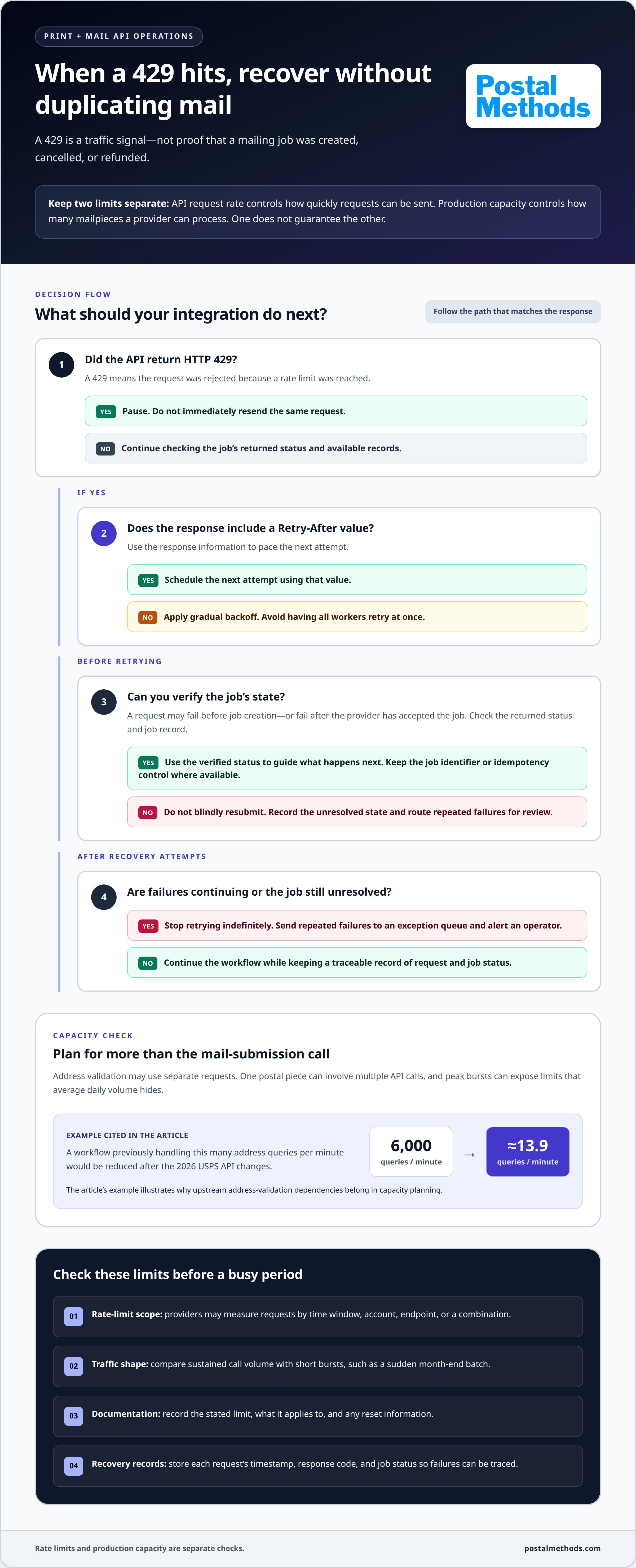
An API rate limit controls how quickly an integration can send requests. Providers may measure requests across a time window, account, endpoint, or combination of these. A 429 response means the request was rejected because a limit was reached. It is a traffic signal, not proof that a mailing job was created or cancelled.
Separate sustained call volume from short bursts. A billing workflow might submit one request per invoice, then send a sudden batch at month-end. If the API allows bursts but restricts sustained traffic, that batch can trigger 429 responses even when average daily volume seems manageable. Record the limit, its scope, and any reset information in the API documentation.
Address validation can also consume requests separately from mail submission. A workflow validating every recipient before creating each job may generate multiple calls for one piece of postal mail. The research estimates that a workflow previously handling 6,000 address queries per minute would be reduced to approximately 13.9 queries per minute after the 2026 USPS API changes. That example shows why upstream dependencies belong in capacity planning.
When a 429 is returned, pause rather than immediately resending the same request. If the response includes a Retry-After value, use it to schedule the next attempt. Otherwise, apply a gradual backoff and avoid having every worker retry simultaneously. Keep the original job identifier or idempotency control where available, so a repeated submission doesn’t create duplicate mail.
What happens when an API request fails, and how are retries, cancellations, and refunds handled? A failed request may be rejected before job creation, or it may fail after the provider has accepted the job; inspect the returned status and job record before retrying. Retry rules, cancellation eligibility, and refunds follow the provider’s documented terms, so an HTTP error alone doesn’t establish that a job was cancelled or refunded.
Build a recovery path into the integration. Store each request’s timestamp, response code, and job status. Route repeated failures to an exception queue instead of retrying indefinitely. Alert an operator when a mailing job remains unresolved, while successful jobs continue automatically. This gives support teams a traceable record and helps prevent duplicate submissions.
Test rate-limit behavior in a controlled environment before launching a large batch. Send requests at the planned pace, trigger a 429, then confirm that the integration backs off, resumes, and records the final status. Include a facility or organization-wide traffic spike in the test if multiple systems share one API account. Review the resulting logs against actual call volume, not just the number of pieces mailed.
For teams connecting document workflows to mailing, RESTful API integration can support a more automated handoff.
Potential hidden costs and trade-offs
A provider’s per-piece rate doesn’t show every cost in a mailing workflow. Compare postage, printing, envelope preparation, address processing, and selected services such as Certified Mail. Then map each charge to a job status or output. This shows whether a quote covers production alone or includes additional handling.
Mail class and document design can shift the total. For example, a multi-page invoice may use more paper and require different production handling than a one-page notice. Certified mail and return receipt options also add steps beyond ordinary mailing. Compare like-for-like samples: same page count, envelope, destination mix, and requested services.
Integration work has its own trade-offs. A platform may require engineering time for authentication, job creation, status updates, error handling, and reporting. Address validation and internal approval systems can add calls and maintenance. For a recurring billing workflow, account for the time needed to resolve rejected records and reconcile completed jobs, not just the initial setup.
Manual handling can remain hidden after automation. Staff may still review exceptions, correct addresses, approve proofs, or investigate returned mail. For an organization sending 10,000+ mail pieces annually, compare the automated workflow with the full manual process, including labor and rework. Track what staff actually do before and after launch rather than assuming every task disappears.
- Production: paper, printing, folding, and envelope requirements for each document type.
- Mail services: postage, certified options, return receipt requests, and other selected services.
- Technology: integration development, monitoring, status reconciliation, and exception handling.
- Operations: address corrections, returned items, reprints, and manual review.
Use a representative invoice, legal notice, or customer letter to test the complete workflow. Confirm that the document renders correctly, the selected service appears in the job record, and the final status reaches your reporting system. A successful API response alone doesn’t show whether later mailing steps were completed.
There are trade-offs between control and delegation. A platform that retains address data may simplify recurring workflows, while sending addresses with each job may reduce the data held by the mail provider. Decide which approach fits your organization’s operating and data-handling needs. Document the decision, who owns it, and how it will be reviewed.
These print and mail API limitations affect both technical design and cost tracking. Build a report that separates postage, production, service options, and internal labor. Review it across different mailing types, then adjust workflows where repeated exceptions or manual corrections consume time.
Assessing API dependencies and call volumes
A mailing request often passes through several systems before letters enter production. A billing platform may create a document, validate its address, submit a job, and receive status updates. Each handoff may depend on a separate API, queue, or internal service. Map those dependencies before estimating the volume your infrastructure must handle.
Count calls by workflow, not by finished mailpiece. One invoice could trigger document creation, address validation, job submission, and status checks. A single letter may therefore generate several requests. Record the calls each feature makes per job, then multiply by expected jobs during ordinary and peak periods. Include retries and scheduled status checks in the estimate.
For example, an organization sending renewal notices might create jobs in a nightly batch. If address checks and submissions happen together, the burst may be larger than the same volume spread throughout the day. Separate steady traffic from batch traffic to see whether the bottleneck is your queue, an upstream address service, or the mailing API.
Dependencies also shape the impact of failures. If address validation is unavailable, decide whether to pause the workflow, hold records for later, or proceed only with previously validated addresses. If the document platform is unavailable, keep mailing jobs queued rather than losing them. Assign an owner to each dependency and record what happens when its response is delayed or incomplete.
Measure useful signals in your operations dashboard:
- Request volume: calls by endpoint, workflow, and time period.
- Queue depth: jobs waiting for address checks, submission, or status updates.
- Completion state: accepted, processing, completed, rejected, or unresolved jobs.
- Dependency health: errors and delays from the postal service, document system, and internal applications.
Compare those signals with actual sending patterns. A notice program may run on a schedule, while customer letters may arrive unpredictably throughout the day. These patterns need different queue behavior. Batch jobs can be paced; urgent individual requests may need a separate path. Keep both visible in reporting so one doesn’t obscure the other.
Plan capacity around the slowest dependency, not the fastest. If an upstream service can’t accept work, sending more calls to the mailing API won’t clear the backlog. Use queues, controlled submissions, and status reconciliation to protect downstream systems. Retain enough job information to resume after an outage without creating duplicate mailpieces.
Review the dependency map whenever a workflow changes, such as when you add address checks or status polling. Recalculate calls per job, retest batch behavior, and confirm monitoring captures every handoff. This keeps volume estimates tied to the actual process, not an outdated design document.
What are the page, file size, and format limits for print and mail APIs?
There’s no single page count or upload size that applies to every print-and-mail API. Limits depend on the provider, endpoint, document type, and mailing configuration. Check the API documentation for separate rules on uploaded files, rendered documents, pages per piece, and total batch size. A successful upload doesn’t establish that every document in the batch can be produced.
Separate file acceptance from print readiness. An API may accept a PDF, for example, while the resulting document still needs review for page order, margins, orientation, and legibility. A file-size cap controls the upload payload; a page limit controls the printed piece. Both may affect the same request, but they address different constraints.
Page counts can affect production and mailing decisions. Depending on provider rules and the selected configuration, a two-page statement may be handled differently from a long legal notice. Confirm whether blank pages count, whether attachments are joined to the same piece, and how the service handles documents with varying page counts in one batch. These details affect document assembly and envelope preparation.
File format rules also shape the integration. Before sending production jobs, identify accepted formats, required PDF settings, and whether the API expects one file per recipient or a combined batch. Don’t assume that a format supported by your document system is accepted by the mailing endpoint. Use the documentation to match each input format to the required upload method.
- Upload: identify the maximum file size and whether the limit applies per file or request.
- Pages: find the page cap per mailpiece and how attachments or blank pages are counted.
- Layout: check orientation, margins, color, and double-sided printing requirements.
- Batch: determine whether one request can contain documents with different page counts.
Test representative documents before connecting a live workflow. Include a short letter, a multi-page statement, and a document close to the documented file-size limit. Check the API response, generated proof, and final page sequence. Also test a file that violates a documented rule, then confirm the error identifies the issue clearly enough for your system to route it for correction.
Build these constraints into document generation rather than relying on last-minute fixes. For example, a billing platform can flag an oversized attachment before submission while an exception queue holds the affected job. Record the file name, recipient reference, and returned error so operations can correct the source and resubmit safely.
For a workflow that sends documents from email for physical processing, send documents through an email-to-mail workflow.
Postal Methods: Email-to-Mail Service
Postal Methods’ Email-to-Mail Service offers an alternative when maintaining an API integration would add unnecessary work to your mailing process. Submit documents by email for printing and mailing, and keep your team focused on systems that need direct API control. This can suit recurring correspondence when the priority is moving digital documents into physical mail.
For specialized workflows, Postal Methods also offers HIPAA-Compliant Printing & Mailing Services, Invoice Printing & Mailing Services, and Legal Printing & Mailing Services. These services support common document needs without requiring every task to use the same API workflow.
If you’d like to discuss your mailing needs, contact Postal Methods.
Choose the workflow that fits your next mailing
Treat print and mail API limitations as design inputs, not a reason to force every document through the same process. Decide which steps need to stay in your software and which recurring tasks are better handled through a managed print-and-mail workflow. That choice can shape document preparation, exception management, and future changes.
For healthcare correspondence, invoices, or legal documents, Postal Methods offers HIPAA-Compliant Printing & Mailing Services, Invoice Printing & Mailing Services, and Legal Printing & Mailing Services. The right fit depends on the documents and workflow you need to move from digital files to physical mail.
Share the type of correspondence and how it enters your current process. Contact Postal Methods to discuss your mailing needs and identify a practical next step. A clear workflow decision can help your team move forward with confidence.
Frequently Asked Questions
What are common print and mail API limitations?
Common limits cover request rates, job volume, accepted document formats, file size, page count, address fields, and available mail services. They can apply at different stages: an upload may succeed while a later production rule rejects the document. For example, a statement with an attachment may exceed a page limit even when its file format is accepted. Design integrations to capture errors and keep affected jobs traceable.
What are typical API rate limits, throughput limits, and delivery timelines?
There’s no single rate or throughput limit shared by all providers; quotas depend on the API and account. Separate request volume from the number of pieces processed, then consider batching and peak demand. Postal Methods begins processing letters at 4:30 a.m. CST and transfers them to USPS once each weekday. Its First-Class delivery estimate is 3-5 days within the United States, and up to 2 weeks internationally.
What security, privacy, and compliance requirements apply to documents sent through a print and mail API?
Protect document data with controls suited to its sensitivity, including authentication, access permissions, and encryption in transit and at rest. For healthcare communications, confirm that the workflow’s handling of protected information aligns with applicable HIPAA requirements. Ask providers how they protect sensitive documents and what security controls they can demonstrate. Also define who can submit documents, access records, and manage exceptions within your organization.
How do leading print and mail API providers compare in features, limits, and pricing?
Compare providers using the same sample workflow, not headline feature counts. Review accepted file formats, page and upload limits, USPS services, status events, address handling, and API error behavior. Then compare pricing by identifying which production and mailing elements are included and which depend on document specifications or selected services. Healthcare workflows may prioritize compliance controls, while invoice operations may value repeatable batch submissions and reconciliation.