


Outsourced Mailroom Solutions for Managing Costs
A smoother mailroom starts with a better process, not more manual handling. Outsourced mailroom solutions can move some recurring in-house work to a service model, with incoming documents received, digitized, classified, and routed into the right workflow. The savings depend on what your current operation handles and what the service includes.
When mailroom costs keep growing, it’s understandable to focus on staffing and equipment. But the process behind each document matters too: delays and repeated data entry can create friction across departments. A well-defined workflow helps make those steps more consistent and visible.
Learn how to assess cost drivers, compare vendor quotes by scope, and set clear service levels and reporting expectations. You’ll also see how incoming mail can connect with accounting, customer service, and other business workflows, so documents don’t stop at the scanner. The goal is a practical process that fits your mail volume and lets your team focus on work that needs its attention.
Key Takeaways
- Compare in-house and outsourced workflows by considering staffing, space, equipment, mail volume, and the manual work each model requires.
- Assess how digitizing and routing incoming documents could reduce handling friction and free employees for higher-priority tasks.
- Compare vendor quotes by matching each proposal’s included services to your actual mail volume and processing needs.
- Set clear service levels, tracking expectations, and reporting measures so you can monitor how mail moves through each step.
- Connect document intake to the next business process, and consider Email-to-Mail Service when you need digital documents turned into physical mail.
How can outsourcing inbound mail services reduce costs?
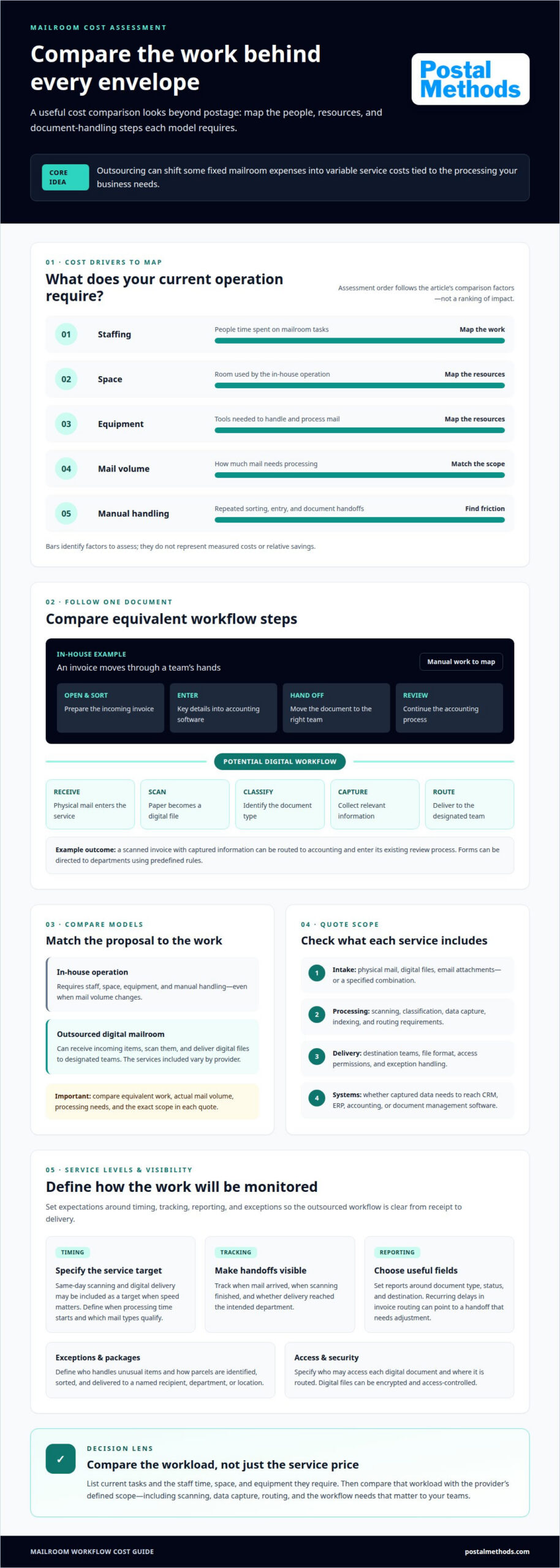
Outsourced mailroom solutions can shift some fixed mailroom expenses into variable service costs, tied to the processing a business needs. An in-house operation requires staff, space, equipment, and manual handling, even when mail volume changes. An outsourced digital mailroom can receive incoming items, scan them, and deliver digital files to designated teams. The cost comparison starts with the work behind each envelope, not just the postage.
In the United States, outsourced mailroom providers can handle physical mail intake, scanning, and digital delivery. Service models vary in what they process and how they route documents. One may digitize incoming physical mail; another may also accept digital files and email attachments. To compare options, map each step: receipt, scanning, classification, data capture, routing, and access.
For example, an in-house team might open and sort an invoice, then enter its details into accounting software. A digital mail workflow can scan the invoice, capture relevant information, and route it to accounting. Forms can also go to the right department under predefined rules. These steps reduce repeated handling and help staff spend less time moving documents between teams.
Scanning and document capture turn physical mail into digital files. Authorized employees can access these documents without passing the originals from desk to desk. Digital files can be encrypted and access-controlled, while physical mail relies on physical custody. A secure workflow should define who can access each document and where its digital copy is routed.
Workflow integration makes scanning an operational step rather than a separate storage task. Relevant data from digitized mail can be delivered to systems such as CRM, ERP, or document management software. An invoice routed into accounting, for instance, can enter the existing review process. Integration requirements depend on the destination system, document types, indexing rules, and how teams use the captured information.
Same-day scanning and digital delivery can be included as a service-level target when speed matters. The workflow should specify when processing time starts, which mail types qualify, and where completed files go. A practical setup defines the delivery format, recipient permissions, and exception path for unreadable or misrouted items. These details help teams compare service scope and assess whether outsourcing can replace manual work.
To estimate the operational difference, list current mailroom tasks and identify the staff time, space, and equipment each requires. Then compare that workload with the outsourced scope, including scanning, data capture, and routing. Outsourced mailroom solutions are worth assessing when digitization can remove recurring manual steps or reduce resources that fluctuate with mail volume. Keep the comparison focused on equivalent work and workflow needs.
How can mailroom outsourcing solve your mail operation problems?
Outsourcing can reduce repetitive sorting and scanning and give teams digital access to incoming documents. The trade-off is less direct, hands-on control, so define how exceptions, package distribution, and reporting will work.
Outsourcing Benefits and Drawbacks
Delegating mail handling can move routine work away from employees with other priorities. For example, a finance team can receive invoice images through a defined workflow instead of collecting envelopes from a central desk. The benefit depends on how well the outside process matches your organization’s routing rules. Unclear instructions, however, can create handoff delays or leave unusual items waiting for review.
Mail Collection and Scanning
A consistent collection process moves mail from receipt to sorting, scanning, and delivery. The provider can classify documents by type, then direct an invoice, customer letter, or internal package to its intended destination. Intelligent capture can support classification and indexing, while staff handle items that need judgment. Supply Chain Resource Cooperative at North Carolina State University notes that outsourced support services can include internal mail distribution.
Tracking, Analytics, and Reporting
Tracking records make it easier to see where a document is in the process. A useful report can show when mail arrived, when scanning finished, and whether delivery reached the intended department. For example, recurring delays in invoice routing can signal a handoff that needs adjustment. Set reporting fields around the steps your team needs to monitor, such as document type, status, and destination.
Package distribution also needs a clear route. Define how incoming parcels are identified, sorted, and sent to the right person or department. A named recipient, department, or location gives each handoff a practical destination. For internal mail, a distribution record can show where an item should go and reduce repeated searches across desks and shared mail areas.
Returned mail needs a separate process from ordinary scanning. Record the return reason, associate it with the original document or recipient, and route it to the team responsible for address updates. For example, a returned customer notice may need review before another copy is sent. Keep its status visible so staff can distinguish an unresolved address issue from completed delivery.
Before moving the workflow, map one common item, such as an invoice or customer letter, from arrival to final recipient. Identify who handles exceptions, how package distribution is recorded, and which reports reveal incomplete handoffs. These steps help align the outsourced process with daily work while keeping returned items and routine documents on distinct, trackable paths.
Cost-benefit analysis and vendor quotes
Compare equivalent workloads, not just quoted totals. Include processing scope, employee time, equipment, and the steps required to handle incoming mail.
Cost-Per-Piece and ROI Calculations
Calculate in-house cost per piece by dividing mailroom expenses for a period by the pieces processed during that same period. Include staff time, equipment, space, and related operating costs. Apply the same method to an outsourced quote, using its included processing and service fees. To estimate ROI, compare the value of reduced internal costs and time with the outsourcing expense, then divide the difference by that expense.
Use the same mail volume and service scope in both calculations. For example, if one estimate includes scanning but another covers only collection, the per-piece figures don’t describe equivalent work. Separate routine mail from exceptions, such as documents requiring manual review, so the comparison reflects actual operations.
Mailroom Cost and Time Savings
Savings can come from reducing the need to staff and manage an in-house mailroom or maintain its equipment. Time savings matter too: record which employees currently sort mail, enter data, or deliver documents, then estimate what an outsourced process would remove. A team leader can use this task list to identify where staff time could shift to higher-priority work.
Build a complete baseline before comparing proposals. Include space and equipment costs, along with time spent on repeated handling. Then compare those expenses with the proposed service scope. Don’t count a task as eliminated if employees still need to do it after documents arrive digitally.
Cost Reduction and Scalability
Incoming mail volume can change, so compare how each model handles busy and slow periods. An in-house team may retain staffing and equipment needs as volume shifts. A service model can tie some processing costs to the work required. Check how the quote handles volume changes, extra processing, and documents requiring manual review.
Scalability depends on the workflow as well as capacity. If a new document type needs different indexing or routing, that may change the processing scope. Map the expected change, such as a seasonal rise in invoices, and compare how the proposal accommodates it. This helps distinguish a flexible service from a fixed process that could add internal work.
Vendor Quotes and Provider Selection
Choose a provider by matching its stated scope to your document types, processing steps, delivery format, security needs, and reporting requirements. Request a quote that separates included work from optional services and exception handling. Pricing depends on the workflow; key factors include mail volume, service scope, document handling, and workflow requirements.
Costs and risks can go uncounted when setup, exceptions, volume changes, or ongoing internal tasks are missing from the comparison. Review each proposal against the same workflow, from receipt through delivery, and identify who handles unresolved items. This makes gaps visible before you assess projected savings.
Service-level agreements, tracking, and reporting
Outsourced mailroom services can include receiving physical mail, sorting, scanning, classification, data capture, digital delivery, and internal distribution. A service-level agreement (SLA) defines expected handling steps, timing, security controls, and reporting measures, so teams know how each item should move.
In an onsite model, provider staff handle mail at the business’s location, using its mailroom and distribution points. This can suit an organization that needs physical items delivered to specific offices or departments. An offsite model moves receipt and processing to a provider’s facility. The workflow should specify how documents and packages reach the business, who handles exceptions, and how completed processing is recorded.
Both models need clear service boundaries. Specify which mail types are accepted, how items are sorted, and whether scanning or internal distribution is included. For example, a workflow might classify invoices separately from customer correspondence, then route each type to its designated team. A defined exception path keeps damaged, unreadable, or misdirected items from being lost between steps.
Build the SLA around observable actions. Define when the clock starts, which processing milestones count, and how completion is recorded. Tracking can show a document’s arrival, scanning status, and destination. Chain-of-custody records can provide an audit trail for mail handling. Reporting should make these details useful, with measures such as processing status, document category, incomplete handoffs, and exception resolution.
Customization means aligning the workflow with your organization’s requirements. Set indexing fields, recipient rules, access permissions, and routing instructions for different document types. A legal notice, for instance, may need a different destination and handling path than a general business letter. Document those rules in the operating process, then use reporting to identify misroutes or recurring exceptions.
A full virtual mailroom centers on digital access to incoming mail. Physical items are received and scanned, then delivered as electronic documents to authorized users. This format can help distributed teams review correspondence without waiting for an envelope to reach a particular desk. Specify file formats, delivery destinations, user permissions, and how originals are handled, since digital delivery alone does not determine what happens to the physical item.
Review performance against agreed measures on a regular reporting cycle. If an invoice repeatedly reaches the wrong queue, use its category, routing record, and completion status to locate the handoff issue. Clear service levels, tracking, and reporting make mailroom processing a visible workflow and support efficiency and accuracy across physical and digital handling.
Integration with business workflows
A digital mailroom creates value when document capture starts the next business action. A scanned item should enter a defined workflow, not stop as an image in a shared folder. For example, an incoming invoice can be classified, indexed, and routed for accounting review, connecting mailroom operations to daily work.
Start by mapping a document’s path from receipt to completion. Identify its type, the information staff need, the system responsible for the next step, and who handles exceptions. Intelligent capture software can classify documents and apply predefined metadata fields. Those fields can then help initiate processes using the scanned image and its associated information.
Different documents trigger different workflows. An invoice can enter invoice processing, while a loan application may begin loan origination. A customer letter can prompt a service response, and a medical claim can move into claims handling. Surveys can also be routed for review. These examples show why classification rules should reflect actual document types and departmental processes.
Choose the destination system based on the work that follows. Relevant data from digitized mail can be delivered to CRM, ERP, or document management software. Customer correspondence, for instance, belongs in the system where service staff manage responses. An invoice’s captured details should reach the accounting workflow responsible for review and approval.
Define metadata before automating routing. A business might index invoices by account or document category, then assign each category to its appropriate queue. Clear fields make documents easier to retrieve and help prevent similar items from entering the wrong workflow. Include an exception route for unclear scans or missing information, so those documents are reviewed rather than processed incorrectly.
Integration also needs a visible handoff. Specify which event marks a document as received by the destination system, who owns the next action, and how completion is recorded. Workflow notifications can show when each step has been completed. For example, a team can distinguish a scanned invoice awaiting approval from one already routed into its accounting process.
Test the design with representative documents before expanding it. Follow an invoice, a customer letter, and a claim through capture, classification, routing, and destination handling. Note where information is re-entered or responsibility becomes unclear. These checks reveal whether the digital mailroom streamlines the process or merely moves manual work into another system.
For businesses connecting mail intake with existing software, RESTful API Integration can support the integration approach. Define the document types, metadata, destination systems, and handoff points the workflow requires. That gives technical and operations teams a shared map for connecting capture to the next business action.
Postal Methods: Email-to-Mail Service
Postal Methods’ Email-to-Mail Service turns digital documents into physical mail when recipients need paper copies. Submit documents for printing, folding, stamping, and mailing without managing each production step in-house. It can suit recurring correspondence or individual business mail pieces that still need physical delivery.
Use this option when a workflow starts with a digital file but ends with a mailed document. For sensitive medical correspondence, HIPAA-Compliant Printing & Mailing Services may fit; invoice and legal documents also have dedicated printing and mailing services. Choose based on the document type and the output your process requires.
To discuss mailing documents from a digital workflow, contact Postal Methods.
Make the Next Mailroom Decision Practical
Choose one document flow to improve first. Identify who sends it, what happens after it arrives, and where delays or repeated handling occur. That focused starting point helps your team define the workflow and assess whether outsourced mailroom solutions fit its needs. It also keeps the next decision grounded in the work your business actually handles.
Postal Methods offers HIPAA-Compliant Printing & Mailing Services, Invoice Printing and Mailing Services, and Legal Printing and Mailing Services. These services support specific document needs when a digital process still requires printed and mailed output. Match the service to the document type and the outcome your workflow calls for.
Bring the document category and desired handling steps into the conversation. A clear starting scope helps make the next steps more useful, from choosing the right service to outlining how documents should move. Contact Postal Methods to discuss your mailroom and take the next step toward a process that fits your operation.
Frequently Asked Questions
How can inbound mail workflows be simplified?
Simplify inbound workflows by defining a clear route for each document type. For example, direct invoices to accounts payable and customer complaints to the service team. Use consistent categories and recipient rules so staff don’t have to decide where every item belongs. A separate exception route can handle missing information, unclear recipients, or unusual requirements without holding up routine items.
How can print and mail outsourcing enhance your business communication?
Print-and-mail outsourcing connects a digital document with recipients who need a physical copy. It can help teams send invoices, notices, or legal documents without printing and preparing each item internally. Before choosing a workflow, define which documents need mailing, who receives them, and what the finished output must include. This makes coordination across departments easier.
How does outsourcing mailroom tasks improve office efficiency?
Outsourcing can reduce interruptions from routine mail handling. Employees can spend less time collecting, sorting, and distributing items and focus on tasks tied to their roles. For example, an administrative employee who currently delivers department mail could instead support scheduling or records work. The benefit depends on whether outsourcing removes tasks rather than adding internal review steps.
What are some benefits of centralized inbound mail management?
Centralized inbound mail management gives an organization a consistent process for receiving and distributing mail across locations or departments. A shared workflow can make document categories and routing rules easier to manage. For example, a company with several offices can direct similar customer correspondence through the same intake process, reducing variation in how teams identify and forward documents.
What are the advantages of leveraging specialized expertise for mailroom operations?
Specialized mailroom staff bring experience with document processing, handling procedures, and security practices. That expertise can help an organization establish consistent steps for routine mail and unusual items. For instance, a team can define how sensitive correspondence is separated, recorded, and directed to authorized recipients. Clear procedures also make it easier to bring departments into the same workflow.
What are the challenges of managing your own mailroom operations?
An in-house mailroom requires employees, workspace, equipment, and oversight of manual processes. Changes in mail volume can make staffing and capacity harder to manage, while repetitive sorting and data entry take time away from other duties. A business also needs to keep handling consistent as teams or workflows change. These demands can be challenging when mailroom work sits alongside unrelated administrative responsibilities.
How much do outsourced mailroom services cost in the United States?
Costs depend on processing scope, mail volume, document types, and handling requirements. Scanning alone has different requirements from a service that also sorts packages or routes information into business systems. Request a quote based on the actual workflow, then compare what each proposal includes. Postal Methods charges per document for printing and mailing; project pricing depends on scope.
How are outsourced mailroom providers priced: per piece, per employee, or fixed fee?
Pricing may be based on pieces processed, staffing, a recurring fee, or a combination of service components. Compare what each quote covers, such as collection, scanning, distribution, and exception handling. Separate included work from optional tasks, then assess proposals against the same mail volume and workflow. Postal Methods charges for each document processed through its printing and mailing service.