


The Business Case for Outsourced Mailing for Companies
Keeping mail in-house can seem cheaper until you account for labor, equipment, maintenance, and staff time. The business case for outsourced mailing rests on comparing those full internal costs with the cost and flexibility of having a provider print and mail documents as needed. Outsourcing can make particular sense when volumes fluctuate or repetitive mailroom work pulls employees away from core responsibilities.
Mail still needs careful handling, accurate processing, and appropriate data safeguards, whether it’s managed internally or outsourced. The right approach depends on your volume, workflow, security requirements, and need for flexibility. This article explains how to compare in-house and outsourced costs, what to consider in data protection and compliance, and how a professional service can manage documents from processing through mailing. You’ll also see how outsourced workflows can adapt as business needs shift, and when keeping mail in-house may remain a better fit.
Key Takeaways
- Compare the full demands of in-house mailing, including equipment, supplies, upkeep, and staff time, with the flexibility of outsourcing.
- Match data-handling controls to the sensitivity of your documents; government mailers handling tax data may consider IRS Publication 1075 controls.
- Map each step from document processing to printing and mailing to identify where a managed workflow can reduce manual handoffs.
- Consider outsourcing when mail volume changes, grows, or pulls employees away from core work, while weighing the value of in-house personalization.
- Use a professional email-to-mail service when you want documents sent for printing and mailing without managing each physical step internally.
Comparing In-House vs Outsourced Corporate Mailing Services: Which Is More Cost-Effective?
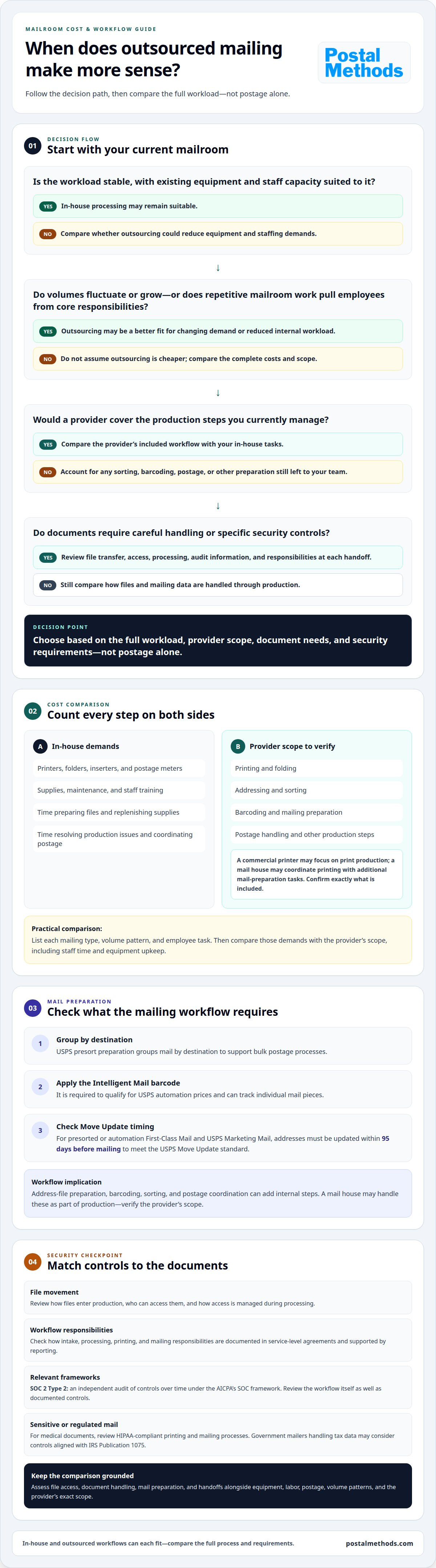
Compare the full cost of managing mail internally with the provider’s scope, then weigh equipment, staff workload, postage, and document requirements. The business case for outsourced mailing is clearest when you account for every production step, not just postage. Consider whether volumes fluctuate and how much employee time each mailing takes.
In-house processing can involve printers, folders, inserters, postage meters, supplies, maintenance, and staff training. A company sending invoices and notices, for example, may need equipment for regular batches and occasional larger runs. Outsourcing can eliminate the need to buy and maintain that equipment. Include the time employees spend preparing files, replenishing supplies, and resolving production issues when you compare the options.
Commercial printers and mail houses may handle different parts of the work. A commercial printer focuses on producing printed materials, while a mail house can coordinate printing with folding, addressing, sorting, and mailing. Likewise, for organizations coordinating direct door-to-door promotional materials alongside postal mailings, providers like LeafletPro UK handle specialized leaflet distribution. For finished mail pieces, compare the provider’s full workflow with the work currently divided among employees or vendors.
USPS presort preparation groups mail by destination to support bulk postage processes. The Intelligent Mail barcode is required to qualify for USPS automation prices and can track individual mail pieces. Barcoding and sorting affect preparation and eligibility for automation prices. The USPS Move Update standard applies to presorted or automation First-Class Mail and USPS Marketing Mail. Mailers must update addresses within 95 days before mailing to meet that standard.
These preparation requirements can add steps to an internal workflow. Staff may need to prepare address files, apply barcodes, sort mail, and coordinate postage. A mail house can handle those steps as part of production while the business supplies documents and recipient data. Compare exactly what the provider includes, since printing alone does not cover sorting or mailing preparation.
Sensitive business correspondence adds another consideration. Medical documents, invoices, and legal notices can contain information that requires careful handling. Compare how each approach manages file access, document processing, and mail preparation. In-house operations keep production within the organization’s workflow; outsourcing assigns those tasks to a provider. Weigh security requirements alongside equipment and labor demands.
For a practical assessment, list each mailing type, its volume pattern, and the steps employees currently complete. Compare those tasks with the provider’s scope, including sorting, barcoding, and postage handling. Include staff time and equipment upkeep. The business case for outsourced mailing is clearest when the workflow reduces internal demands while meeting document and security requirements. In-house processing may remain suitable when existing equipment and staff capacity match a stable workload.
How do outsourced mailing services handle data security and compliance?
Outsourced mailing moves document processing into a provider’s workflow, so security controls and responsibilities matter. Review how sensitive files are transferred, handled, and prepared for mailing.
Security and Compliance Frameworks
Start with the frameworks and controls relevant to your documents. A provider’s security structure should explain how files move through intake, processing, printing, and mailing. Review how responsibilities are documented in service-level agreements, or SLAs, and what reporting supports oversight. Clear procedures make it easier to understand who handles each stage and how compliance-related work is managed.
SOC 2 Type 2 is an independent audit of controls over time under the AICPA’s SOC framework. An audit can help describe how controls are assessed, but it doesn’t replace a review of the mailing workflow itself. Consider whether the documented controls address the information and processes involved in your organization’s mail.
Health-related mail calls for particular attention to document handling. HIPAA-compliant printing and mailing services are relevant when organizations send sensitive medical documents. Review how the process protects information as it moves from digital files to printed pages and sealed envelopes. Responsibilities should be clear at each transfer point, from file intake through mail preparation.
Secure data transfer is a practical checkpoint. Identify how files enter production, which roles can access them, and how access is managed during processing. Then review the provider’s security audit information and incident-handling procedures. These steps help organizations assess whether the transfer and production process fits the sensitivity of documents such as patient notices or billing records.
Government mailers handling tax data may look for partners compliant with IRS Publication 1075 controls, according to the Internal Revenue Service. This gives tax-related mailers a specific framework to consider when assessing a provider’s controls. Match the scope of the work to the controls relevant to the data being processed.
Mailing Data Quality and Security
Accurate mailing data supports reliable delivery and careful information handling. A file with mismatched names, addresses, or document records can send a sensitive notice to the wrong recipient. A sound process connects each document to its intended address before printing, then keeps that match intact as pages are assembled into envelopes.
For example, a batch of patient notices needs consistent links between recipient records and the right documents. Ask how exceptions, such as incomplete address fields or mismatched records, are handled before production. Clear exception procedures reduce avoidable handling and help protect information. For organizations weighing savings against risk, a documented secure print and mail workflow can help clarify the steps involved.
Comparing outsourcing costs with in-house mailing
Compare the full workload and operating requirements, not just one line item. The decision depends on the mailing type, volume pattern, and how often employees repeat each task.
Mailing Costs and Workloads
In-house mailing uses employee time across several stages: preparing files, printing documents, assembling envelopes, and organizing completed batches. A recurring invoice run, for example, may involve finance staff gathering records and operations staff preparing each mailing. Include those tasks when assessing internal costs. Outsourcing shifts defined production work to a provider, but employees still supply approved content and recipient information.
Build a like-for-like comparison using one specific communication. Record the internal steps, supplies used, equipment involved, and staff roles. Then match those needs against the provider’s stated scope. If a provider handles printing and mailing but your team retains document preparation, include that internal work in the comparison. Separating included tasks from retained tasks clarifies both the operational and cost picture.
Volumes and Mailing Types
Outsourcing can suit recurring invoices, notices, and legal communications, especially when batches fluctuate or require repeated handling. A business with a seasonal billing cycle, for instance, may need more production capacity during a busy period than during quieter months. Outsourcing can accommodate that changing workload without requiring the organization to maintain internal capacity for every peak.
Volume alone doesn’t determine fit. Consider how often mail goes out, whether documents are personalized, and how much assembly each format requires. A steady stream of simple statements differs from a smaller batch that requires careful recipient matching. Organizations can start by shifting one repeatable mailing, then assess whether the new workflow fits before moving other communications.
In-House and Outsourced Printing
In-house printing offers direct oversight of production timing and document changes. It may suit teams that need to coordinate printing closely with internal approvals or adjust formats frequently. However, staff must manage print runs alongside other duties. Outsourced printing places production with a provider, allowing internal teams to focus on content decisions and business operations.
Use a sample mailing to compare workflows. Trace a notice from final approval through printing, assembly, and mailing preparation. Note which employees handle each handoff and where work waits between teams. With outsourcing, clarify which files and address information your team supplies and which production tasks the provider handles. This avoids comparing printing alone with a complete internal workflow.
For a phased transition, select a repeatable mail type with clear content and recipient data. Keep communications that require close internal coordination in-house while the selected batch moves to a provider. Review the division of responsibilities and workload afterward. The best fit depends on whether your team values direct production control or a more flexible way to handle recurring mail.
Data processing, printing, mailing, and fulfillment workflow
A reliable fulfillment workflow makes each handoff visible, from approved file to completed mail piece. For a recurring billing notice, the organization prepares the document and recipient data, then submits them for processing. Production matches each record with its document, prints the approved content, prepares the mail piece, and arranges mailing. Clear stages help teams understand where work stands without coordinating every physical task themselves.
Before production, data processing focuses on matching each document with its intended recipient. For example, a batch of separate account notices needs each record matched to the corresponding file. A defined exception process can separate incomplete records before they move forward. This reduces avoidable confusion during assembly and gives the organization a clear opportunity to resolve discrepancies before mailing.
Printing and assembly follow the approved file and mailing instructions. A provider may print the pages, fold them, insert them into envelopes, and prepare the batch for mailing. The organization supplies final content and recipient information in the required format. This division can remove repetitive handling from internal teams while preserving their control over what each communication says.
Integration links document creation to production. In 2026, organizations are seeking print and mail partners that support integration, automation, and risk management alongside production. For example, an organization can connect a business system to a print-and-mail workflow rather than passing files manually between departments. The integration approach depends on how the source system creates and approves documents, and which steps need to remain under internal control.
Automation can reduce handoffs between document preparation and physical fulfillment. A recurring invoice process, for instance, can move approved files into production without staff separately coordinating printing, folding, and envelope preparation. Employees can focus on reviewing communications and resolving exceptions. The operational value depends on how much manual work the existing process requires and whether documents can follow a consistent structure.
Physical and electronic communications may also be coordinated within a broader communications workflow. DNI says outsourced mailing services can combine physical and electronic communications under one umbrella. This can help organizations plan how different formats serve the same business process. For example, a company may send a printed notice to recipients who need physical mail while managing related electronic communications through its existing operations. Teams seeking to optimize those digital channels alongside direct mail often turn to specialized CRM and email marketing agencies like verticalbrands.co.
Fulfillment should have clear ownership at each stage. Define who approves content, supplies recipient data, handles exceptions, and authorizes a batch for mailing. For a notice with personalized fields, these checkpoints help keep the correct information together through production. Mapping the workflow from intake to mailing reveals where automation can reduce manual coordination and where human review remains critical to accurate business communications.
Scalable outsourced mailroom services
Mail volume rarely stays identical across every business cycle. A health insurer may face a steady stream of personalized documents, then need additional capacity as its communications grow. One health insurance organization grew mailings 200% a year while achieving 99% accuracy on personalized mailings. This example shows why scaling means more than producing extra pieces. The workflow must preserve document-to-recipient matching and reliable handling as output increases.
Scalable operations can absorb volume changes without requiring a business to staff and equip for its busiest period. A provider coordinates production capacity around the mail being sent, while internal teams supply approved files and recipient information. For example, a company can mail routine statements regularly and add a larger notice batch during a peak period. Separating these demands helps prevent temporary increases from becoming a permanent manual workload.
HealthPoint sends 20,000 pieces of health information across its locations every week and serves a patient base of over 100,000 people. That example illustrates the coordination involved when organizations send recurring, sensitive documents across multiple locations. A scalable process needs consistent file handling, document matching, and mail preparation. As volume rises, clear handoffs help teams maintain oversight without adding the same manual steps at every office.
Growth also changes how employees spend their time. If staff prepare every envelope themselves, a larger mail run can pull more people into repetitive work. Outsourcing lets internal teams focus on core operations while a provider handles production. The value is not simply fewer manual tasks. It is the ability to accommodate changing demand without rebuilding the organization’s mailroom for every new workload.
Plan scaling around specific triggers, such as a new communication type, a growing recipient list, or a seasonal increase. Start with one repeatable batch, define who supplies documents and addresses, and map how each batch moves through production. Then expand the scope as the workflow proves suitable. This phased approach gives teams a practical way to transfer work while keeping other mail operations steady.
Scalability also depends on exception handling. Rising volume can expose incomplete addresses, duplicate records, or documents that need special handling. Define how those cases are separated from ready-to-mail files and who resolves them before production. This helps protect quality as volume changes. Review the process when mailing formats or document types change, not only when total volume grows.
Choose a workflow that can flex without making every increase a new manual project. Plan a scalable mailing workflow around your documents and changing volumes.
Postal Methods: Email-to-Mail Service
Postal Methods’ Email-to-Mail Service helps businesses move document mailing out of routine office workflows. It fits organizations that need digital documents printed and mailed without assigning employees to manage each physical step. For sensitive medical communications, HIPAA Compliant Printing & Mailing Services address document production and mailing needs. Invoice Printing and Mailing Services and Legal Printing and Mailing Services support recurring business correspondence and legal documents.
Choose the service that matches the documents and workflow you need handled. Submit your files for production, and Postal Methods handles printing and mailing. This can be a practical next step when internal mail preparation takes staff away from core work or changing volumes make in-house handling harder to manage.
To discuss your mailing workflow, contact Postal Methods.
Make your next mailing decision with clarity
The business case for outsourced mailing becomes practical when you choose one communication to evaluate first. Identify its purpose, the documents involved, and the handoffs your team wants to simplify. That gives you a focused starting point for discussing how a managed workflow could fit your operations.
Postal Methods offers HIPAA-Compliant Printing & Mailing Services for sensitive medical documents, Invoice Printing and Mailing Services for business billing, and Legal Printing and Mailing Services for legal correspondence. Each supports a distinct mailing need, so start with the document type and the work your team wants handled. Choose the relevant service to discuss a workflow that fits your operations.
Bring your mailing needs and the process you want to improve. Contact Postal Methods to discuss your mailing needs, and take the next step toward a workflow that fits your business.
Frequently Asked Questions
What Is Print and Mail Outsourcing?
Print and mail outsourcing means a business sends digital documents and recipient information to a provider for physical production and mailing. The provider handles tasks such as printing, folding, preparing envelopes, and postage. For example, an accounting team can submit client invoices instead of printing and assembling each batch internally. The business remains responsible for supplying accurate content and recipient details.
Does Outsourcing Mean Losing Control of Your Mailings?
No. A business can retain control over document content, recipient data, and which communications it sends while delegating physical production. For instance, a team can approve a notice and its address file before submitting them for mailing. Define internal approvals and submission responsibilities clearly. This separation helps staff oversee business decisions without managing every printing, folding, and envelope task.
How Do Mail Houses Work With an Organization’s Existing Systems?
Mail houses can receive documents through different submission channels, depending on the provider’s available integrations. Postal Methods supports a web portal, email, and RESTful API integration. An API can connect document submission with an organization’s existing systems, while the portal or email can suit workflows without that connection. The right route depends on how documents are created and approved internally.
In-house or outsourced: which makes sense for your team?
In-house handling can suit teams with steady mail needs, available equipment, and a preference for direct control over each production step. Outsourcing can suit operations where staff time, changing demand, or repeated preparation tasks create friction. Compare the work involved for a specific communication, such as recurring invoices. Include employee effort and equipment upkeep, then assess which approach fits your team’s workload.
What is outsourced mailing and what services do providers offer?
Outsourced mailing is the delegation of document production and physical mailing to a provider. Services vary, so match the offering to the documents and workflow involved. Postal Methods provides an online print-and-mail platform and offers HIPAA-compliant options for sensitive medical documents. A provider’s compliance capabilities can vary, so confirm that its services fit the documents and requirements involved. Other offerings include invoice, legal, and notice printing and mailing.
How much does outsourced mailing cost per piece and per month in the United States?
There is no single per-piece or monthly cost that applies to every mailing. The total depends on page count, print format, mailing type, postage, assembly requirements, and volume. A recurring single-page invoice run differs from a multi-page legal mailing. Compare the same document specifications and frequency across estimates so the costs reflect equivalent work and included production steps.
How do outsourced mailing costs compare with in-house mailing costs?
Compare the provider’s mailing charge with the full internal workload, not postage alone. In-house costs can include staff time, supplies, equipment upkeep, and time spent coordinating production. For a fair comparison, choose one recurring mailing and account for every step employees currently handle. Then compare that total workload with the provider’s scope, including which preparation and mailing tasks are included.
What are the cost savings and ROI of outsourcing business mail?
Outsourcing’s return depends on whether it reduces internal effort or replaces equipment and processes the business would otherwise maintain. Estimate the value of staff time redirected from mail preparation, alongside avoided supply and maintenance demands. Then compare those benefits with the provider’s charges for the same mailing volume and format. The clearest assessment uses a defined mail type and includes all recurring internal tasks.