

Mailing Audit Trail: What to Record for Legal Compliance
A mailing audit trail for legal compliance should record who handled a document, what they did, and when. Include the document and version, key events such as access, edits, approvals, sharing, and mailing, along with relevant context such as the user account or device. These records create a traceable history for accountability and can help establish what happened during a breach investigation.
Clear records matter, especially when mailed communications contain sensitive or legally important information. A log is useful only if it is complete, protected from unauthorized changes, and ready to review when questions arise.
This article explains what to capture in a mailing compliance audit trail, how to secure and export logs, and how communication records can support investigations. You’ll also learn how mailing workflows fit into broader recordkeeping, helping reduce manual tracking and make essential activity easier to trace.
Key Takeaways
- Set clear logging rules across teams and workflows so routine document activity doesn’t fall through the gaps.
- Limit access to audit logs, protect them from tampering, and review them for unusual activity.
- Keep communication records connected to the relevant mailing workflow to make decisions and follow-up easier to trace.
- Export logs in a readable, organized format so they’re easier to use during audits or investigations.
- For physical legal correspondence, printing and mailing services can reduce manual handling between document preparation and dispatch.
What Is a Compliance Audit Trail?
A mailing audit trail for legal compliance is a time-stamped history of actions and system events tied to a document or mailing. Recordkeeping requirements can vary by state, industry, and notice type, so the rules for each communication determine what evidence to retain.
Document Activity Logs
A document activity log records events such as uploading, viewing, editing, approving, sharing, printing, or sending a file. Each entry can connect the action to a user account, timestamp, document version, and relevant device or system details.
That sequence helps explain what happened to a notice after it was prepared. For example, a record might show that an employee uploaded a revised notice, a supervisor approved that version, and the file then moved to mailing. System-generated audit logs provide a clearer history than a manual list assembled later.
Traceability and Compliance Policies
Document traceability links each action to the person, file, and process involved, giving an organization evidence of how records were handled. For contracts containing personal data, access records can help demonstrate accountability under the GDPR. The ESIGN Act and Uniform Electronic Transactions Act (UETA) recognize electronic signatures when their execution can be demonstrated, often through an audit trail.
Policies explain which events must be logged, who may access records, and how changes are documented. Under the HIPAA Security Rule, 45 C.F.R. 164.316 requires entities to document policies and procedures for required specifications. A practical policy can distinguish a draft, an approved notice, and a corrected version, then define how each status is recorded.
Legal document automation and form libraries can support consistency when they use controlled templates and identifiable versions. A standard notice template, for example, can reduce manual re-entry, while records of the selected template and later edits help show which document was prepared. Automation does not replace policy; it makes the defined process easier to follow and trace.
Document Custody and Mailing Requirements
Document chain of custody is the recorded sequence of possession and handling from file creation through mailing. A useful file-tracking record connects the source document to its approved version, print-ready file, and dispatch event. That connection helps distinguish the notice approved for sending from an earlier draft or amended copy.
Requirements can depend on jurisdiction, industry, and notice type. Insurance record-retention rules, for example, vary by state and record type, while a legal notice may have its own governing requirements. The applicable rule determines which records matter, how long they must be kept, and what evidence supports the mailing history.
Define each workflow transition, such as prepared, reviewed, approved, and sent. Record the responsible account and timestamp at each step. If a file changes after approval, preserve the new version and its relationship to the original. This makes the chain easier to reconstruct without relying on memory or scattered email threads.
Audit-trail program design and log security
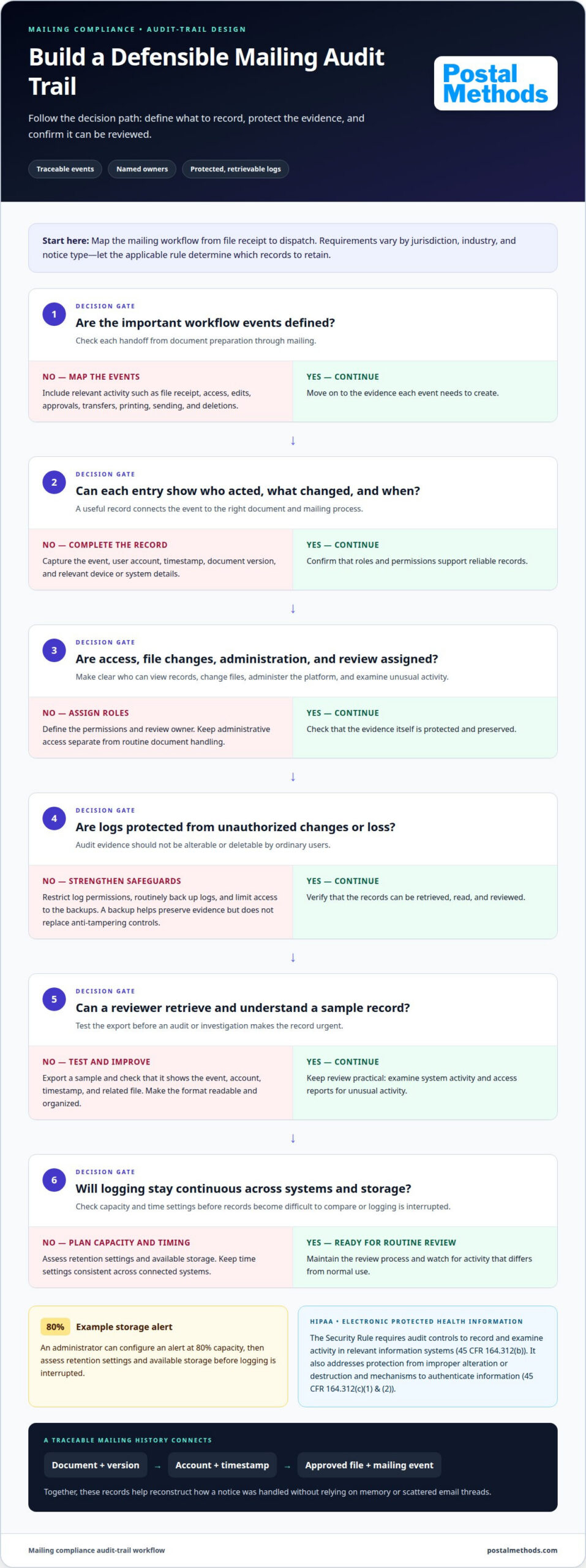
A defensible mailing audit trail starts with defined events, named owners, protected logs, and a review process. Build one by mapping the mailing workflow, deciding which actions to record, restricting log access, preserving backups, and testing whether records can be retrieved.
For electronic protected health information, the HIPAA Security Rule requires covered entities and business associates to implement audit controls that record and examine activity in relevant information systems under 45 CFR 164.312(b). Regularly reviewing system activity, including audit logs and access reports, can help identify unusual activity.
Fit the controls to the workflow. A notice process could include file receipt, approval, transfer for printing, and dispatch. Define which events generate evidence, which role owns each review, and how exceptions are escalated. A written policy turns these decisions into repeatable practice rather than relying on memory.
- Map events: Identify document access, edits, approvals, transfers, and deletions in each mailing workflow.
- Assign roles: Specify who can view records, change files, administer the platform, and review unusual activity.
- Protect logs: Restrict permissions so ordinary users cannot alter or delete the evidence they generate.
- Test retrieval: Export a sample record and confirm it shows the event, account, timestamp, and related file.
Separate administrative access from routine document handling. For example, a staff member approving a notice should not automatically have permission to change audit settings. Under 45 CFR 164.312(c)(1) & (2), the HIPAA Security Rule requires policies and procedures to protect electronic protected health information from improper alteration or destruction, and mechanisms to authenticate that information.
Back up audit logs routinely and limit access to backups. A backup helps preserve evidence after data loss or a system outage, but does not replace controls against tampering. Automated alerts for abnormal access can help teams spot activity that differs from normal use, while scheduled reviews can reveal patterns a single alert might miss.
Plan log capacity before storage becomes a problem. An administrator can configure a storage alert at 80% capacity, then assess retention settings and available storage before logging is interrupted. Keep time settings consistent across connected systems so an event in a document platform can be compared with a transfer or mailing record.
Online file-sharing needs the same discipline. Limit access to intended roles, record transfers, and remove permissions when a user no longer needs them. For physical correspondence, a digital-to-mail workflow can move files into printing and mailing without relying on disconnected manual handoffs.
Communication logging and certified client updates
Communication logs connect each notice to the messages and events surrounding its mailing. Courts and regulatory audits can use attributable, time-stamped records as evidence, so the record should identify the document and action. For each outgoing piece, capture its identifier, recipient, approved version, sender or system account, dispatch time, channel, and available status.
Logging and Monitoring Guidance
Logging and monitoring guidance defines how communication events are captured, reviewed, and retained. CMS guidelines described for audit logs call for online logs for 12 months, archiving for 18 months, and timestamps synchronized within one minute of UTC. ISO 27001 includes logging and monitoring among its information security controls.
These details help teams compare events across systems and reconstruct a communication history. For example, synchronized timestamps can align a file transfer with a recorded client update. Retention and archiving practices also keep sensitive records available for review after they leave routine online storage.
Automated Audit Logging
Automated audit logging records defined actions performed by users or systems, reducing dependence on manual notes. A communication platform can capture a message’s sender, recipient, timestamp, channel, and related document identifier when an update is created or sent.
Set event rules for approvals, corrections, dispatch notices, and failed transfers. Preserve the original entry when making a correction, then log the new action separately. This creates a visible history and helps protect record integrity. Automation supports transparency, but logs still need access controls and review.
Off-channel messaging creates gaps when business communications move to personal apps or unrecorded accounts. In 2022, the SEC and CFTC fined major financial institutions over a billion dollars in total for failing to retain business communications made through personal messaging apps. A documented policy should identify approved channels and explain how relevant messages enter the official record.
Mailing and Delivery Evidence
Mailing and delivery evidence comprises records that connect an approved communication to its dispatch and any recorded delivery event. A system-generated log can show which file was sent, who or what initiated the action, and when it occurred. This supports a factual account without treating dispatch as proof of receipt.
For court use, Federal Rule of Evidence 901 requires sufficient evidence that a signature is genuine. Keep communication records attributable and tied to the relevant document; a log can support authenticity, while the specific evidence needed depends on the issue under review.
Outgoing Mail Log Details
An outgoing mail log records each piece’s identity, content reference, handling actions, and mailing events. Use a unique item or batch identifier, recipient details appropriate to the record, document version, approval status, dispatch date and time, and responsible account.
Add the mailing channel and any available tracking or delivery status, along with corrections or returned-mail events when recorded. Keep sensitive content out of general update messages and link them to a controlled record instead. These fields help distinguish what was prepared, what was sent, and the status later recorded by the system.
Exporting audit trails for records and audits
An export turns system activity into a record that can be reviewed, preserved, and presented during an audit. Retain mailing audit trails for the period required by the applicable record type and regulatory requirements, rather than following one universal schedule.
Exporting Records for Review
An audit-trail export is a filtered copy of logged activity prepared for a defined review. It matters because reviewers need records they can read, sort, and connect to the relevant document or mailing.
Choose a date range, document identifier, or user account to narrow the export. Include event descriptions, timestamps, account identifiers, and file or version references. Preserve the original export, record who generated it, and note the filters used. For example, a request about one notice can be answered with its related activity rather than an unfiltered system dump.
Healthcare records need careful handling. Under 45 C.F.R. 164.312, electronic medical record audit trails can log actions such as viewing, editing, printing, deleting, downloading, and exporting. Keep the exported log protected and accessible to authorized reviewers. A clear filename and accompanying index can help connect each entry to its source record without exposing unrelated patient information.
Record Integrity and Timestamps
A mutable record can be changed, while an immutable record preserves its original entry and records later activity separately. That distinction matters when reviewers need to determine whether a record changed after an event.
Use time-stamped logs that retain the original data and show later corrections as separate entries. For systems subject to FDA 21 CFR Part 11, Section 11.10(e) requires secure, time-stamped audit trails that independently log operator actions, including each entry’s date and time. Keep exports in human-readable and electronic formats when needed for review. Record the export date and source system to preserve context.
Before sharing an export, confirm that it opens and that timestamps, event details, and identifiers remain readable. It should distinguish, for example, an original mailing event from a later correction. Store the exported copy with access controls and document any transfer to an auditor. These steps help maintain a usable record without overwriting the underlying log.
Retention Periods
A retention period is the time a record remains preserved and retrievable. It matters because audit evidence must remain available for the relevant review, claim, or regulatory need.
There is no single retention period for every mailing audit trail. U.S. insurance record-retention requirements vary by state and record type, with stated periods ranging from 3 to 10 years. The U.S. Securities and Exchange Commission states that some records under SEC rules may require retention for six years. For HIPAA audit logs, the U.S. Department of Health and Human Services states healthcare organizations must retain them for at least six years.
Apply the schedule that matches the record and obligation, then preserve linked logs and mailing records together. For an insurance notice, the applicable state and record category affect retention. For a healthcare communication, HIPAA-related records may follow a different schedule. Document the retention rule, start point, and authorized disposal process so staff can retrieve records consistently and avoid premature deletion.
Audit trails for accountability and breach investigation
A useful audit trail does more than store events. It gives internal teams visibility into who accessed a mailing file, what changed, and which actions followed. This sequence supports accountability and helps investigators distinguish routine processing from unauthorized activity.
Incomplete or inaccurate mailing records can leave an organization unable to show how a communication was handled or who accessed its information. That gap can complicate an audit, weaken evidence during a dispute, and slow a breach investigation. The consequences depend on applicable legal and regulatory requirements.
During a suspected breach, follow a consistent sequence: preserve relevant logs, export the affected activity, and compare entries across connected systems. An access event followed by a file change and an outbound transfer, for example, may help establish the incident’s path. Keep original records intact while investigators review copies.
Look for anomalies against the normal workflow. Access outside a user’s role, an unexpected change to a mailing file, or an unfamiliar export can help focus monitoring. One unusual entry does not explain the full incident, but linked events can reveal where exposure may have started and what happened next.
Audit trails can also deter misuse. When users know actions are logged and reviewed, activity is clearly linked to accounts and documents. The GDPR accountability principle makes controllers responsible for demonstrating compliance. Well-organized records can help show how access was managed and how the organization responded to identified concerns.
For a practical review, group relevant events by document, account, and time. Check whether the file was viewed, changed, approved, shared, or exported, then compare those entries with the corresponding mailing activity. Record which evidence supports each conclusion. If an entry is missing, note the gap without altering the source log.
- Preserve: Keep original logs and related records unchanged during review.
- Scope: Identify affected files, accounts, systems, and communication events.
- Compare: Align timestamps and actions across available records.
- Document: Record findings, unresolved gaps, and response actions.
After containment, review how the event occurred and whether controls worked as intended. An unexpected file export, for example, may prompt a review of account permissions or alert settings. Use the findings to refine internal policies and monitoring, then retain the investigation record with its supporting evidence.
For business documents that move from digital files to physical mail, streamline document-to-mail processing as part of a traceable workflow.
Postal Methods: Legal Printing and Mailing Services
Postal Methods handles legal documents from digital files through physical mail with Legal Printing and Mailing Services. Use the service when preparing, printing, and mailing notices or other legal correspondence adds repetitive handling to your workflow.
Upload documents for printing, folding, stamping, and mailing. For correspondence that starts in email, the Email-to-Mail Service connects digital delivery with physical mail. Postal Methods also offers HIPAA-Compliant Printing & Mailing Services for sensitive medical documents, as well as Invoice Printing and Mailing Services.
Keep your audit-trail program focused on what your organization must record and retain. Mailing support handles the physical distribution step; your internal policies determine which documents, approvals, and communication records belong in your compliance evidence. Contact Postal Methods to discuss printing and mailing legal documents.
Make recordkeeping part of the mailing workflow
A mailing audit trail for legal compliance works best as part of everyday operations, not as a file assembled only after a problem arises. Assign someone responsibility for maintaining the process, and revisit it when document flows, communication channels, or approval steps change. This keeps records aligned with how work actually moves.
Start with one recurring mailing workflow. Map its handoffs, identify where records are created, and decide how those records connect to the final communication. Then apply the same approach to other workflows. A clear process helps staff follow established practices and your organization explain how it handled important correspondence.
When physical mail is part of that process, Postal Methods can handle document printing and mailing. Contact Postal Methods to discuss your mailing workflow and choose a practical next step. A consistent process can make routine correspondence easier to manage and its history easier to follow.
Frequently Asked Questions
What is a mailing audit trail and what records should it include?
A mailing audit trail links a communication to its preparation, approval, and dispatch history. Give each mailing a unique reference that connects the approved document with its recipient record and related system events. If a customer disputes receiving a notice, for example, the reference helps retrieve the exact version and associated mailing record. Limit access to recipient details, especially when a communication contains sensitive information.
Which U.S. laws and regulations require businesses to retain mailing records?
No single U.S. rule sets one retention period for every mailing record; applicable requirements depend on industry and record type. The U.S. Securities and Exchange Commission states that some records under SEC rules may require retention for six years. The U.S. Department of Health and Human Services states that healthcare organizations must retain HIPAA audit logs for at least six years. These rules concern specific records, not every business mailing.
How do USPS Certified Mail, Registered Mail, and Return Receipt compare for legal documentation?
These services document different parts of a mailing, so match the service to the evidence your process needs. Certified Mail provides a mailing record and delivery status; Registered Mail documents custody through the postal process; Return Receipt provides a record of delivery acknowledgment. Keep the mailing receipt, tracking details, and any returned receipt with the notice’s file. These records document events, but do not by themselves establish that every legal notice requirement was met.
How can digital mailroom software provide audit trails and tamper-evident records?
Digital mailroom software can generate logs as documents move through defined workflow events. Configure it to record approvals, transfers, exports, and access changes, then restrict who can alter or delete log data. To test the process, handle a sample notice and export its history; confirm that the file links to the correct version and shows each logged event. Backups and separate administrator permissions can further protect records from loss or unauthorized changes.