


Transactional Print and Mail API Pricing and Monthly Allowances
Delivery status is a signal, not the whole story. A webhook sends your application an event recorded by the service. In email workflows, an email.delivered event means the receiving mail server accepted responsibility, not that the message reached an inbox or was read. Assess a transactional print and mail API by the events it reports, its handling of retries and replies, and what its monthly allowance covers.
It’s easy to treat an accepted request as a completed delivery. Understanding what each status means helps you build clearer workflows and respond appropriately when something fails.
This guide explains how delivery webhooks work, what retries and reply routing involve, and which setup tasks affect integration effort. It also explains how monthly API allowances fit into usage planning, so you can understand the moving parts before choosing an approach.
Key Takeaways
- Read delivery events as status signals, not proof that a message reached an inbox or was seen.
- Use structured errors and request logs to understand failures and build retry behavior that fits your application.
- Estimate setup effort by considering how your system handles authentication, event processing, and reply routing.
- Understand what a monthly allowance counts and how your usage patterns affect the plan that fits your workflow.
- When a transaction needs a physical letter instead of an email, Postal Methods’ Email-to-Mail Service can help move documents into print and mail.
How do webhooks report delivery?
US providers include API-connected print-and-mail services and transactional email platforms, but they handle different delivery channels. Compare event tracking, error details, integration options, and geographic coverage rather than assuming one API does both. For email, an email.delivered event means the receiving mail server accepted responsibility. It doesn’t prove the message reached an inbox or was read.
Webhook events give an application a record it can use to decide what to do next. For example, a system might log an accepted event, then flag a later bounce for review. A receiving mail server can report a bounce after initially accepting an email. Delivery confirmation emails may also provide details such as the exact delivery time. These signals help teams distinguish processing status from a customer’s actual experience.
USPS requirements, postage options, and delivery estimates depend on the mailpiece format, selected mail class, destination, and preparation. These factors shape the available mailing choices and expected transit, so an API’s digital event should not be treated as proof of physical delivery.
For time-sensitive transactional email, APIs can send a single triggered message in under 500 milliseconds. That describes message delivery speed, not printing, postal processing, or arrival at a mailbox. An order confirmation or password reset can be time-critical inside an application, while a printed invoice follows a separate physical workflow. Track each channel with status events that reflect its actual stage.
Monitoring also helps protect sender reputation. A first email to a subscriber can have a high hard-bounce rate because of typos or bot signups. High hard-bounce rates can harm reputation and inbox placement. Verifying email addresses when collected can help prevent sends to invalid addresses. Keep bounce and complaint events visible in logs, then use them to improve address collection and sending decisions.
Useful deliverability support focuses on interpreting specific evidence: event payloads, bounce reasons, complaint reports, and changes in sending patterns. A support team can connect those signals to application actions, such as suppressing an invalid address or reviewing a sudden increase in failures. This makes monitoring operational, rather than just recording events on a dashboard without guiding what happens next.
For a transactional print and mail API, first separate electronic acceptance from physical-mail progress. Then map each event to a useful step: record the status, notify the right team, or investigate an exception. Clear event definitions help developers and operations teams act on the same information without treating a webhook as a delivery guarantee.
Compare APIs by event tracking, error details, integration options, and geographic coverage, while distinguishing email events from physical-mail status. Transactional email can be sent in under 500 milliseconds, whereas print-and-mail transit depends on the mailpiece format, mail class, destination, and preparation.
Error handling, logging, and retries
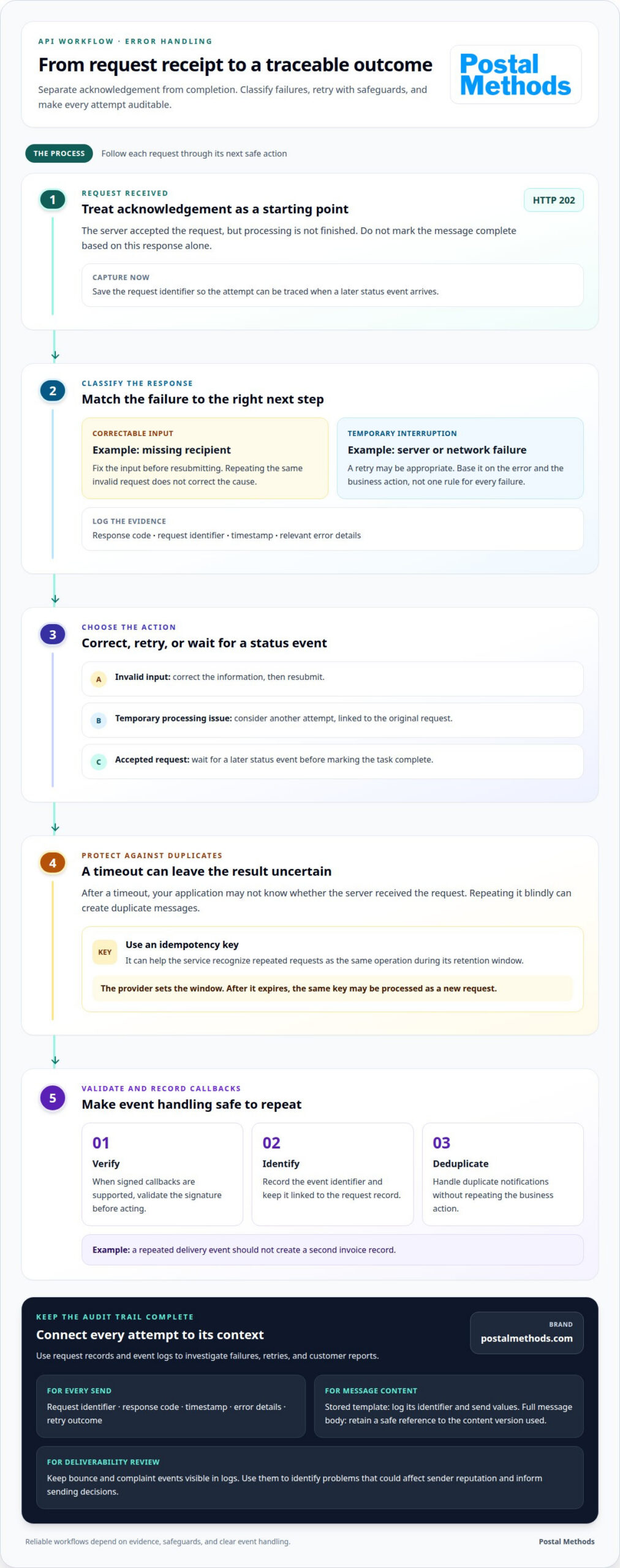
A reliable sending workflow separates a request receipt from completed processing. An HTTP 202 status means the server accepted a request, but hasn’t finished processing it. Treat that response as an acknowledgement, not proof that a message was delivered. Your application should record the request identifier and wait for a later status event before marking the task complete.
Structured errors help identify what happened and what action should follow. A validation error, such as a missing recipient field, needs corrected input before another attempt. A temporary server or network failure may justify a retry. Log the response code, request identifier, timestamp, and relevant error details so support teams can trace an individual sending attempt.
Retries need safeguards. If an application times out after sending a request, it may not know whether the server received it. Repeating the request blindly can create duplicate messages. An idempotency key can help the service recognize repeated requests as the same operation during its retention window. The provider sets that window; after it expires, the same key may be processed as a new request.
Build retry logic around the error and business action, not one rule for every failure. For example, correct an invalid address before resubmitting, while a temporary processing interruption may justify another attempt. Keep the original request linked to each attempt. That record helps a team distinguish a retry from a new invoice or account notice.
- Record: Store the request identifier, response, timestamp, and retry outcome.
- Classify: Separate correctable input errors from temporary processing failures.
- Prevent duplication: Reuse an idempotency key within its provider-defined retention window.
- Review: Use bounce and complaint events to spot problems that could affect sender reputation.
Templates add another point to track. If a provider stores templates, log the template identifier and the values passed for that send. If the application sends the full message body, retain a safe reference to the content version used. This makes a receipt easier to investigate when a customer reports a missing or incorrect message.
Webhook security matters, too. When signed callbacks are supported, validate the signature before acting on an event. Then record the event identifier and handle duplicate notifications without repeating the business action. For example, a repeated delivery event should not trigger a second invoice record.
Clear logs turn failures into useful signals. For workflows that also send physical correspondence, a print-and-mail workflow can move documents from digital files into mailed output.
Implementation effort and ease of setup
API limits come from provider and endpoint rules, while accepted file formats depend on the operation. Integration options include direct HTTP requests, SMTP for systems that already support it, or provider-hosted templates.
Setup Effort and Integration Options
Setup effort is the work of connecting an application to a service and handling its responses. It matters because each added mapping, trigger, and error path creates maintenance work. A direct email API uses HTTP requests; SMTP can suit an existing application with simple sending needs. Choose the path that matches the system’s current structure and the workflow it must support.
For example, a password-reset trigger can call an API after the application verifies the request. The application decides whether the reset is authorized, then sends the required data. Developers connect authentication, recipient details, and the response to the application’s existing account flow. This separation keeps business decisions in the application and message delivery in the sending service.
Template handling also affects setup. An application can send the full message body in an API call or pass values to a template stored by the provider. Provider-hosted templates let marketers edit message content without changing application code. Full-body requests keep content within the application’s workflow. The better fit depends on who manages the copy and how often the message changes.
API Limits and Supported File Formats
API limits define the requests or payloads an endpoint accepts, while supported formats define how its content must be sent. These rules matter because an oversized request or incompatible file can stop a workflow before processing begins. Limits can cover request rates, payload size, or concurrent processing, and vary by provider and endpoint.
Match the payload to the specific operation. An email endpoint handles message content and any supported attachments; a print endpoint handles document files and mailing details. Don’t assume that a format accepted for one action works for another. Confirm the endpoint’s input rules in its integration documentation, then validate the file and required fields before sending.
A practical test uses one representative trigger, such as an invoice generated after payment becomes due. Send a sample request through the intended integration, inspect the response, and verify that the application records the outcome. This catches field-mapping errors before the workflow handles live transactions.
Keep implementation scope focused. Start with one transaction type, one message template, and the response handling that workflow needs. Add other triggers after the first path works from application event through service response. This staged approach makes setup effort easier to estimate and isolates problems when a later integration change causes failures.
Webhook payloads and reply routing
A webhook payload carries event data to an application, while reply routing sends a recipient’s response to the right destination. Keep those paths separate: a delivery event is system information, but a customer reply needs a mailbox or workflow that people can handle.
For each event, organize the data around the action your application must take. A delivery update might include an event type, recipient reference, message reference, and status. Use stable identifiers to connect that payload to the original request. Your system can then update the correct transaction without relying on a subject line or recipient address alone.
Payload format matters. Parse structured data, validate required fields, and retain the event identifier with the related record. If the same event arrives again, the identifier helps your application recognize it rather than perform the action twice. For example, a repeated status update should not create a second order record or trigger another customer notification.
Replies follow a different route. A message’s reply address directs a human response to a monitored mailbox or service workflow; a webhook URL receives application events. For an invoice email, route a customer’s question to the team handling billing, while delivery status continues updating the transaction record. This separation prevents replies from disappearing into an event-processing endpoint.
Threading headers can help keep email conversations connected. Under RFC 5322, email thread tracking uses the Message-ID, In-Reply-To, and References headers. Preserve these values when your application needs replies associated with the original conversation. A password-reset email, by contrast, usually needs a clear action path back into the application, not an open-ended reply thread.
- Match: Connect each event to a transaction using a stable message or request reference.
- Route: Send customer replies to a mailbox or team that can respond.
- Separate: Keep delivery callbacks apart from customer-facing email conversations.
- Review: Make event and reply handling distinct for each message type.
Message purpose also affects routing. Order confirmations, invoices, and account notices can be transactional messages tied to a customer action. Promotional content doesn’t become transactional merely because an API sends it, and using an API doesn’t remove CAN-SPAM obligations. Keep marketing and transactional emails distinct in your application so each channel follows its intended purpose.
Plan the full path before launch: the application creates a message, the service returns event data, and a recipient can reply through the designated route. For physical correspondence, Email-to-Mail Service provides a separate route from digital replies, turning an email-to-mail workflow into printed and mailed output.
API pricing and monthly allowances
A monthly allowance sets how much API usage a plan includes during its billing period. Providers may count requests, messages, recipients, or another usage unit, so identify the billing unit before estimating capacity. A password-reset workflow, for example, may create one transactional message per qualifying account request.
Separate the number of API calls from the number of messages. One application action may trigger a request that produces one message, while retries or separate notifications can add activity. Estimate usage from real workflow events, such as invoice creation, account verification, and password resets. This gives you a grounded forecast without treating every request as identical.
Also account for uneven demand. A monthly average can hide a busy period, such as a billing run that sends many invoices together. Compare expected activity by workflow and timing, then consider whether the provider’s allowance accommodates peaks or applies limits that affect processing. The plan’s allowance and overage rules determine how usage beyond the included amount is handled.
Before choosing an API plan, review these points:
- Billable unit: Determine whether usage tracks API calls, sent messages, recipients, or another measure.
- Allowance period: Identify when the monthly count resets and how unused capacity is treated.
- Overage handling: Understand whether excess activity triggers added charges, throttling, or another response.
- Workflow volume: Include transactional messages, retries, and notifications in the estimate.
Keep transactional and promotional activity separate in your forecast. A password reset is triggered by a user action, while a promotional campaign may involve a different audience and sending pattern. Separating these channels makes expected volume easier to explain and helps teams see which workflows drive usage.
For digital API providers, price depends on the plan structure and the provider’s definition of billable activity. For physical print-and-mail work, pricing depends on the project and is provided through a quote; cost factors include document volume, page count, format, postage, and mailing requirements.
Review usage reports against application events each billing period. If invoice notifications rise, trace that change to invoice creation rather than assuming every message category grew. A transaction-level record helps connect usage to the workflow that generated it and supports a more accurate allowance choice.
To plan a workflow that turns digital documents into mailed output, map your print-and-mail workflow around its document volume, format, and mailing needs.
Postal Methods: Email-to-Mail Service
Postal Methods’ Email-to-Mail Service turns digital documents into physical correspondence when email isn’t the right channel. Upload documents for printing, folding, stamping, and mailing, with the process handled from printing through postage.
Use it for workflows that need paper output, such as invoices, legal documents, notices, or sensitive medical correspondence. Postal Methods also offers Invoice Printing and Mailing Services, Legal Printing and Mailing Services, Notice Printing and Mailing Services, and HIPAA Compliant Printing & Mailing Services. The right option depends on the document and its purpose.
If your workflow needs to move documents from digital files into the mail, discuss your mailing needs with Postal Methods.
Put your next workflow into motion
Choose one document workflow to move forward, then decide where physical mail best serves the recipient. A transactional print and mail API can support the digital handoff, while a separate print-and-mail process handles documents that need paper delivery. Keep the next step practical: identify the document, its purpose, and the team responsible for the information it contains.
For sensitive medical correspondence, Postal Methods offers HIPAA Compliant Printing & Mailing Services. Invoice Printing and Mailing Services and Legal Printing and Mailing Services can support workflows where those documents need to reach recipients by mail. The right choice begins with the document your process needs to send.
Bring your workflow requirements together and discuss the next step with Postal Methods. Contact Postal Methods about your workflow. A clear starting point can make it easier to move from manual handling to a more streamlined process.
Frequently Asked Questions
How is it different from SMTP relay or a marketing platform?
An email API uses direct HTTP requests, while SMTP relay sends messages through the SMTP protocol. A marketing platform is typically organized around campaigns and audience management; transactional sending responds to an application event, such as a completed purchase. A print-and-mail API handles a different output: it sends document and mailing data into a physical-mail workflow. Choose based on whether the recipient needs an email, a printed document, or both.
What is a transactional print and mail API and how does it work?
A transactional print and mail API connects an application to a service that processes documents for physical mailing. For example, a billing system can send an invoice file and recipient details when it creates a statement. The service then prepares the document for mailing. The application can use the response to associate the request with its invoice record, helping staff locate the related transaction if a customer asks about it.
What are the prices per letter, postcard, and check for transactional print and mail APIs?
Pricing depends on the mailpiece and processing requirements, and is provided through a quote. Factors can include document format, page count, printing, postage, volume, and special assembly needs. A postcard and a multi-page letter don’t necessarily follow the same pricing structure. For a check workflow, describe the document and mailing requirements in the quote request so the estimate reflects the actual project.
How do you integrate a print and mail API with a CRM, billing system, or application?
Connect the system event that creates a document to an API request containing the file and recipient information. For example, a billing application can submit an invoice after generating it, then save the returned reference with the customer’s account. Postal Methods offers RESTful API Integration, and its platform supports connections with applications such as Salesforce and QuickBooks. Map fields carefully so each document matches the intended recipient.
How do providers handle security, encryption, data retention, and regulatory compliance?
Security practices differ by provider, so distinguish stated certifications and retention rules from encryption details. For workflows involving sensitive information, review the provider’s stated security and retention practices before choosing a service. Documents are retained for one year. For a workflow containing patient or financial information, limit access to the records needed for processing and understand how the service’s stated controls fit your organization’s handling requirements.
What are the risks of using a print and mail API, including delivery failures and address errors?
Common operational risks include incorrect recipient data, malformed documents, failed requests, and delays between processing and postal delivery. A billing export might contain an outdated address, sending a correct invoice to the wrong destination. Address validation and reviewing document-to-recipient matching can reduce avoidable errors. Keep a record of the submitted file and recipient reference so staff can investigate a returned or misdirected piece without recreating the original transaction.
How can businesses track, cancel, or verify the delivery of mailed documents?
Track the stages your mailing workflow records, such as submission, processing, and transfer to the postal service; those stages don’t by themselves confirm mailbox delivery. Postal Methods transfers letters to USPS once per weekday processing day. Cancellation depends on whether processing has advanced to dispatch, so design approval steps before submission for documents that need review. Use available postal confirmation options when proof of delivery is needed.
What should businesses consider when choosing a transactional print and mail API?
Start with the document types, recipient data, and application events your workflow must support. Then assess API integration, supported file formats, event visibility, security information, retention practices, and how costs are calculated. For example, a healthcare billing workflow may prioritize HIPAA-compliant handling, while a recurring invoice process may depend on reliable field mapping from its billing system. Choose a fit for the actual documents and operational controls involved.