

Risks of Handling PHI In-House: What Healthcare Organizations Should Know
What can go wrong when PHI stays in-house? The risks of handling PHI in-house often emerge between teams and steps, not from one dramatic failure. A file may be accessed by more people than necessary, a mailing may go to the wrong address, or a manual handoff may leave no clear owner. Repetitive work makes small process differences harder to spot and correct.
It’s understandable to want direct control over sensitive information. But control depends on clear responsibilities, consistent procedures, and appropriate safeguards at every point in the workflow. When those pieces are scattered across departments, even careful teams can overlook an exposure.
This article will help you identify weak points in how your organization handles PHI, strengthen access controls and oversight, and assess which tasks make sense to keep in-house. We’ll also compare manual handling with an automated print-and-mail workflow. For physical mail, HIPAA-compliant printing and mailing can reduce internal handling steps, while your organization remains responsible for its compliance obligations. The goal is a clearer process, fewer avoidable handoffs, and better-informed decisions about how PHI moves.
Key Takeaways
- Trace each step in your paper workflow to see where PHI is accessed, handled, mailed, and disposed of.
- Review access, document assembly, addressing, storage, and disposal to identify the risks of handling PHI in-house.
- Compare internal and outsourced mailing based on staff workload, process consistency, oversight, and integration needs.
- Assign owners, test handoffs, document fixes, and revisit safeguards when workflows change.
- Consider whether automated print and mail workflows can reduce manual handling. Postal Methods accepts submissions through QuickSend Portal, email, or RESTful API, with SOC 1 and SOC 2 certified operations.
What Are the Risks of Handling PHI In-House?
Protected health information (PHI) is health information that can be linked to a specific person. It may include a patient’s diagnosis, test results, treatment details, or payment information when paired with identifying details such as a name or address. De-identified information has had identifying details removed under an applicable standard so the person is not reasonably identifiable. Simply removing a name may not be enough if other details still point to the individual.
The Health Insurance Portability and Accountability Act (HIPAA) provides the framework for protecting PHI. To assess the risks of handling PHI in-house, trace the information’s path and identify who handles it at each step. A paper workflow might start when staff receive records, then move through printing, sorting, inserting, addressing, mailing, and disposal. At each transfer, a document could be seen, misplaced, or matched with the wrong recipient.
In-house PHI risk is the possibility that a gap in access, handling, or accountability exposes identifiable health information, regardless of whether the work is done internally or externally. Internal handling isn’t automatically noncompliant. The exposure depends on how the workflow is designed and safeguarded.
Which everyday workflows put PHI in staff hands?
Patient statements, test results, appointment notices, and billing correspondence can all contain PHI. A clinic may generate a notice, billing staff may prepare a mailing file, administrative staff may print and sort pages, and mailroom staff may insert and dispatch envelopes. When ownership changes at each stage, it may be unclear who confirms that the right pages go to the right person.
Paper documents have physical risks: pages left on a printer, exposed during sorting, or placed in the wrong envelope. Electronic PHI follows a different path through systems, user accounts, and digital transfers. The risks can overlap, but secure printing and disposal don’t replace access controls for electronic systems, and vice versa.
Why doesn’t keeping the process internal remove risk?
Internal teams still need appropriate access controls, written procedures, training, and oversight. A staff member who can view information for one task may not need access to every record or mailing file. Without clear permissions and assigned responsibilities, routine work can spread access beyond what the task requires.
Workarounds can also take hold: one department may use a checklist, while another relies on memory or an informal double-check. That inconsistency makes mistakes harder to catch and ownership less clear. Review the handoffs, not just the people. A controlled process should identify who prepares, verifies, sends, and disposes of each document, while keeping paper handling and electronic system safeguards distinct.
How In-House PHI Handling Can Lead to Exposure
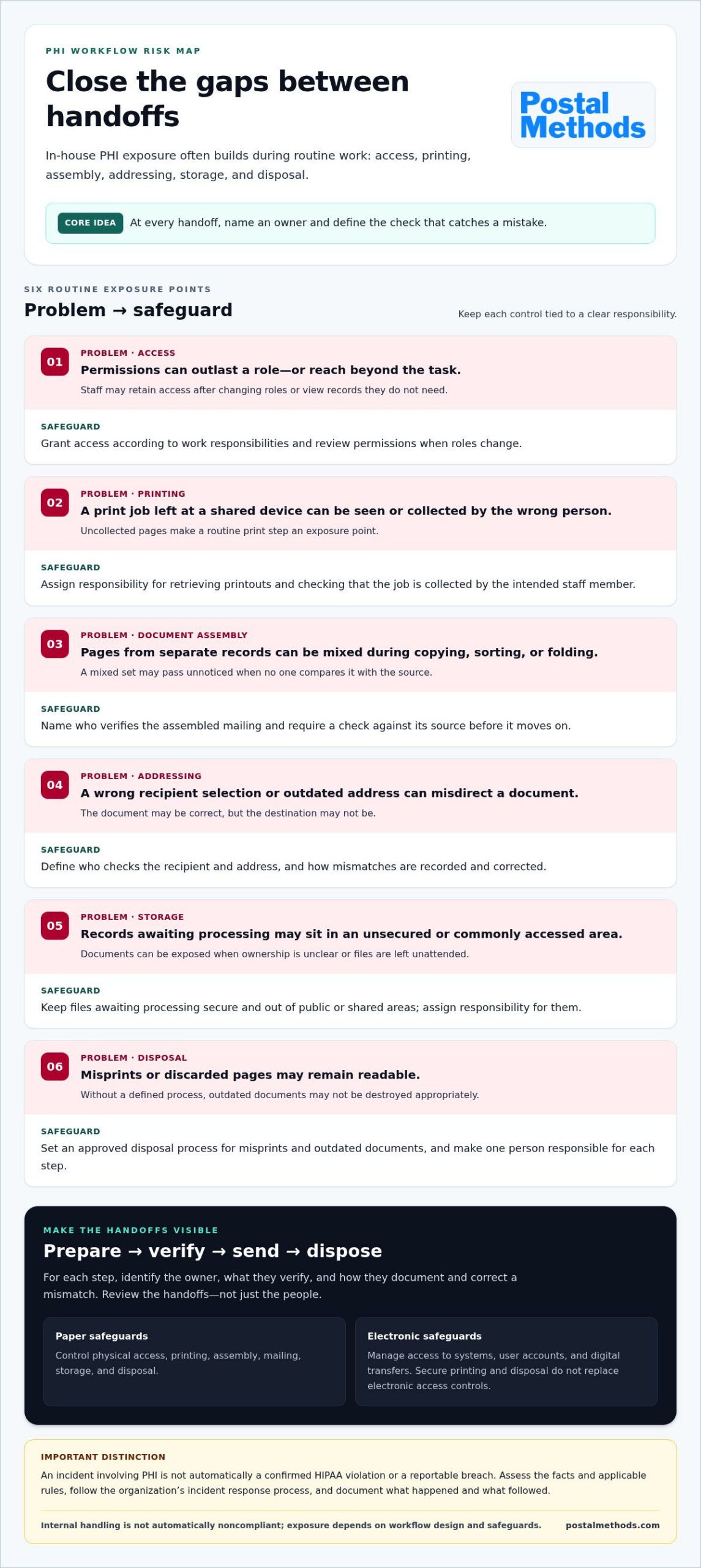
The risks of handling PHI in-house often cluster around routine handoffs. A document can be accurate when created, yet become exposed if access is too broad, a print job is left unattended, or pages are matched to the wrong envelope. At each stage, identify an owner and a specific check that can catch errors.
- Access: Staff may retain permissions after changing roles, or see records they don’t need for their tasks.
- Printing: Printouts left at a shared device can be viewed or collected by the wrong person.
- Document assembly: Pages from separate records may be mixed during copying, sorting, or folding.
- Addressing: A wrong-recipient selection or outdated address can send a document to someone else.
- Storage: Records awaiting processing may be left in an unsecured or commonly accessed area.
- Disposal: Discarded pages or misprints can remain readable if staff don’t follow an approved disposal process.
Where can manual print-and-mail processes break down?
Every extra handling step creates another point to verify. For example, one employee may select recipients, another may print and sort the pages, and a third may insert and address envelopes. A mixed document set can pass unnoticed if no one compares the assembled mailing with its source. Uncollected print jobs and outdated address data create other failure points. Document who checks each handoff, what they verify, and how they record and correct a mismatch.
How do weak access and disposal controls increase exposure?
Give staff access based on their work responsibilities, and review permissions when roles change. This role-based approach helps limit unnecessary access. Physical controls matter too: keep records out of public or shared areas, secure files awaiting processing, and define how misprints and outdated documents are destroyed. Assign responsibility for each step so records aren’t left unattended because everyone assumes someone else is handling them.
A security incident involving PHI is not automatically a confirmed HIPAA violation or a reportable breach; the facts and applicable rules must be assessed. A misdirected mailing or exposed page may warrant prompt review, but don’t jump from an error to a legal conclusion. HHS explains the assessment and notification framework in its HIPAA Breach Notification Rule guidance. Follow your organization’s incident response process and document what happened, what information was involved, and what steps followed.
For recurring physical mail, compare your internal handoffs with a defined print-and-mail workflow. HIPAA-compliant printing and mailing can reduce repetitive internal handling steps. Outsourcing a workflow doesn’t transfer your organization’s responsibility for its compliance decisions.
In-House vs. Outsourced PHI Mailing: How to Compare the Options
There’s no single setup that fits every healthcare organization. Internal mailing may work well when volume is manageable, staff have capacity, and the process is consistently controlled. Recurring statements, notices, or billing letters can strain staff workflows when printing and assembly compete with other duties. Compare the actual steps, staff time, and checks required, not just who owns the printer.
| Factor | In-house mailing | Outsourced mailing |
|---|---|---|
| Control | Direct oversight of staff and equipment, with responsibility for maintaining the workflow. | Production steps are handled externally, so responsibilities and boundaries need to be clear. |
| Staff workload | Uses internal time for file preparation, printing, sorting, inserting, and mailing. | Can shift recurring physical production tasks outside the organization. |
| Process consistency | Depends on documented steps, training, and reliable checks across staff and departments. | A defined production workflow can reduce internal variation; assess how it handles your specific requirements. |
| Oversight | Managers oversee internal access, handling, and quality checks. | Requires oversight of the provider, responsibilities, safeguards, and incident processes. |
| Integration | May fit existing systems and routines, though staff still coordinate each mailing step. | Must fit how files are submitted, how volume changes, and what visibility your team needs. |
What should a healthcare organization assess before outsourcing?
Map the workflow from file receipt through processing, mailing, and data disposition. Review the safeguards and security evidence, who can access information, and how incidents are handled and communicated. Define responsibility boundaries in applicable agreements, including whether a business associate agreement is required. Also assess integration needs, expected volume patterns, and the operational visibility your team needs to oversee the process.
Postal Methods provides HIPAA-compliant printing and mailing through QuickSend Portal, email, or RESTful API. Its operations are SOC 1 and SOC 2 certified. These certifications describe the operations, not HIPAA certification, and they don’t guarantee that your organization meets its obligations. For more evaluation criteria, consult a HIPAA-compliant mailing services guide.
Which mailing tasks are candidates for external processing?
Look for repeatable physical-mail tasks with predictable inputs, such as patient statements, notices, and billing letters. Keep clinical decisions and compliance oversight with the organization. Outsourcing production may reduce internal handling steps, but it doesn’t transfer every responsibility for protecting PHI. The risks of handling PHI in-house are only one part of the comparison; external processing also requires clear oversight of the vendor relationship.
Start with one recurring workflow. Compare its internal handoffs, staff time, and checks with the external process, then decide which arrangement your team can govern consistently. Explore HIPAA-compliant printing and mailing for recurring physical-mail workflows.
A Practical Checklist for Reducing In-House PHI Risk
Make the workflow visible before changing it. A clear map shows where PHI moves, who is responsible, and which safeguards need attention. Map the workflow first, then target safeguards at handoffs where information can be exposed or errors can go unnoticed.
- Map PHI flows. Trace how information enters, moves between staff and systems, is stored, and leaves the organization. Include paper records and electronic PHI, noting where their handling paths differ.
- Assign owners. Name a responsible role for each stage, from file preparation to final disposition. Clarify who can approve exceptions and who receives escalations.
- Assess controls. Review staff access, training, procedures, storage, printing, mailing, and disposal safeguards. Check electronic access controls separately from physical document protections.
- Test handoffs. Walk through a sample workflow. Confirm staff follow the documented steps, pages stay matched to the intended recipient, and problems have a clear route for escalation.
- Document remediation. Record gaps, assign follow-up actions, and note how the team will verify that fixes are working. Include near misses, not just incidents that resulted in confirmed exposure.
How can teams map and control access to PHI?
For each workflow, record where PHI originates, which roles handle it, where it is stored, and how it is sent or disposed of. Set access according to work responsibilities, then assign an owner to each processing stage. Document training, exception handling, review cadence, and escalation paths so staff know what to do when a normal step can’t be completed.
Include electronic systems in the map: identify where PHI is entered, viewed, transferred, and stored, and review who has access. For organizations seeking to uncover sensitive records across systems, data discovery tools like EmberHound can assist in locating and managing exposed digital data. Paper safeguards don’t replace controls for electronic PHI, and electronic security doesn’t protect a printed page left in an open area. Keep both tracks visible.
How should teams review printing, mailing, and disposal?
Write down how staff release print jobs, match pages to records, check addresses, and reconcile completed mailings. Define where working copies and misprints are secured while awaiting approved disposal. Specify who verifies each step and what record they keep. Clear procedures make it easier to spot missed checks and act consistently across departments.
Review the process periodically, and again after a change in staffing, systems, workflow, or mailing volume. A new handoff or higher workload can alter how safeguards work in practice. Log incidents and near misses, look for recurring patterns, and update procedures and training based on what the review finds. These steps help address the risks of handling PHI in-house without assuming that every error means a compliance failure.
If recurring physical mail is creating extra internal handoffs, consider HIPAA-compliant printing and mailing as one workflow option. Your organization retains responsibility for its compliance oversight.
When Outsourcing PHI Mailing Can Simplify the Workflow
Recurring physical mail can take staff through file preparation, printing, folding, sorting, inserting, and dispatch. Moving production outside the organization can reduce those internal handling steps and free staff from repetitive print-room work. It doesn’t remove the need for safeguards. It changes where part of the workflow happens, so clear responsibilities, appropriate oversight, and a suitable process remain essential.
What does an automated mailing workflow change?
Postal Methods automates physical document printing and mailing. Healthcare organizations can submit documents through QuickSend Portal, email, or RESTful API, choosing a route that fits how their team prepares and sends files. This replaces internal production steps with digital submission and external processing, while staff retain oversight of what information is authorized for mailing and to whom it should go.
For example, a team sending recurring patient statements can compare the time and handoffs involved in preparing mail internally with submitting files digitally for external processing. An API may suit a connected system workflow, while portal or email submissions may fit other routines. Postal Methods automatically verifies addresses against the USPS database. If an address is invalid, the document isn’t processed unless the user forces it to be sent. Include that step in your review of how recipient information is checked.
Postal Methods’ HIPAA-Compliant Printing & Mailing operations are SOC 1 and SOC 2 certified. These certifications describe the operations, not HIPAA certification, and they don’t guarantee that a healthcare organization meets its own HIPAA responsibilities. Outsourcing can reduce internal handling, but it doesn’t eliminate the need to assess the workflow and manage the relationship.
What responsibilities remain with the healthcare organization?
Keep ownership of your PHI risk assessment and decisions about appropriate safeguards. Before shifting a mailing task, define what information will be sent, who may submit it, and how your organization will oversee the process. Review applicable agreements and clarify responsibilities for access, incident handling, communication, and ongoing oversight. A well-defined boundary helps both sides understand their role.
Use a practical comparison. Track the staff time, handoffs, quality checks, and workload involved in your current mail process. Then compare those needs with the digital submission and external production workflow. The risks of handling PHI in-house may be harder to manage when recurring mail volume competes with other staff responsibilities, while an internal process may still suit a team with adequate capacity and consistent controls.
Start by comparing your current mail tasks with your organization’s control and workload needs. Explore automated mailing services as you evaluate options for physical-mail operations.
Choose a Clear Next Step for PHI Mailing
Reducing the risks of handling PHI in-house starts with a practical decision: which parts of your mailing workflow can your team consistently manage, and where would a different process ease the load? Use your next workflow review to identify a recurring task, clarify who owns it, and compare the effort and oversight it requires with an automated option.
Postal Methods’ HIPAA-Compliant Printing & Mailing service supports digital submissions through QuickSend Portal, email, or RESTful API. Its operations are SOC 1 and SOC 2 certified. These points can inform your assessment, but they don’t replace your organization’s responsibility to evaluate its PHI workflows, safeguards, and oversight.
Take the next step by reviewing how automated print and mail could fit your physical-mail operations. Explore automated print and mail services and compare the workflow with your organization’s needs. A clear view of responsibilities and handoffs helps your team make a confident, manageable choice.
Frequently Asked Questions
What counts as PHI in paper documents?
Paper contains PHI when it connects health information to an identifiable person. A lab report with a patient’s name, a bill linking a person to a medical service, or an appointment card showing a clinic and date may qualify. Context matters: a document without a name can still identify someone through other details. Handle paper records as PHI whenever identity and health-related information remain reasonably linkable.
Can a small medical practice handle PHI in-house?
Yes. A small practice can handle PHI internally if it establishes appropriate safeguards and follows them consistently. For example, limit record access to staff who need it for their duties, train employees on privacy procedures, and decide how paper files are secured when the office closes. The risks of handling PHI in-house depend on the practice’s processes and oversight, not simply its size or whether it uses outside help.
Does HIPAA require encryption for paper records?
No. Encryption is a safeguard for electronic information, not a method for protecting a paper chart. Paper records still need reasonable physical protections, such as controlled access to file rooms and secure handling during transport. If paper information is scanned, emailed, or stored in an electronic system, protect that electronic copy through appropriate technical and administrative safeguards. Keep the paper and digital procedures distinct.
What happens if PHI is mailed to the wrong person?
A wrong-recipient mailing should be reported promptly through the organization’s privacy or incident-response process. The organization should establish what information was involved, who received it, and what steps may reduce further exposure. A mailing error isn’t automatically a confirmed HIPAA violation or reportable breach; the circumstances require assessment under applicable rules. Staff should document the event and follow the organization’s notification procedures.
Is outsourcing PHI mailing enough to make an organization HIPAA compliant?
No. Outsourcing one mailing task doesn’t make an organization HIPAA compliant as a whole. The organization still needs to assess its own PHI handling, set appropriate safeguards, and oversee the relationship. For example, a secure production process won’t correct a staff member selecting the wrong recipients before sending a file. Treat outsourcing as one workflow decision within a broader compliance program, not a substitute for it.
How can an organization reduce the risk of unauthorized staff access to PHI?
Give each staff member access suited to their job, and remove or adjust permissions when their role changes. Review accounts periodically, including those belonging to employees who no longer need access. Train staff not to share credentials or leave records visible to others. For example, billing staff may need billing details without needing unrestricted access to clinical notes. Clear access rules make appropriate boundaries easier to follow.
Does a mailing service that handles PHI need a business associate agreement?
Often, yes. If a mailing service performs work on behalf of a healthcare organization and handles PHI in a way that makes it a business associate under HIPAA, a business associate agreement is generally required. The answer depends on the specific relationship and services involved. Define how PHI may be used, each party’s responsibilities, and how issues are handled. Have the appropriate privacy or compliance staff review the arrangement.