


Mass Mailing Services for Small Business Costs and Savings
Bulk direct mail helps small businesses send printed pieces to a defined audience or neighborhood without handling every mailing step by hand. The right mass mailing services for a small business can simplify production and postage preparation, while the final cost depends on factors such as mailpiece format, quantity, and mailing method.
Postage is only one part of a mailing’s cost and effort. List quality, file preparation, processing, and delivery timing also matter. Planning each step helps you organize a campaign and avoid preventable delays.
Here, you’ll learn how mailing costs and postage savings work, which list formats support processing, and what to expect from production and delivery. You’ll also find practical business mailer resources, so you can choose a route that fits your audience and workload.
Key Takeaways
- Compare mailing methods by audience, mailpiece format, and volume to understand what drives postage and potential savings.
- Prepare your mailing list as a CSV file, then use address validation to help clean records before production.
- Plan delivery around processing needs, origin, destination, and drop-off timing rather than postage alone.
- Bulk direct mail can move thousands of printed pieces in one mailing run, so align the schedule with production needs.
- Use neighborhood mailing tools and business mailer resources to shape a campaign around the audience you want to reach.
Mailing costs and postage savings tools
Service Fees and Postage
A mail service may handle printing, addressing, folding, inserting, and postage preparation, while postage itself depends on the mailing category and format. Compare what each service includes, then match the scope to the work your team would otherwise perform. For example, a campaign that needs addressing and insertion has different production steps from one mailing a single-page letter.
The service price depends on the project. Key factors include print format, quantity, addressing, and preparation. Consider these alongside postage when comparing mass mailing services for a small business.
Presorted and Commercial Postage Rates
Presorting groups mail by destination so it can enter the postal network in an organized way. Bulk mailers may qualify for postage discounts through presorting and high-volume shipments. Commercial postage rates therefore depend on preparation and volume, not just the number of pieces. Compare the postage method with the labor and handling needed to prepare the mailing.
These are different entry options, so compare eligibility and preparation requirements alongside the per-piece rate.
USPS EDDM Retail requires at least 200 mailpieces and allows up to 5,000 mailpieces per day per ZIP Code. Its flats can weigh up to 3.3 oz. For neighborhood mail campaigns that meet those conditions, EDDM Retail offers a defined postage route without relying on a customer address list.
For other bulk mail, permit and presort requirements depend on the USPS mailing category and entry method. Don’t apply EDDM Retail’s 200-piece minimum to every commercial mailing. Confirm the selected category’s rules in the mailing workflow before preparing pieces, since the category determines the relevant preparation steps.
Which mass mailing services work best for small businesses? Choose a service that fits your audience and handles the steps you need, such as printing, folding, and mailing. Postal Methods’ online platform processes documents from printing through postage, so your team can avoid managing each step separately.
To connect CRM or marketing activity with a mailing, export the selected address records and submit them through your mailing workflow. Keep campaign segments separate so each group receives the intended message.
Direct mail response and ROI vary by audience and channel. Reported response rates are 5.3% for mail sent to houses and 2.9% for prospect lists. Median ROI figures are 29% for direct mail, 23% for paid search, and 16% for online display. Use the figures to compare channels, then track each campaign’s response and revenue.
If I’m uploading my own mailing list, what file formats are acceptable?
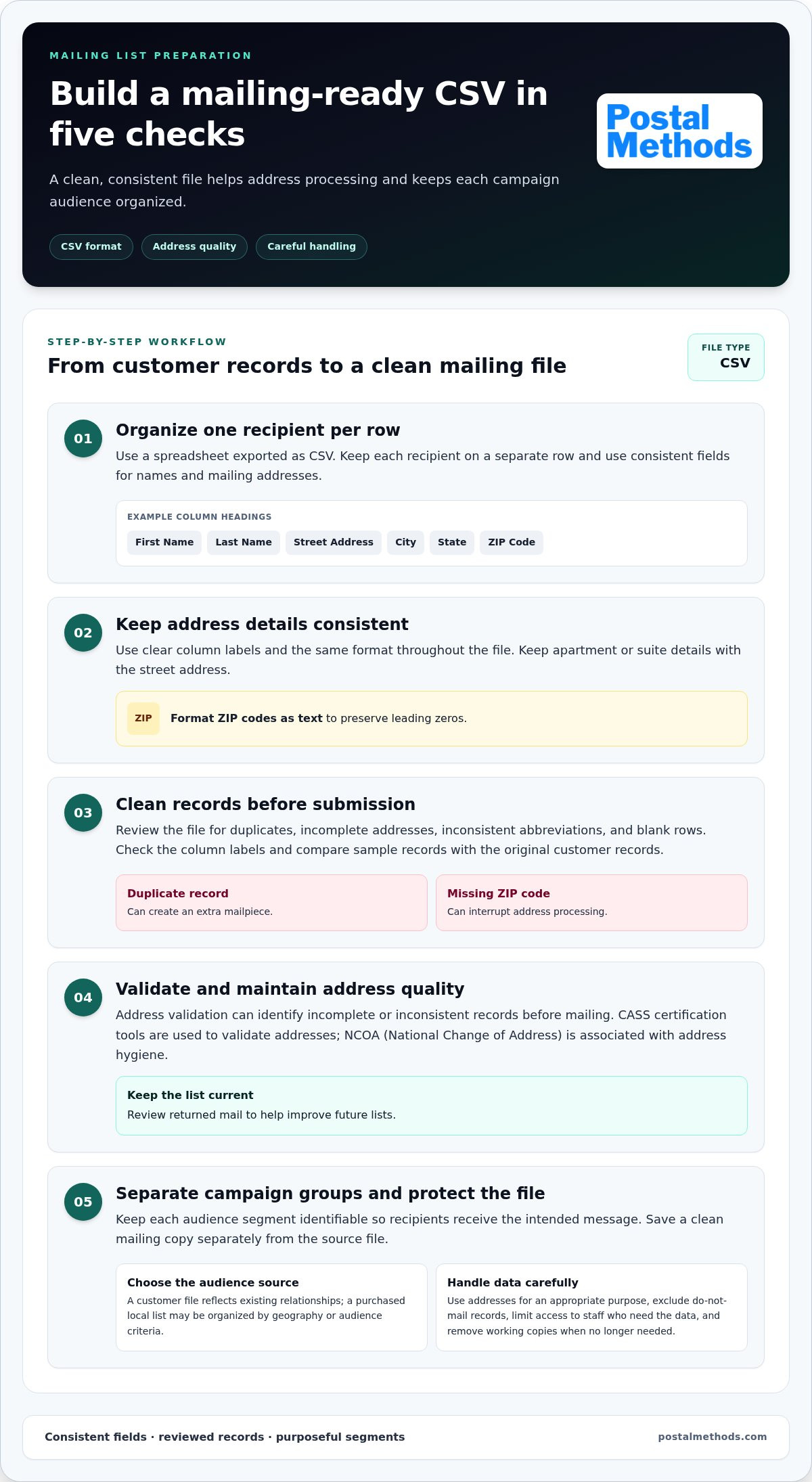
CSV is a practical format for organizing a customer-provided mailing list. Put each recipient on a separate row, with consistent fields for names and mailing addresses. Before submitting the file, remove blank rows, check column labels, and separate address details into clear fields.
A spreadsheet exported as CSV might have columns for first name, last name, street address, city, state, and ZIP code. Use the same format throughout. Keep apartment or suite details with the street address, and format ZIP codes as text to preserve leading zeros.
Before sending postcards or letters, review the file for duplicates, incomplete addresses, and inconsistent abbreviations. A duplicate record can create an extra mailpiece; a missing ZIP code can interrupt address processing. Sort the mailing list by campaign segment if different recipients will receive different messages.
- Check the header row: use clear labels such as “Street Address” and “ZIP Code.”
- Review sample records: compare several rows with the original customer records.
- Separate campaign groups: keep each audience segment identifiable in the file.
- Save a clean copy: retain the source file separately from the version prepared for mailing.
Address validation can identify incomplete or inconsistent records before mailing. CASS certification tools are used to validate addresses, while NCOA, or National Change of Address, is associated with address hygiene. Keep records current and review returned mail to improve future lists.
Buying a local address list is different from uploading customer records. A purchased list may be organized by geography or audience criteria, while your own list reflects existing customer relationships. Define the neighborhood or audience first, then decide whether a locally targeted list or your customer file better fits the mailing. For bulk mail, accurate records and consistent formatting support efficient preparation; list quality matters alongside postage discounts.
What privacy, data-security, and advertising rules apply to customer mailing lists? Use addresses for an appropriate purpose, protect files during handling, and exclude records marked do-not-mail. Limit access to staff who need the data, and remove working copies when they are no longer needed.
To move documents from digital files into physical mail, explore online document mailing options.
Processing, shipping, and scheduled delivery times
A direct mail campaign moves through audience selection, file and artwork preparation, printing, addressing, and postal entry. Set the send date only after allowing time for each step, including review of the final piece and delivery details.
Build a schedule around the mailing’s destination ZIP code, piece format, quantity, and chosen postal service. Processing time covers preparing files and producing the mailpieces; transit time begins after postal entry. Ask for these stages separately in the schedule so production progress isn’t mistaken for delivery progress.
- Prepare the campaign: Choose the audience, message, and mailpiece format. For example, a postcard campaign needs a finished postcard file and a recipient list.
- Review the files: Check the mailing list, address fields, and artwork before production. Templates can help keep repeated campaigns consistent, but confirm each one contains the current offer and contact details.
- Produce the pieces: Print, address, and prepare the quantity for mailing. A change to the artwork or recipient file after approval can affect the production sequence.
- Enter the mailstream: Confirm where the mailing enters USPS and use that handoff date to plan expected delivery.
USPS Priority Mail Next Day is available in more than 60 U.S. markets for businesses with a negotiated service agreement. Delivery timing can vary depending on the origin, destination, and drop-off time. That expected date isn’t money-back guaranteed. This service describes Priority Mail, not a standard bulk-mail campaign, so don’t use it as the delivery estimate for every mailing.
Shipping labels and business accounts are most relevant when materials or finished mailpieces move as packages between locations. Before dispatch, match the label to the receiving address and confirm the contents and destination. Track production completion and postal entry separately in the mailing schedule.
For mailings sent to a Post Office, distinguish postal entry from delivery to a recipient’s Post Office Box. Include the intended delivery address, including a PO Box where applicable, in the address file. If materials must reach a specific facility, record its location and handoff instructions in the operational plan, separate from recipient addresses.
Use a campaign calendar to coordinate approvals, printing, and postal entry. Work backward from the desired arrival date, allowing time for production and transit based on the mailing method. Record the quantity, destinations, final file version, and entry date in one schedule. This helps the team track each batch and avoid using a revised file in place of the approved version.
Turnaround times and production capacity
Production capacity describes how many printed pieces an operation can prepare in one run. Bulk direct mail can consolidate a large mailing, reducing the staff time needed to assemble pieces individually. Turnaround involves more than printing: file approval, addressing, finishing, and postal handoff all need time in the schedule.
Start with the date the audience should receive the message, then plan backward through production. Set deadlines for the final document and recipient data, allow time for printing and finishing, and schedule postal entry once preparation is complete. Clear milestones are more useful than treating the mailing date as a single event.
Quantity affects how a mailing is organized. A small batch may go through printing and addressing as one job, while a larger run may need separate audience segments. For example, prepare customer and prospect mailings separately, with a distinct file and piece count for each. Clear labels help prevent batches from being mixed.
- Lock the audience: finalize recipient segments before production begins.
- Approve the print file: check the finished version, not an earlier draft.
- Confirm the quantity: match the production count to the approved mailing data.
- Schedule postal entry: separate the production completion date from the handoff date.
Rush service is a scheduling question, not simply a faster press setting. A late artwork change, incomplete address file, or added finishing step can affect the path to postal entry. To compress a timeline, prepare the final files early, settle the format, and keep revisions together. A campaign with approved artwork and clean recipient data has fewer process steps left unresolved.
USPS Every Door Direct Mail can reach addresses in a selected neighborhood or ZIP code. It may suit businesses targeting a geographic area rather than a named customer list. Define the area and mailpiece before production so preparation matches the campaign’s intended reach.
Keep production capacity separate from delivery timing. A large run can be prepared as one mailing, but postal delivery depends on the mailing method and destination. USPS Priority Mail Next Day is a distinct shipping service, not a standard delivery schedule for bulk mail. Track production and delivery separately.
Use a shared production tracker to record each job’s approved file, quantity, audience segment, and postal handoff. For example, a “Spring offer” batch should show its final document version alongside the destination list. This helps staff see what is ready, what still needs approval, and which pieces belong to each campaign.
Business mailer tools and resources
Useful mailing resources turn audience choices into a prepared, trackable campaign. Start by deciding who should receive the mail, which format suits the message, and what tasks need handling before sending. A campaign worksheet can help organize files, production, and postal entry.
For neighborhood outreach, USPS Every Door Direct Mail can reach addresses in a selected neighborhood or ZIP code. It suits campaigns where geographic coverage matters more than targeting named customers. Define the area first, then choose a mailpiece that fits the message, such as a flyer about a service or a postcard inviting residents to an event.
Use a simple planning sheet to keep each mailing decision visible. Record the campaign goal, target area or audience, mailpiece format, approved copy, list source, and planned handoff. For example, a shop promoting a new location can identify nearby ZIP codes and prepare one flyer for that geographic audience. A customer renewal notice may instead require a named recipient list and personalized documents.
- Audience resource: document whether the campaign targets a neighborhood or known recipients.
- Content resource: keep approved copy and the final mailpiece file together.
- Production resource: list printing, folding, inserting, and addressing tasks.
- Tracking resource: record the mailing batch, destination, and postal handoff.
A mailing service may handle printing, folding, inserting, addressing, and postage. List the tasks your campaign requires before choosing a workflow. For folded flyers with inserts, specify each component and its order. For postcards, confirm the format and recipient source. Clear instructions help keep production details from getting lost between teams.
Templates help organize repeat mailings, such as invoices, notices, or promotional pieces. Keep a master version for the layout and approved language, then create a separate copy for each campaign. Update the offer, audience, and destination details before preparing the final file. This reduces the risk of reusing outdated content.
Choose tools that fit the mailing route. A neighborhood campaign using USPS Every Door Direct Mail needs area selection and a suitable mailpiece; a named-recipient campaign needs an organized address file. For either route, use one final version of each file and record who approved it to keep audience, content, and production aligned.
Ready to move from digital documents to prepared mail? Organize your business mailing workflow around the documents and audience you need to reach.
Postal Methods: HIPAA Compliant Printing & Mailing Services
Postal Methods provides HIPAA-compliant printing and mailing for businesses sending sensitive medical documents. Submit documents through an online workflow for printing, folding, stamping, and mailing, rather than preparing each piece manually.
For routine business correspondence, Postal Methods’ Invoice Printing and Mailing Services turn digital files into mailed invoices. Its Legal Printing and Mailing Services and Notice Printing and Mailing Services handle those document types. Choose the service that matches what you are sending, then prepare the files and recipient details.
If handling printing and mailing in-house creates extra steps, Postal Methods can take on that workflow. Visit Postal Methods to learn more.
Put your next mailing into motion
Choose a mailing workflow that lets your team focus on the work behind the message. Identify what you are sending, who should receive it, and which steps you want handled. A concise project brief gives Postal Methods a clear starting point and helps keep files, recipient data, and approvals aligned.
For sensitive medical documents, Postal Methods provides HIPAA-compliant printing and mailing. Its Invoice Printing and Mailing Services and Legal Printing and Mailing Services support business correspondence and legal documents. The right mass mailing services for a small business should suit each mailing’s purpose and reduce manual preparation.
Ready to discuss your mailing needs? Contact Postal Methods about your mailing. Take the next step with a clear plan and a simpler path from document to delivery.
Frequently Asked Questions
What Is Bulk Direct Mail and Why Should You Use It?
Bulk direct mail is a planned mailing of printed pieces to multiple recipients or locations. Businesses use it to share a consistent message with a defined audience, such as customers due for a renewal or households in a service area. It can support promotions, reminders, and business notices. Choose it when physical mail suits the message and you can prepare the documents and recipient data together.
Do you review my mailing list before submission?
Postal Methods automatically checks submitted addresses against the USPS database. If an address is invalid, the document is not processed unless you force it to send. This check can flag address issues during processing, but it does not replace reviewing audience selection, duplicate records, or campaign segments. Before submitting, confirm the intended recipients and match each record to the right document.
How much does direct mailing cost?
Direct-mail costs depend on the mailing method, document format, quantity, and preparation required. Postage is one part of the total; printing and handling also matter. Postal Methods’ service price depends on the project. For a useful estimate, identify the final mailpiece, quantity, and preparation steps.
What Are Bulk Mailing Services?
Bulk mailing services coordinate preparation and sending for a larger mailing, rather than having staff address and dispatch each piece individually. Depending on the workflow, tasks may include printing, folding, inserting, addressing, and arranging postage. A business might use bulk mailing for a recurring customer notice or a scheduled invoice run. The service fits best when repeatable steps can be organized into one planned job.
What Is a Mail House?
A mail house prepares mailings for organizations. It can coordinate steps from a document file to postal handoff, including printing, addressing, folding, and inserting. For example, a company sending a multi-page notice may use a mail service to assemble documents and envelopes consistently. Decide which tasks you want to delegate, then organize the files and instructions.
How much do small-business mass mailing services cost per piece and per month?
Per-piece and monthly costs vary with the service model, volume, format, and preparation needed. A one-time flyer campaign differs from recurring invoices with personalized documents. Postal Methods’ service price depends on the project. For a useful estimate, identify whether you need a one-time or recurring mailing, along with the document type and expected frequency.
How do I prepare a mailing list and remove duplicates or outdated addresses?
Start with a copy of your address file, standardize the fields, and look for repeated names or matching addresses. Keep one intended record per recipient and review questionable entries against current customer records. Save corrections separately so the original remains intact. Address validation can flag issues, but your team decides which records belong in the mailing.
How can a small business target local neighborhoods and estimate delivery times?
For neighborhood coverage, USPS Every Door Direct Mail lets senders select an area and reach its addresses without choosing individual recipients. Define the area first, then match the mailpiece and message to the audience. Delivery estimates depend on the mailing method, origin, destination, and drop-off timing. Allow for production separately from postal transit when planning the campaign.