


Mail W-2 Forms to Employees Securely and Choose a Delivery Method
Electronic W-2 delivery is allowed, but employees must consent first. The best way to mail W-2 forms to employees who need paper copies is to prepare each form accurately, place it in an envelope addressed to that employee, and send it by the due date. Employers must furnish W-2s by January 31 annually, according to the Internal Revenue Service.
It’s easy to assume a digital copy or an email attachment is enough. It isn’t: employers may not send W-2 forms by email, and employees who don’t consent to electronic delivery must receive a paper copy.
This guide explains when W-2s are due, what consent means for electronic delivery, and how to prepare and distribute paper forms securely. You’ll also learn how to handle employee copies and organize the mailing process, so year-end distribution is clearer and easier to manage.
Key Takeaways
- Plan around the annual January 31 deadline for furnishing employee W-2 forms, and distinguish employee delivery from filing forms with the Social Security Administration.
- Offer electronic delivery where appropriate and provide paper copies to employees who prefer them.
- Use payroll software to organize year-end forms and employee access, while keeping distribution steps clear and consistent.
- Before mailing, match each employee’s copies to the correct recipient and review the forms and addresses for accuracy.
- Learn when a printing and mailing service can help move W-2 documents from digital files to prepared, mailed forms.
Employer filing and employee delivery deadlines
Track employee delivery and government filing on separate calendar entries. They involve different recipients, copies, and responsibilities. Missing either deadline can leave an employee without tax documents or result in a late employer filing.
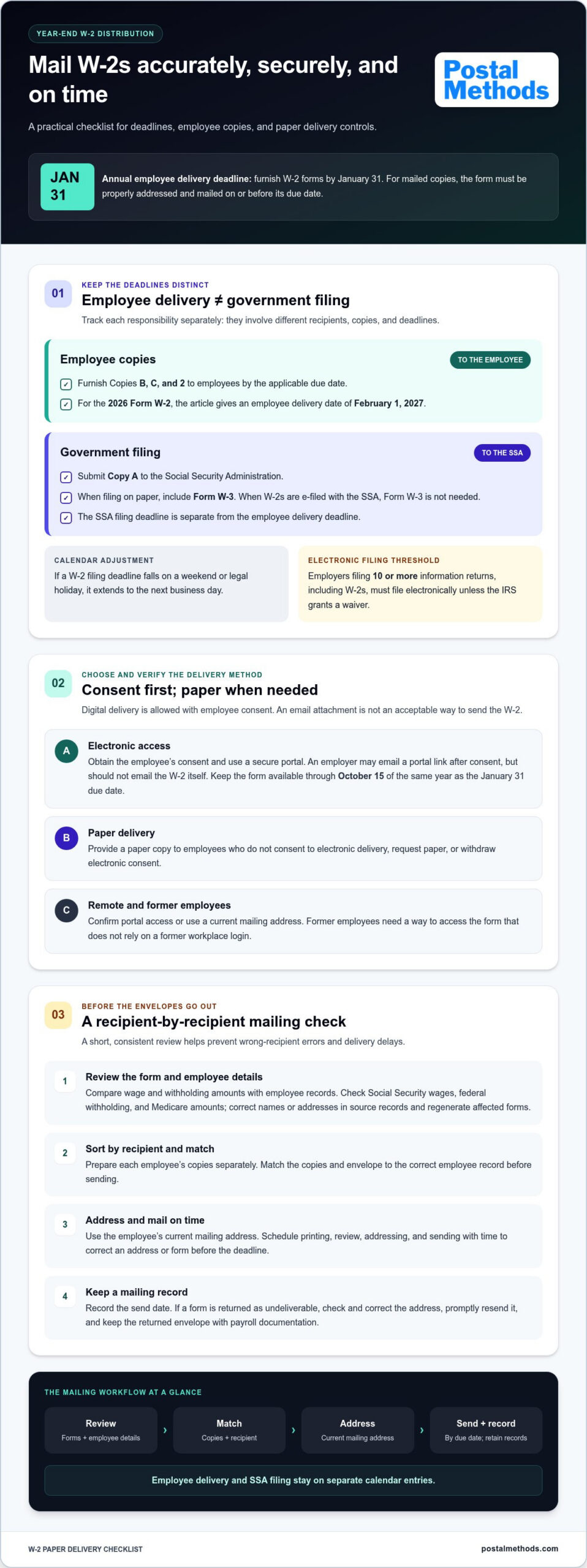
According to the Internal Revenue Service, U.S. employers must furnish employee W-2 forms for the previous tax year by January 31 annually. This is the employee delivery deadline. For the 2026 Form W-2, employers must furnish employees Copies B, C, and 2 by February 1, 2027, according to the Internal Revenue Service. These copies help employees report wages and income on their tax returns.
Government filing is a separate step. Employers submit Copy A to the Social Security Administration, along with Form W-3 when filing on paper. The filing deadline is separate from the employee delivery deadline. When employers e-file Forms W-2 with the Social Security Administration, they don’t need to file Form W-3. Keep the employee deadline and the SSA filing date distinct in payroll records.
Calendar adjustments matter. If a W-2 filing deadline falls on a weekend or legal holiday, the date extends to the next business day. Use the applicable year’s calendar to plan printing, review, addressing, and sending. A mailing workflow should leave time to correct an address or a form before the deadline.
W-2 and 1099 deadlines aren’t interchangeable. A W-2 reports employee wages, while 1099 forms cover other payment relationships. The exact due date depends on the 1099 form and whether the deadline concerns furnishing a recipient copy or filing with an agency. Employers filing 10 or more information returns, including Forms W-2, must file electronically unless the IRS grants a waiver. Count the applicable returns when planning submission.
For mailed employee copies, employers meet the W-2 furnishing requirement when the form is properly addressed and mailed on or before its due date. Use the employee’s current mailing address and keep a record of the send date. If a W-2 comes back as undeliverable, check the employee’s address, correct it, and promptly resend the form. Keep the returned envelope and mailing record with payroll documentation.
These distinctions clarify the best way to mail W-2 forms to employees: prepare the correct copies, address each envelope accurately, and schedule delivery separately from government filing.
Payroll software and year-end form distribution
Payroll software can organize employee wage information and year-end reporting. Employers still need to choose how each person receives their W-2 and track access or mailing outcomes.
W-2 Distribution Options
W-2 distribution means delivering each employee’s tax statement electronically, by mail, or in person. The method matters because consent, accurate contact details, and a clear record of delivery shape the workflow.
For in-person distribution, prepare each employee’s copies separately and hand them directly to the intended recipient. Record who received a form and when, then arrange another delivery method for employees who aren’t on site. For electronic access, obtain employee consent and use a secure portal rather than sending the W-2 as an email attachment.
Mailing Versus Payroll Provider Distribution
In-house mailing requires staff to print, sort, address, and send forms. Payroll-provider distribution can shift some of that work into the provider’s workflow. The main tradeoff is direct control versus less manual processing; costs depend on printing needs, mailing volume, staff time, and provider terms.
Compare the steps involved, not just the final delivery. A small team may prefer to manage its own batches, while a distributed workforce can make address updates and delivery tracking more demanding. Whichever route you choose, assign someone to review employee details and resolve delivery failures.
W-2 Delivery for Remote and Former Employees
Remote employees can receive W-2s through a secure online portal after consenting to electronic delivery, or by mail when paper delivery is needed. Former employees need the same attention to delivery details: use a current mailing address and provide a way to access the form without relying on a former workplace login.
If an employee withdraws consent to electronic delivery or requests paper, provide a paper copy. If portal access changes after a software update, tell employees what has changed. These steps help prevent former or remote workers from missing a form because their access or address changed. While payroll documents require secure compliance portals, distributed teams managing broader digital collaboration and high-volume data exchange often rely on modern platforms like WarpSend to keep remote workflows running smoothly.
Use payroll software to compare year-end wage and withholding amounts with employee records before releasing forms. Check Social Security wages, federal withholding, and Medicare amounts for inconsistencies. Correct names and addresses in the source records, then regenerate any affected forms before distribution. A clear review queue separates forms ready to send from those that need attention.
Annually, for portal delivery, confirm each employee can access the W-2 and keep it available through October 15 of the same year as the January 31 due date. If software changes how employees access electronic forms, notify them. An employer may email a link to a secure portal when the employee has consented, but shouldn’t email the W-2 itself.
For a paper batch, export or print the forms, sort them by recipient, and match each envelope to the employee record before sending. For in-person delivery, perform the same recipient-by-recipient check and log each handoff. These final controls help prevent mix-ups among remote, former, and on-site employees.
Having a payroll provider mail W-2s
A payroll provider can coordinate W-2 preparation and physical distribution from payroll data. The employer still needs a clear review process, accurate employee records, and a plan for handling exceptions.
Define the provider’s role
Start by mapping which tasks the provider handles and which remain with your payroll team. A provider may receive an approved tax-form file, print employee copies, prepare envelopes, and mail them. Your team can remain responsible for reviewing names, wage amounts, withholding, and addresses before release.
Agree on how corrections move through the workflow. If a reviewer finds an incorrect address or amount, identify who pauses that employee’s form, updates the payroll record, and submits a corrected file. A defined handoff prevents an outdated version from entering the mailing batch.
Review the data before submission
Payroll software is the source for wages and tax withholding, so compare its year-end output with employee records before submitting a file. Check each employee’s name, mailing address, Social Security number, and reported income. Then compare federal withholding and Social Security and Medicare amounts with payroll reports.
Use a controlled approval step. One staff member can prepare the file while another reviews exceptions and approves the final version. Keep a record of the submitted file, approval, and any corrections. This record helps your team confirm which version of each tax form was sent.
Coordinate production and exceptions
Before printing begins, agree on the file format, delivery method, and how processing issues will be reported. Assign someone in your organization to handle rejected records, missing addresses, or formatting errors. Resolve each issue before the affected form is produced.
Separate routine forms from exceptions. For example, keep an exception list for employees with returned mail, recent address changes, or corrected wage details. After the batch is mailed, reconcile that list with the payroll system so every record has a clear status.
Keep access and records controlled
Limit access to W-2 files to staff who need them for payroll, review, or distribution. Transfer files through an approved secure method, and avoid placing tax forms in ordinary email attachments. Store the final output and processing records in a restricted location, organized by tax year and employee.
A provider can reduce internal printing and sorting work, but it doesn’t replace careful data review. Employers filing 10 or more information returns, including Forms W-2, must file electronically unless the IRS grants a waiver. Treat that filing obligation as separate from employee-copy mailing, and coordinate both workflows with payroll software.
Furnishing W-2 forms to employees
Give each employee the correct W-2 copies through an approved delivery method. A physical W-2 includes Copies B, C, and 2. Copy B supports the employee’s federal income tax return, Copy C is for personal records, and Copy 2 is for state, city, or local tax returns when required.
Paper delivery requires accurate addressing and timely mailing. Employers meet the furnishing requirement when a W-2 is properly addressed and mailed on or before its due date. Match each employee’s name and address to the payroll record, place that person’s copies together, and keep a record of when the form was mailed.
What IRS rules apply to mailing paper W-2 forms to employees? Mail the paper statement to the employee’s last known address by the applicable deadline; an employer may not send the W-2 itself by email. If an employee requests paper, provide a paper copy rather than requiring electronic access.
Electronic delivery has separate consent requirements. Obtain an employee’s consent before providing a W-2 electronically, and obtain new consent if the delivery method changes. An employee can withdraw consent and request a paper copy. Employers may email a link to a secure portal when the employee has consented, but the W-2 must not be attached to the email.
Portal access also needs attention after distribution. Annually, keep online W-2 forms available through October 15 of the same year as the January 31 due date. If a software update changes how employees access electronic forms, inform them. A notice should explain the access change and direct employees to the correct portal.
What are the penalties for late, incorrect, or undelivered W-2 forms? For returns due in 2027, the Social Security Administration may assess $60 per return filed late or incorrectly within 30 days of the deadline, $130 per return filed more than 30 days late but by August 1, and $340 per return filed after August 1 or not filed. Intentional disregard may result in a $690 penalty per return for returns due in 2027.
Follow up promptly when an envelope is returned. Check the address against the employee’s records, correct any error, and resend the paper form to the updated address. Keep the returned envelope and new mailing record together to maintain a clear distribution history.
Before sending a batch, reconcile the forms against the employee list. Confirm that each person receives the correct statement and that no envelope contains another employee’s information. This final check helps protect Social Security and compensation details and document the distribution process.
Preparing W-2 forms and accompanying documents
Accurate W-2 mailing starts with clean payroll data and the right copy for each recipient. Separate employee statements from forms prepared for government filing, then review each batch before printing.
Review employee and wage details
Compare each employee’s name, address, Social Security number, wages, and withholding with payroll records. Check federal income tax, Social Security, and Medicare amounts against the year’s payroll totals. Correct errors in the source data before generating replacement forms, so outdated details do not carry into the mailing batch.
Use the Social Security Administration’s online process to generate up to 50 W-2 forms. For typed forms, use black ink and, if possible, 12-point Courier because entries are machine-read. Follow the form instructions closely, especially for identifiers and wage boxes.
Choose compliant print formats
For employee copies printed in-house, use standard white printer paper measuring 8.5” X 11”. Place Copies B, C, and 2 for one employee together in that employee’s envelope. Copy 2 is for the employee’s state, city, or local tax return when required.
Copy A is different. Social Security processes paper W-2 forms only when they are Copy A for the agency, printed in red and white or black and white, and arranged two forms per page. Laser-printed W-2 and W-3 forms, including red drop-out ink forms, must comply with IRS Publication 1141 and receive Social Security pre-approval.
Reconcile statements and filing documents
Form W-3 summarizes wages and withholding reported on paper W-2 submissions. Reconcile its totals against Forms 941, 943, 944, or Schedule H for the year. Resolve any difference before sending the filing package.
Electronic filing changes the accompanying paperwork: employers e-filing Forms W-2 with the Social Security Administration don’t need to file Form W-3. Employers filing 10 or more information returns in a calendar year, including W-2s, must file electronically unless the IRS grants a waiver. Keep employee copies and agency filing copies in separate production batches.
Before mailing, check that each envelope contains only the intended employee’s copies and that the address matches the payroll record. Keep the final W-2 and W-3 records organized; employers must keep copies of each form for at least 4 years. These checks help make the best way to mail W-2 forms to employees a repeatable process rather than a last-minute sorting task.
Need help moving approved documents into a prepared mailing? Explore printing and mailing support for a streamlined print-to-post workflow.
Postal Methods: HIPAA Compliant Printing & Mailing Services
Postal Methods offers HIPAA Compliant Printing & Mailing Services for sensitive medical documents. For W-2 distribution, its online platform provides a print-to-mail workflow: upload approved documents for printing, folding, stamping, and mailing. This can help employers who want to move the physical production and mailing steps out of their internal workflow while keeping payroll review and approval in their hands.
Prepare and approve employee forms before sending files for production. Keep responsibility for accurate W-2 data, employee consent, and applicable deadlines within your payroll process. Then use a consistent handoff to reduce manual printing and envelope preparation.
For support with document printing and mailing, visit Postal Methods.
Make year-end distribution easier to manage
Build a repeatable handoff for each tax season: approve the employee data, prepare the documents, and keep mailing records organized. That gives your team a clear process to refine for future payroll cycles. The best way to mail W-2 forms to employees is one that fits your delivery needs while keeping review and distribution steps under control.
Organizations looking to move document production and mailing out of their internal workflow can use Postal Methods’ HIPAA Compliant Printing & Mailing Services. Postal Methods also offers Invoice Printing and Mailing Services and Legal Printing and Mailing Services. These services support document workflows beyond year-end payroll and help teams streamline recurring print-and-mail tasks.
Consider which steps consume the most staff attention, then decide where an external print-and-mail workflow could fit. Contact Postal Methods about W-2 mailing to discuss your document workflow. With a clear process and the right support, your next distribution cycle can start with less manual handling and more room for focused review.
Frequently Asked Questions
Can W-2s Be Sent Electronically?
Yes, employers can furnish W-2s electronically when employees have consented. Use a secure portal that lets each employee access their own statement, rather than distributing forms through an open shared folder. Keep the portal instructions clear, and tell employees how to retrieve and save their form. If an employee can’t access the portal or asks for paper, provide a paper copy instead of relying on digital delivery alone.
Is it legal to email W-2 to Employees?
No. Employers may not send an employee’s W-2 as an email attachment. Email can carry a link to a secure portal when the employee has consented to electronic delivery, but the form itself should remain behind the portal’s access controls. For example, send a brief notification with login instructions, then make the W-2 available after the employee signs in. This keeps sensitive wage and identity details out of the email attachment.
What is the deadline for employers to furnish W-2 forms to employees?
U.S. employers must furnish W-2 forms for the previous tax year by January 31 annually, according to the Internal Revenue Service. For example, Copies B, C, and 2 of 2026 Form W-2 must be furnished by February 1, 2027, according to the Internal Revenue Service. Build the schedule backward from the applicable due date, allowing time to review employee records and address corrections before forms are released.
How should employers address and package W-2 forms securely?
Use the employee’s correct mailing address and place only that person’s Copies B, C, and 2 in the envelope. Standard 6666-2 W-2 envelopes are intended for mailing printed W-2s. Before sealing each envelope, match the employee name on the forms to the address label. Keep the work area organized so forms for different employees aren’t mixed during sorting, inserting, or final envelope checks.
Should employers use first-class mail, certified mail, or a tracking service for W-2 forms?
Choose the mailing method based on the records your process needs. A properly addressed W-2 mailed by its due date meets the furnishing requirement. Certified Mail can provide a more documented mailing trail; employers sending W-2 forms by Certified Mail should use ZIP code 18769-0002. USPS offers up to $5,000 in insurance for mailed paperwork. Keep the mailing record with the employee’s distribution history.
Can employers send W-2 forms electronically instead of by mail, and what consent is required?
Yes. Electronic delivery can replace paper mailing when the employee has given consent. The employee may later withdraw consent and request paper, so keep a record of the consent and any changes. Obtain new consent if the delivery method changes. For example, switching from portal access to another electronic delivery method requires fresh consent; do not assume the original approval covers a different method.
How can employers protect employees’ Social Security numbers when mailing W-2 forms?
Limit access to W-2 files and printed forms to people who handle payroll or distribution. Keep sorted forms face down or in a controlled work area, and compare each form with its envelope before sealing. Don’t place Social Security numbers or complete W-2 images in ordinary email. For electronic access, use a secure portal and share access instructions without including the employee’s sensitive tax information in the message.