


How to compare bulk invoice mailing service pricing
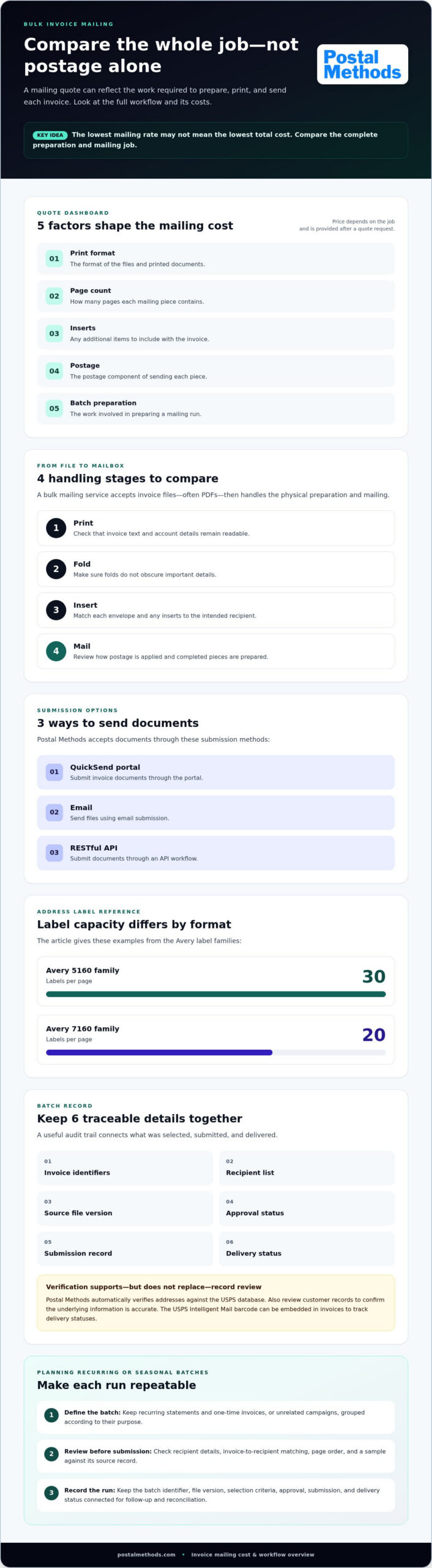
The lowest mailing rate may not mean the lowest total cost. A bulk invoice mailing service accepts invoice files, typically PDFs, then prints, folds, inserts, and mails them. Compare the full cost of preparing and sending each piece, not postage alone.
It’s easy to focus on the per-piece figure, especially when invoices go out on a recurring schedule or in a seasonal rush. But print format, page count, inserts, postage, and batch preparation can all affect the quoted price. The price depends on the job and is provided after a quote request, with those factors shaping the total.
Learn how invoice mailings work, what to compare in a quote, and how to plan recurring or seasonal batches. We’ll also cover how undeliverable letters and digital returns fit into the process, so you can choose a workflow that’s easier to manage from file to mailbox.
Key Takeaways
- Separate the work included in a mailing quote so you can compare the full job, not just postage.
- Set a repeatable process for recurring and seasonal batches, including file preparation and approval steps.
- Use delivery records to make mailing activity easier to trace and reconcile.
- Plan how your team will handle returned mail and update customer records when addresses need attention.
- See when outsourcing invoice production and mailing can reduce repetitive handling for your team.
What are statements and invoice mailings?
Prepare invoices by selecting the records for a mailing run, generating the files, reviewing recipient details, and submitting them for printing and mailing. Keep a record of each batch and its processing status to support follow-up and reconciliation.
-
Select Invoices for Batch Delivery
Open the invoices page and select the invoices intended for the same mailing run. Compare each recipient, invoice number, mailing address, and delivery status before adding it. For example, exclude a record already sent or an invoice with a corrected address awaiting approval. Keep the selection tied to a billing period or campaign so the batch has a clear purpose.
Check the selected records against your billing list before proceeding. This review can catch duplicates, missing recipients, and invoices that belong in a later batch.
-
Create and Submit Invoice Batches
Generate a batch from the reviewed invoices, then inspect the files before submission. A digital invoice mailing service accepts invoice files, often PDFs, and prints, folds, inserts, and mails them. Confirm that each invoice matches its recipient and that its pages are in the intended order.
Save the batch identifier, file version, selection criteria, and submission date in your records. Those details help distinguish a corrected batch from an earlier version if a recipient reports a problem.
- Choose standard mail when the invoice should arrive as a physical document and doesn’t require another delivery method. Before submitting, review address formatting and confirm that the envelope contains the right invoice for each recipient. Address labels can support organized preparation: Avery 5160 family labels provide 30 labels per page, while Avery 7160 family labels provide 20 labels per page.
Choose a file format that fits your mailing setup, and check that addresses are legible and correctly formatted. Postal Methods automatically verifies addresses against the USPS database. Review your customer records too, since verification doesn’t replace checking that the underlying information is accurate.
- Record each batch’s contents and processing milestones to create a useful audit trail. Include invoice identifiers, the recipient list, source file version, approval status, and submission record. Keep these details together rather than scattering them across email threads and spreadsheets. For example, a finance team can use one batch record to trace which invoice version was mailed to a recipient.
Keep delivery tracking connected to that same record. The USPS Intelligent Mail barcode can be embedded in invoices to track delivery statuses. Capture the relevant status alongside the batch details, then use it to guide follow-up on delayed or returned items. Tracking records show delivery status, while the batch log explains what was mailed and when.
How invoice printing and mailing services work
A bulk invoice mailing service should explain file intake, printing, envelope preparation, postage, and delivery records. Choose a workflow that shows how each invoice moves from your system to its recipient.
-
Set Up Automated Invoice Mailing
Map the workflow from invoice creation through mailing, then define which records enter each run. For example, separate monthly statements from one-time invoices before generating files. Confirm that invoice data matches the recipient list and that each file opens correctly. Automation reduces repeated manual handling, while clear selection rules help prevent the wrong invoice from entering a batch.
Set a review point before submission. A finance team can compare a sample invoice with its source record, checking the recipient name, amount due, and account details.
- Choose a file format and submission method that preserve the complete invoice. Postal Methods accepts documents through its QuickSend portal, email, or RESTful API, then prints, folds, inserts, and mails them. Keep statements and invoices grouped according to their purpose. A statement can summarize account activity, while an invoice requests payment for a specific transaction.
Before sending invoices, check that page order, text, and account details remain readable in the generated file. Use a consistent naming pattern, such as a billing period and batch label, so staff can identify the correct version without opening several files.
-
Print, Fold, and Stuff Invoices
Review how each document moves through printing, folding, and envelope insertion. Check that the invoice remains legible and that folds don’t obscure important details. For a multi-page statement, confirm that its pages stay together and reach the correct recipient. Reviewing a sample file before submission can reveal layout or alignment problems.
Also review how postage is applied and how completed pieces are prepared for mailing. Matching each envelope to its document is essential. Keep inserts and attachments tied to the intended recipient, especially when invoices have different supporting pages.
- Match your invoice mailing workflow to your batch size, file format, and schedule. This matters when recurring statements overlap with a seasonal rush. For example, a routine billing run may need to go out alongside a separate annual renewal batch. Plan around those patterns instead of combining unrelated documents.
Compare the full sequence, not just the printing stage. Identify how files are submitted, how batches are reviewed, and how mailed pieces are recorded. A dependable process makes responsibilities clear from file generation to dispatch.
-
Assess Bulk Printing Availability
Describe your recurring and peak-period needs when planning bulk invoice printing. Include document types, file preparation, and whether statements need separate handling. Map the workflow from upload to mailing, noting each review and approval step. This gives your team a practical picture of how a batch moves and where internal checks belong.
For a connected print-and-mail workflow, explore digital document mailing as one way to move files into physical mail.
Bulk invoicing for recurring or seasonal billing
- Set a billing calendar that separates routine cycles from seasonal runs. A monthly invoice cycle can follow a regular schedule, while an annual renewal may need its own batch. Record the billing date, source system, approval owner, and intended recipient group. These details help staff prepare the right files without mixing routine charges with seasonal invoices.
Create a calendar entry for each billing event. For example, label one run “monthly service invoices” and another “renewal billing.” Clear names help distinguish files when batches are being prepared close together.
- Map the steps that remain manual before repeating a billing run. List how invoices are generated, exceptions reviewed, files approved, and envelopes prepared. For example, a staff member may need to resolve a disputed charge before that invoice enters the monthly batch. Assign an owner to each exception so it doesn’t stall the rest of the cycle.
Keep the minimum review fields consistent across cycles: billing period, recipient, invoice status, and approval. That checklist helps staff spot incomplete records before preparing the batch.
- Separate seasonal billing from standard recurring invoices. A renewal campaign, membership cycle, or annual service charge may use different invoice text or supporting documents. Give it its own batch label and approval path. Compare the seasonal invoice template with the approved version before generating the file, so a one-time change doesn’t carry into routine invoices.
Plan the seasonal run around its preparation tasks, not just the mailing date. List when source records will be ready, exceptions resolved, and approvals complete.
- Review time-and-billing records before generating invoices for professional services. Confirm that approved hours, rates, expenses, and client details appear correctly. For example, compare a completed project’s time-entry summary with its invoice line items. Resolve missing entries first. Otherwise, corrections after invoice generation can create rework and delay the full billing run.
Keep time approval separate from invoice approval when different staff handle those tasks. A clear handoff shows which records are ready for billing and which still need review.
- Measure each cycle using practical process markers. Record how many records need manual correction, which approval step causes delays, and whether seasonal batches require different documents. Compare notes across billing periods. If an address or account issue keeps recurring, correct the source record before the next run instead of fixing each invoice individually.
Use the review to refine the next schedule. Retain successful templates, update outdated instructions, and keep recurring and seasonal workflows distinct.
Pay-per-piece pricing and enterprise plans
- Compare the full cost before choosing a mailing option. Consider printing, paper, envelope preparation, postage, and any file handling. A multi-page invoice may require different production steps from a single-page statement. Compare options using the same document assumptions and mailing specifications, since a lower per-piece figure may not include the same services.
Ask for the pricing basis: per piece, per batch, or a planned service arrangement. Then match that basis to your actual billing pattern.
- Use per-piece pricing to understand how each mailed letter contributes to the total. The count may reflect documents, envelopes, or completed mailpieces, depending on the pricing structure. Check how multi-page invoices and inserts are handled. One envelope containing a statement and invoice differs from two separately mailed documents.
Compare a representative batch, including its page mix and address file. This gives you a more useful comparison than unrelated per-piece figures.
- Evaluate enterprise plans against your recurring volume and operating needs. Enterprise print and mail bureaus serve very large mailing volumes, described as tens of thousands pieces. A high-volume organization may benefit from planning batches together, while a business with irregular mailings may prefer a per-piece structure. Consider seasonal peaks, statement runs, and the internal effort required to prepare files.
Review the service workflow alongside your mailing pattern. Choose an option that fits how your team submits documents, approves batches, and maintains recipient addresses.
- Compare the full job at different batch sizes. A lower unit rate doesn’t automatically mean a lower total if the larger batch includes letters you aren’t ready to send. Build a realistic example from your billing calendar, then account for page count, envelope format, postage, and address preparation. Use the same assumptions for every comparison.
Track errors and returned pieces as operational costs, too. Incorrect addresses can create rework, while duplicate invoices can complicate reconciliation.
- Request a quote using a clear job description. Include document type, page count, mailing frequency, address-file format, and any inserts. The price depends on the case and is given after a quote request; document length, postage, preparation, and batch volume shape the total. Keep these factors together so each pricing response reflects the same mailing requirements.
Before choosing, compare the service scope with your workflow. Confirm how files are submitted, printed, folded, inserted, and mailed, then record the assumptions for future reviews.
Undeliverable mail and digital returns
Outsourcing risks include mismatched documents and addresses, duplicate letters, and unclear return status. Reduce errors by reconciling the approved invoice file, recipient records, and mailing batch before submission.
- Set a return-mail process before submitting the first batch. Assign a team member to record returned documents, identify the recipient, and classify the reason shown on the item. A changed address, for example, needs a different update from a recipient-name mismatch. Link the original mailing record to the returned item so staff can trace the invoice without searching separate files.
Decide who can update customer addresses and what review is required. This prevents an unverified correction from flowing into the next billing run.
- Choose a mailing option based on the invoice’s delivery needs and any tracking requirements. Postal Methods offers First-Class delivery and Certified Mail, including “No Return Receipt” and “Signature Required” options. Don’t assume every document needs the same service: a routine statement and a time-sensitive payment notice may have different priorities.
Record the selected mailing option with the batch details. This gives your team a reference when reviewing delivery information or comparing later runs.
- Use mail tracking to connect delivery information with invoice records. The USPS Intelligent Mail barcode can be embedded in invoices to track delivery statuses. Store each relevant status alongside the invoice identifier and batch record. This gives staff a practical way to distinguish a mailed invoice from one still being prepared.
Delivery information supports follow-up, but it doesn’t explain every return. Pair it with the physical returned item or the digital return report.
- Build a digital return log for returned-mail notices and address updates. Include the invoice identifier, recipient, return date, status, and next action. For example, flag an invoice for address review instead of resending it to the same destination. Saving the reason and action together helps prevent repeated errors in a future batch.
Separate address corrections from payment questions. A returned letter may need a record update, while a recipient asking about a balance needs billing follow-up.
- Reconcile the mailing batch after delivery updates arrive. Compare submitted invoices with mail status and returned documents, then flag unmatched records for review. For example, an invoice without a status update should remain distinct from a returned letter. This keeps payment follow-up grounded in the available delivery record rather than an assumption.
For help moving invoices into physical mail, explore invoice mailing support and streamline document handling.
Postal Methods: HIPAA Compliant Printing & Mailing Services
Postal Methods helps businesses send invoice files through Invoice Printing and Mailing Services. Submit documents for printing, folding, stamping, and mailing instead of handling each production step in-house. This suits teams managing recurring billing batches, seasonal invoice runs, or a steady flow of customer statements.
For sensitive medical documents, HIPAA Compliant Printing & Mailing Services provide a relevant option. Postal Methods also handles Legal Printing and Mailing Services and Notice Printing and Mailing Services, supporting other document workflows through the same print-and-mail process.
If you’re ready to streamline invoice preparation and mailing, visit Postal Methods.
Turn your mailing plan into the next step
Make your next invoice run a practical test of the workflow you want to keep. Set the document requirements, recipient-file process, review steps, and return handling before preparing the batch. Then assess the workflow against the work your team needs done, not a headline rate alone. A bulk invoice mailing service should fit your billing routine and give each step clear ownership.
Postal Methods offers Invoice Printing & Mailing for businesses moving invoice production and mailing out of their internal workflow. It also provides HIPAA-Compliant Printing & Mailing for sensitive medical documents and Legal Printing & Mailing for legal documents. Choose the service that matches the documents you need to send.
Ready to discuss your mailing workflow? Contact Postal Methods about your mailing. A clear starting point can help your team plan its next batch with confidence.
Frequently Asked Questions
Can return envelopes include prepaid postage?
Reply envelopes are available as an add-on, and additional postage is a separate option. Don’t assume an envelope included with an invoice has prepaid postage. For payments by mail, decide whether recipients will return a check or another document, then provide the return address and remittance instructions. Make the envelope’s purpose clear so customers know how to send their payment information back.
Can I add remittance/return envelopes to speed up payments?
Yes, reply envelopes can be included with invoice mailings. They give recipients a way to return payment documents, but don’t guarantee faster payment. Make the remittance instructions easy to follow and ensure the return address routes payments to the right team. If postage should be prepaid, account for it separately from the envelope.
Is There a Minimum Requirement to Send Invoices?
A transactional mailing workflow can process individual documents, so you don’t need a large batch. For a one-off invoice, prepare the document and recipient details, then submit through the QuickSend portal, email, or API. For recurring billing, group invoices by cycle to simplify approvals and recordkeeping. Consider page count, mailing frequency, and preparation needs when organizing runs.
What is a bulk invoice mailing service and how does it work?
A bulk invoice mailing service turns digital invoices into physical mail. Submit files through the QuickSend portal, email, or RESTful API; Postal Methods prints, folds, inserts, and mails them. For example, a finance system can generate invoices and submit them for processing without staff preparing each envelope by hand. Choose the submission method that fits how your team creates and organizes invoices.
How much does bulk invoice printing and mailing cost per invoice?
The price depends on the job and is provided after a quote request. Key factors include document length, printing format, postage, envelope needs, and any additional assembly. A single-page invoice and a multi-page statement have different production requirements. To make a quote useful, describe your document mix, mailing schedule, and return-envelope needs, then compare proposals using the same assumptions.
What file formats and billing system integrations do invoice mailing services support?
Invoice workflows commonly accept PDF files, while submission channels may include a portal, email, or API. Postal Methods’ RESTful API integrates with systems such as QuickBooks, Salesforce, Microsoft Dynamics, Zoho, and SAP. Choose an approach that fits how your billing system generates documents. For email submissions, keep attachment size in mind: the stated limit is 25 MB.
Can bulk invoice mailing services print, insert, and mail checks or payment return envelopes?
Invoice mailings can include reply envelopes for recipients returning payment documents. Preparing checks is a separate task from printing and mailing invoices. Postal Methods offers Invoice Printing & Mailing and reply envelopes as an add-on. Include clear remittance directions so recipients understand what to return and where to send it.
What USPS postage options and mailing rules apply to bulk invoices?
Choose postage and mail class based on the document, delivery needs, and tracking requirements. Postal Methods offers First-Class delivery and Certified Mail, with “No Return Receipt” and “Signature Required” options. Certified Mail is available only in black and white. Match the mailing choice to the purpose of the invoice or notice, and make sure the address and document are prepared for the selected mailing workflow.