


Certified Mail API: Automate Mailing and Proof Tracking
Sending certified mail can involve a business system, document preparation, postage, and records of mailing or delivery. A certified mail API can connect a digital request to a physical mail workflow, reducing repeated data entry and helping keep mailing details linked to the records they belong to.
Those steps are related, but they are not the same. A mailing request, USPS service, postage, document printing, and delivery evidence each play a different role. An API’s usefulness depends on which steps it supports and what information it returns to your workflow. Postal Methods’ RESTful API integration connects digital workflows with print-and-mail fulfillment, including document printing, folding, postage, and mailing.
This guide follows a mailing request from software to physical fulfillment, explains what to assess in API documentation and recordkeeping, and outlines a practical integration plan. It also distinguishes mailing fulfillment from tracking and proof functions, so your team can evaluate the workflow based on specific capabilities rather than broad API claims.
Key Takeaways
- Distinguish the USPS mail service from the software used to prepare or manage a mailing workflow.
- Link each request’s document, recipient details, postage, and requested mail service to the correct business record.
- Compare certified mail API capabilities by workflow coverage, returned data, evidence handling, security, and integration needs.
- Implement in stages, from requirements and data mapping through testing, a controlled launch, and ongoing monitoring.
- Postal Methods’ RESTful API integration connects digital documents with printing, folding, postage, and mailing.
What Is a Certified Mail API, and What Does It Automate?
A certified mail API connects a business application to a mailing workflow. It provides a structured way to pass mailing instructions between systems, rather than having staff re-enter information in separate tools. The steps that follow depend on the integration. Printing, postage, mailing, tracking, and proof records are distinct functions, so check which ones the API documents.
USPS Certified Mail is a mail service. An API is a software interface that can help a business prepare, transmit, or manage information related to mailing. Certified Mail provides a way to document mailing and delivery events. For background on its purpose and how it differs from registered mail, see What is Certified Mail? Digital records can make requests and related information easier to retrieve, but their presence alone does not establish a legal result or guarantee compliance.
How a certified mail API differs from a USPS API
USPS APIs and mailing-provider APIs can have different roles. A USPS API may support a specific postal task, while a mailing-provider API may connect a company’s software with a broader print-and-mail workflow. For example, USPS API materials include address standardization. That can help prepare address data, but it is not the same as a dedicated Certified Mail API or a complete certified-mail fulfillment process.
Keep the distinction clear: USPS defines its mail services, while software interfaces help systems exchange information. A provider’s integration can coordinate the functions described in its documentation. Review what it accepts, processes, and returns. Treat tracking updates or delivery evidence as part of the workflow only when those functions are documented.
Which teams benefit from certified-mail automation?
Developers can connect mailing requests with systems such as case-management platforms, billing software, or customer databases. A stable internal identifier can associate each request with its customer, account, or case, giving operations and customer-service teams a shared reference. That link can help staff retrieve relevant records for audits or service inquiries. It does not, by itself, satisfy compliance obligations or prove delivery.
Before relying on a particular function, separate your workflow goals from documented API capabilities. Identify which mailing tasks are supported and which records are returned. This makes it easier to plan the integration without assuming that every certified-mail step is automated.
How a Certified Mail API Connects Requests, Mail, and Proof
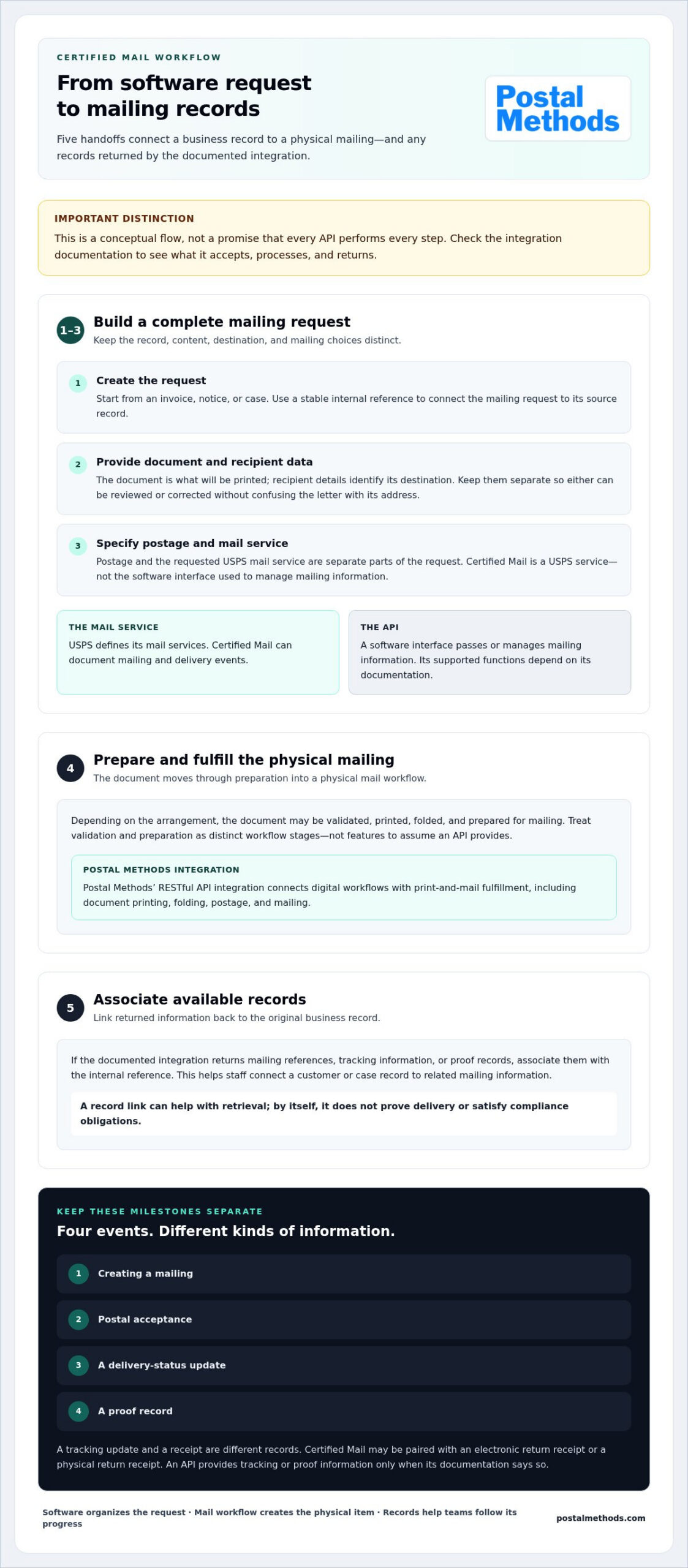
A mailing workflow involves more than sending a document. It must handle the information needed to prepare the mailing, the postal service selected, and any records used to follow its progress. The exact handoffs depend on the integration, so use this as a conceptual flow rather than assuming every API performs every step.
- Create the request. A business application starts a mailing tied to an invoice, notice, or case. A stable internal reference can connect the request to its source record.
- Provide the content and recipient data. The document is what will be printed; recipient details identify its destination. Keeping them separate makes it easier to review or correct one without confusing the letter’s content with its address.
- Specify the mailing choices. Postage and the requested USPS mail service are separate parts of the request. Certified Mail is a USPS service. Represent additional options only as the workflow documentation supports them.
- Prepare and fulfill the mailing. Depending on the arrangement, the document may be validated, printed, folded, and prepared for mailing. Treat validation and preparation as distinct workflow stages, not features to assume an API provides.
- Associate available records. If the documented integration returns mailing references, tracking information, or proof records, link them to the original internal reference. Staff can then follow the connection from a customer or case record to related mailing information.
From API request to prepared mailing
An application may pass a document and destination details into a mail workflow, where checks and document preparation can happen before physical fulfillment. Decide which information your own system must validate, such as required fields, separately from the functions the mailing integration documents. For a broader discussion of digital-to-physical workflows, see API for Physical Mail: The 2026 Developer’s Guide to Snail Mail Automation.
In brief: software organizes the request; a mail workflow turns it into a physical item; associated records help teams follow its progress.
From postal processing to evidence records
Keep four milestones distinct: creating a mailing, postal acceptance, a delivery-status update, and a proof record. They are not interchangeable. USPS Certified Mail may be paired with an electronic return receipt or a physical return receipt. Check current USPS service terminology and evidence options. A tracking update and a receipt are different kinds of records, and an API provides them only when its documentation says so.
For comparison, Simple Certified Mail describes capabilities such as tracking-number capture and electronic proof of acceptance or delivery. Those are that provider’s claims, not standard features of every certified mail API or of Postal Methods’ integration. Postal Methods provides a RESTful API integration alongside print-and-mail fulfillment, including printing, folding, postage, and mailing. Use current API documentation to define which certified-mail submission, tracking, or proof functions your workflow can rely on.
Compare Certified Mail API Capabilities Before You Integrate
Start with the workflow your organization needs, then compare it with what the API documentation describes. An overview can explain the general purpose of an API, but integration decisions depend on specific inputs, outputs, controls, and operational responsibilities. Mark each item essential, optional, or outside your current scope before comparing solutions.
| Area | Essential to assess | Optional or workflow-dependent |
|---|---|---|
| Workflow coverage | Which mailing tasks the integration supports, from request submission through fulfillment. | Automated document preparation or additional mailing choices. |
| Data returned | Available identifiers and response details your system can store. | Status notifications or other updates, if documented. |
| Evidence | Whether relevant records can be retrieved and associated with a request. | Electronic proof documents or other evidence options. |
| Integration | Documented request and response formats, plus error behavior. | Prebuilt connectors or multiple development tools. |
| Security | Documented authentication, access controls, and sensitive-data handling. | Additional controls aligned with internal policies. |
| Support | How technical issues and failed requests are handled. | Support arrangements suited to your operating model. |
An auditable mailing record is a retrievable, time-associated set of documented request details, mailing identifiers, available status information, and any available proof record, linked to the relevant customer, case, or transaction. This is a practical recordkeeping goal, not a claim that any particular record proves compliance or a legal outcome.
Evaluate data, tracking, and evidence handling
Read the technical documentation closely. Identify the fields an application can submit, the data returned in response, whether status updates are described, and how records can be retrieved later. Map each documented identifier to an internal customer, case, or transaction key. If staff must match records manually, include that handoff in your operational plan.
Keep a tracking identifier separate from a proof document. They serve different recordkeeping purposes, and an integration does not necessarily provide both. USPS service terminology and current rules matter too: a return receipt is a distinct service option, and electronic and physical return receipts are different formats. Check the current USPS description of the selected service rather than treating a delivery status as equivalent to a receipt or signature record.
Assess integration, security, and operational fit
Review how the integration authenticates requests, reports errors, and controls access to documents and recipient information. Plan exception handling before launch: what happens if a request fails, when a retry is appropriate, and who owns unresolved errors? Consider expected mailing volume and how your team will reconcile requests that do not complete as planned.
Separate essential requirements from useful extras. Assess a certified mail API against documented capabilities, not broad claims about automation or proof tracking. Build a simple scorecard, test the requirements that matter to your workflow, and record any manual steps that remain.
Implement a Certified Mail API Without Losing Control of Records
A reliable integration starts with the work around the software. Define who owns each mailing, how its records connect to business data, and what staff do when a request goes wrong. Then build and test in stages.
- Set requirements. Identify who creates mail, approves document content, monitors exceptions, and retains records. Separate technical needs from business rules, including review or approval steps.
- Map the data. Document the recipient, document, requested mailing service, and internal reference your workflow needs. Assign each request a stable identifier that links it to the source customer, case, or transaction.
- Test safely. Use a documented test environment where available. Exercise representative document types and failure scenarios, including missing information, corrections, duplicate submissions, and failed requests.
- Launch with control. Start with a limited workflow or volume. Reconcile responses with mailing records and confirm identifiers connect to the right business records before expanding use.
- Monitor and improve. Track measures such as processing time, record completeness, and unresolved exceptions. Review patterns and adjust procedures as the workflow becomes part of routine operations.
Map the business process before writing integration code
Make the handoffs visible before development begins. For example, a team might create a notice from a case record, route its content for approval, and assign an operations owner to resolve mailing exceptions. Specify which recipient, document, mailing, and internal-reference data each step needs. Define success in measurable terms, such as processing time and whether each completed request can be associated with its source record.
Test safely, launch in stages, and monitor exceptions
Use documented test tools and procedures rather than assuming a sandbox is available. Include ordinary and edge-case requests, then compare system responses with the records your team expects to retain. Before increasing production volume, confirm that duplicate submissions can be identified and that corrections do not detach a mailing from its original business record.
Assign ownership for retries and unresolved failures. A technical team may investigate integration errors, while operations staff handle exceptions that require a business decision. Write down when a request can be retried, who approves a correction, and how staff record the outcome. This helps prevent uncertain requests from being overlooked between teams.
Keep technical delivery separate from legal deadlines and evidentiary sufficiency. An API response can report what the integration processed; it does not determine whether a mailing meets a deadline or whether a record is sufficient for a particular legal or business purpose. Define those requirements with the appropriate internal stakeholders.
Postal Methods provides a RESTful API integration alongside print-and-mail fulfillment. Explore Postal Methods’ API integration to plan how to connect document workflows with physical mailing.
Connect Certified Mail Workflows to Postal Methods’ Print-and-Mail Service
Digital workflows can prepare a document request, but physical mail still needs to be produced and sent. Postal Methods connects online document workflows with print-and-mail fulfillment: submit documents to be printed, folded, prepared with postage, and mailed. Its RESTful API integration is available alongside an online print-and-mail platform, connecting business processes with physical document delivery.
Where outsourced print-and-mail fulfillment fits
For teams managing recurring correspondence, print-and-mail fulfillment can take document production and mailing tasks out of individual staff work queues. Rather than coordinating printing, folding, postage, and dispatch manually, an organization can connect a digital process with a fulfillment workflow. This lets operations focus on preparing accurate requests and managing business records.
Relevant mail projects include invoices, notices, legal correspondence, and sensitive medical documents. The workflow depends on the document and the organization’s process. A certified mail API may involve separate functions for submission, USPS service selection, tracking, or evidence records. Keep those distinct from printing and mailing, and use current technical documentation to assess certified-mail-specific functions.
For teams handling legal correspondence, Postal Methods’ article Certified Mail for Legal Documents: 2026 Guide offers related context on that mailing use case. Consider how the selected mail service, document preparation, and recordkeeping requirements fit together before designing the digital handoff.
Choose a practical next step for your workflow
Start with one recurring mailing process, such as a notice or invoice run, and map its path from document creation to fulfillment. Identify who prepares and approves the content, which system holds recipient information, and how the mailing record should connect to the customer or case. This gives technical and operations teams a clear scope for planning an integration without automating every document workflow at once.
Postal Methods offers transparent pricing and no long-term contracts. Consider those terms alongside workflow coverage, documentation, and recordkeeping needs. Begin by defining the mailing, its handoffs, and the records your team needs to retain.
Explore Postal Methods’ mailing and API services to see how digital document workflows connect with print-and-mail fulfillment.
Start With One Mailing Workflow
A full-scale integration does not have to be the first step. Choose one recurring mailing, define the records your team needs, and use that workflow to shape your technical and operational requirements. A focused start helps clarify where a certified mail API fits and what information your organization needs to retain.
Postal Methods combines RESTful API integration with print-and-mail fulfillment, including printing, folding, postage, and mailing. Transparent pricing and no long-term contracts are practical terms to consider as you plan.
Define a clear use case, then expand as your processes and recordkeeping needs become clearer. Explore Postal Methods’ mailing and API services to plan your connected mailing workflow.
Frequently Asked Questions
What is a certified mail API?
A certified mail API is a software connection that lets a business application interact with a workflow for preparing or managing certified mail. For example, a billing system could initiate a mailing request instead of requiring staff to re-enter details in a separate process. The API’s documented functions determine what happens next. Some workflow steps may be supported by the API, while others, such as printing or retrieving proof, may be handled separately.
Is a certified mail API the same as a USPS API?
No. USPS APIs support specific postal functions, while a mailing-provider API may connect business software with additional steps such as document preparation and mailing. An address-standardization API, for example, helps prepare address data, but that alone does not submit a Certified Mail item. Review each interface’s documentation to understand its role, required inputs, and returned information. The API’s name does not establish which certified-mail tasks it supports.
Can a certified mail API connect with a CRM or case-management system?
Yes, an API can connect a CRM or case-management system to a mailing workflow if the systems can exchange the required data. A practical design uses an internal reference, such as a case number, to associate the request with the right record. Before implementation, identify which system owns recipient details and where mailing information should appear. Test sample records to catch mismatches before staff rely on the connection.
Does certified mail include a return receipt?
No, a return receipt is an optional service, not automatically included with Certified Mail. USPS offers electronic and physical return receipt options, which provide different ways to receive delivery evidence. Choose based on the record your process needs, and distinguish a receipt from a tracking update. Review current USPS service details when setting up a mailing, since options and applicable conditions can depend on the selected mail service.
How long does certified mail tracking take to update?
There is no single update time to rely on. Tracking information depends on postal scans and processing, so a new mailing may not show a useful update immediately. Check the USPS tracking information for the item and allow time for the next scan. For time-sensitive workflows, record the mailing reference and submission details, then define who follows up if expected information is not available.
Can certified mail be sent to a P.O. box?
Certified Mail can generally be addressed to a P.O. box. Depending on delivery circumstances and selected options, the recipient may receive a notice in the box and need to collect the item at the post office. Confirm that the address is complete and correctly formatted before mailing. If your process depends on delivery to a specific person or signature option, review current USPS rules for that service and destination.
What should a business retain for each certified mailing?
Keep records that connect the mailing to its business purpose and let staff retrieve supporting details. A useful file may include the internal customer, case, or transaction reference; document version; recipient address; mailing date; selected service; tracking identifier; and available postal or return-receipt records. Limit access to sensitive documents and follow your organization’s retention schedule. The appropriate record set depends on internal policy and the mailing’s purpose.