


Legal Notice Mailing Service: From Digital File to Mailed Notice
Can a legal notice mailing service take a finished digital file through printing and mailing while leaving legal decisions in your hands? Yes. A clear workflow moves a notice from upload to a printed, folded, stamped, and mailed piece, without requiring staff to manage every physical step themselves.
That matters when routine mailings pull people away from other work or recurring notice runs make consistency harder to maintain. Postal Methods handles legal and notice printing and mailing, with submissions through the QuickSend Portal, email, or RESTful API. Your team prepares the notice and recipient information, then sends the file into a print-and-mail workflow.
This article explains what to prepare, how a mailing service moves a digital document into physical mail, and how portal, email, or API workflows can support repeat mailings. It also clarifies an important boundary: mailing records can document parts of the mailing process, but mailing alone doesn’t establish that a notice meets its legal requirements. Those requirements remain the sender’s responsibility.
Key Takeaways
- A legal notice mailing service can handle repetitive print-and-mail tasks, while the sender remains responsible for the notice’s legal requirements.
- Choose a submission route that fits your workflow: portal, email, or RESTful API.
- Compare in-house and outsourced mailing by who manages each step and how much staff time the process requires.
- Prepare approved documents, accurate recipient details, and clear mailing instructions before submitting a notice.
- Align mailing methods and recordkeeping with your requirements, and confirm deadlines with your legal team.
What a legal notice mailing service handles, and where its role ends
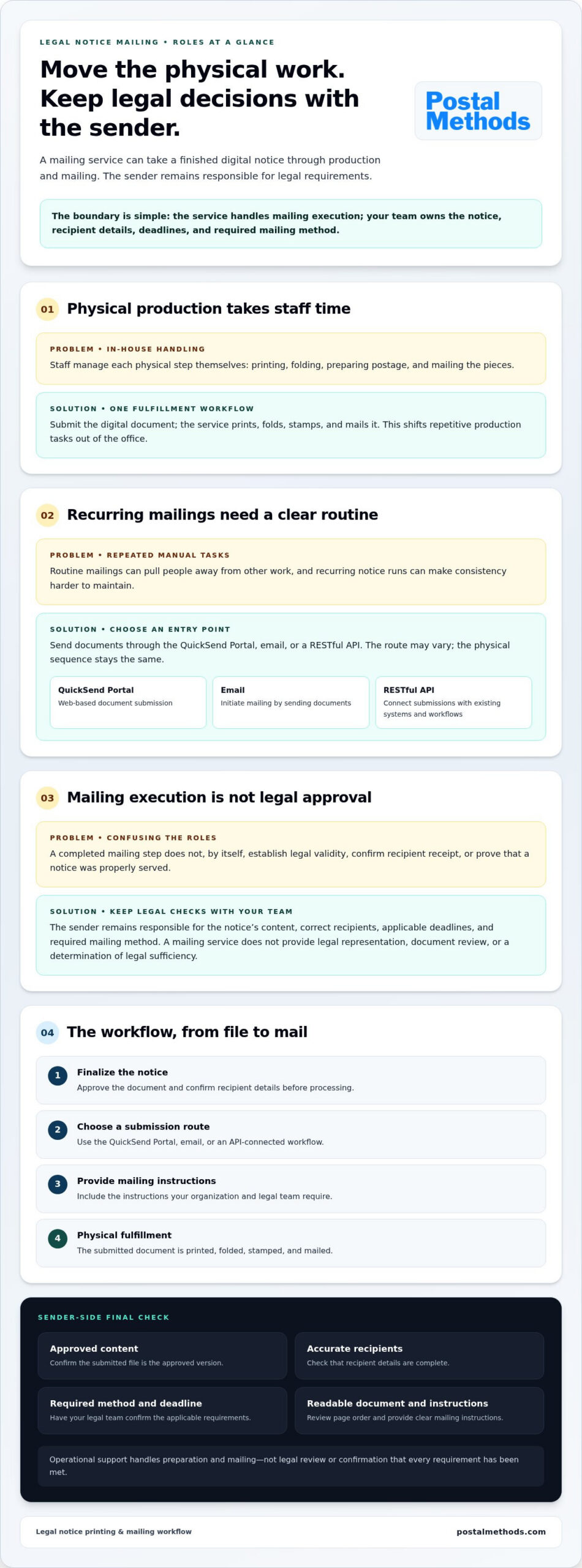
A legal notice mailing service handles the physical work of turning a sender’s digital document into a mailed piece. The sender submits the notice, and the service prints, folds, stamps, and mails it. This shifts repetitive production tasks out of the office and into one fulfillment workflow. It is not legal representation, document review, or a determination of whether a notice meets a particular legal standard.
The division of responsibility is straightforward: the service handles mailing execution, while the sender remains responsible for the notice’s content, recipient details, deadlines, and required mailing method. Completing the mailing step does not, by itself, establish legal validity.
What happens when a notice is sent through a mailing service?
The process starts when you submit a document digitally. Postal Methods accepts submissions through its QuickSend Portal, email, or RESTful API. The document then moves through physical production: it is printed, folded, stamped, and mailed. For a recurring notice run, for example, a team can submit files rather than print and assemble every piece in-house.
These steps cover preparation and mailing, not what happens after dispatch. Don’t assume that mailing alone confirms delivery, recipient receipt, or completion of a legal service requirement. Those outcomes depend on the mailing method and the applicable process.
Does mailing a notice make it legally effective?
Not automatically. Requirements can depend on the type of notice, the rules that apply, the recipient, and the required method. Service of process refers to formal notification in a legal proceeding, but a general mailing workflow cannot determine whether a specific notice has been properly served or is legally effective.
That distinction matters when selecting mailing instructions. A legal notice mailing service handles operational tasks; it doesn’t assess legal sufficiency or provide legal advice. Before submitting a notice, have your legal team confirm the approved content, correct recipients, applicable deadline, and required mailing method. Include those instructions with the document. Clear responsibilities keep the physical workflow efficient without treating proof of a mailing step as proof that every legal requirement has been met.
How legal notice mailing moves from file submission to physical mail
A clear workflow keeps document preparation on your side and repetitive production tasks in one place. Postal Methods accepts legal and notice mailing submissions through the QuickSend Portal, email, or RESTful API. The submission route can vary, but the print-and-mail sequence is consistent: submit the document, then have it printed, folded, stamped, and mailed.
- Finalize the notice. Approve the document and confirm recipient details before sending it for processing.
- Choose a submission route. Use the portal, email, or an API-connected workflow based on how your team manages the mailing.
- Provide mailing instructions. Include the instructions your organization and legal team require to prepare the notice for mailing.
- Move into physical fulfillment. The submitted document is printed, folded, stamped, and mailed.
Which submission method fits a legal notice mailing workflow?
The QuickSend Portal provides a web-based way to submit documents. Email-to-mail lets users initiate mailing by sending documents through email. RESTful API integration connects submissions with a business’s existing systems and workflows. Each offers a different entry point into the same physical process, so choose the route that best fits your team’s day-to-day operations.
For a single document, a direct portal or email submission may fit the task. Recurring or high-volume projects may benefit from a more structured routine, including an API-connected workflow. Postal Methods also handles custom and bulk mailing projects for larger or specialized runs. In every case, the sender prepares accurate documents and recipient information.
What should happen before a notice enters processing?
Complete a final sender-side check. Confirm that the content is approved, recipient details are complete, and mailing instructions match your organization’s requirements. Review page order and readability to make sure the submitted document is the version you intend to send. Keep legal review within your own process; the mailing workflow handles production, not legal approval.
Follow the submission route your team uses and provide clear instructions. To move repetitive handling out of the office, explore legal notice printing and mailing through Postal Methods.
Compare legal notice mailing options, records, and delivery expectations
Choosing how to mail a notice involves two separate decisions: who will handle the physical work, and what mailing method and records the sender needs. A legal notice mailing service can remove printing and mailing tasks from staff routines, but it can’t determine which postal option satisfies a notice-specific requirement. Match the workflow to your operational needs, then confirm the required mailing method with your legal team or the authority governing the notice.
Outsource legal notice mailing or keep it in-house?
With in-house handling, staff own each physical step, from printing and folding to preparing postage and mailing the pieces. This may suit occasional mailings when the process is manageable internally. As tasks recur or volumes increase, the work becomes another operational responsibility to coordinate.
Outsourcing moves those physical steps into a print-and-mail workflow. Your team still prepares the document, recipient information, and instructions, while the service handles production and mailing. Portal, email, and API submission options fit different business processes. The practical comparison is who owns each step and how much staff effort it takes, not an assumed level of speed, savings, or outcome.
What mailing records or delivery evidence might a sender need?
Keep evidence types distinct. A sender’s mailing records document actions taken to prepare or submit a notice. Tracking, when available for the selected postal service, can show recorded handling events. Delivery confirmation may report a delivery event. These records describe different parts of the mailing journey; none should automatically be treated as proof that a legal service requirement has been met.
USPS service names, features, and documentation can change. Review current USPS information for the specific mail class or add-on you are considering, and retain the records your process requires. Then confirm with counsel or the governing authority which method and evidence apply to the notice and recipient. For details focused on one mailing option, see this certified mail guide for legal documents.
Set the process before the next notice goes out: assign responsibility for preparation, select the sender-approved mailing method, and define which records belong in your internal file. This keeps operational documentation useful without confusing a carrier update or mailing record with a legal determination.
Prepare a legal notice mailing: a practical sender checklist
A dependable mailing process starts before a document is submitted. A final review helps prevent avoidable errors in content, recipient information, or instructions. Use this checklist to keep responsibilities clear: your team approves the notice and mailing requirements; the legal notice mailing service handles physical processing.
What should be checked before submitting legal notices?
- Content approval: Confirm the document is final and approved through your organization’s review process. Submit the version intended for mailing.
- Recipient information: Check each recipient’s details against the source record. For a group mailing, review the full recipient list and resolve missing or inconsistent information before submission.
- Mailing instructions: Have your legal team confirm the required mailing method and any timing requirements for the specific notice. Don’t assume a routine postal option fits every situation.
- Document readiness: Check that all pages are included, appear in the correct order, and are readable. Review the document as a recipient would see it, not only as it appears in your editing system.
- Internal records: Decide what your organization or counsel requires you to retain, and store the relevant records according to your process.
Deadlines and required mailing methods can vary by notice. Have counsel confirm them before submission rather than relying on the mailing workflow to determine legal requirements.
How can teams manage repeat or bulk notice mailings?
Build repeatability into the sender-side process. Use a consistent approval step, review recipient data against the intended mailing, and provide clear instructions for each run. For bulk or specialized projects, a defined internal handoff makes it easier to track what has been approved and what is ready to submit. For instance, in development projects where statutory notifications accompany technical planning reports, organizations often rely on traffic engineering specialists like mltraffic.com.au before initiating community notice runs.
Choose a submission route that fits how the work is managed. The QuickSend Portal offers a web-based route; email-to-mail supports email submission; RESTful API integration can connect submissions with an existing business workflow. The route may differ, but content approval, recipient review, and recordkeeping remain part of your organization’s process.
For broader operational context, read this letter printing and mailing overview. To move notice printing and mailing out of routine staff workflows, explore Postal Methods’ mailing services.
Use Postal Methods for legal notice printing and mailing
Postal Methods takes legal and notice documents from digital submission into physical mail. Instead of assigning staff to print, fold, prepare postage, and mail each notice, your team can submit documents through a workflow that handles those production steps. This shifts repetitive handling out of staff routines while keeping document approval, recipient details, deadlines, and legal requirements under your control.
Choose a submission path for your notice workflow
Use the route that fits how your team works. The QuickSend Portal provides web-based document submission. Email-to-mail lets you initiate mailing through email. RESTful API integration can connect document submission with a business’s software workflow. Each option moves documents into legal and notice printing and mailing without making manual print preparation the center of the process.
For a single mailing, a direct portal or email submission may suit your current routine. An API-connected workflow can fit organizations that want document delivery to work within existing systems. In either case, your team supplies approved documents and clear recipient information.
Move from manual processing to a managed mailing workflow
After submission, Postal Methods handles the physical sequence: printing, folding, stamping, and mailing. For larger or specialized runs, custom and bulk mailing projects support different volumes or handling needs. You can shift repetitive production work out of staff routines while retaining responsibility for deciding what to send, to whom, and by which required method.
Transparent pricing and no long-term contracts make the service straightforward to consider as part of your mailing operations. A legal notice mailing service handles fulfillment, not legal review; continue to rely on your legal team for notice-specific requirements and approvals.
Ready to move notice documents into a print-and-mail workflow? Start with Postal Methods’ online mailing services and choose a submission path that fits your team.
Make your next notice mailing easier to manage
A legal notice mailing service can take repetitive physical tasks off your team’s plate, moving documents through printing, folding, stamping, and mailing in one workflow. Choose a submission route that fits your operations, whether that’s a web portal, email, or RESTful API. Then keep sender-side checks in place: approve the notice, verify recipient details, and confirm deadlines and required mailing methods with your legal team.
Postal Methods provides legal and notice printing and mailing, with transparent pricing and no long-term contracts. Your team can hand off production while retaining responsibility for legal requirements and the records your process calls for. A clear workflow reduces manual handling without blurring that important boundary.
Ready to move from file preparation to physical mail? Start your legal notice mailing workflow with Postal Methods. Choose a submission path that fits your team and let staff focus on the work that needs their attention.
Frequently Asked Questions
What is a legal notice mailing service?
A legal notice mailing service handles physical processing, including printing a submitted document, folding it, stamping it, and mailing it. Postal Methods accepts documents through a web portal, email, or API. The service doesn’t replace legal review. The sender remains responsible for the notice’s content, recipient details, deadlines, and applicable requirements. Confirm notice-specific questions with your legal team before submitting the document.
Can I send a legal notice online for printing and mailing?
Yes. You can submit a notice digitally instead of having staff print, fold, and mail it in-house. Postal Methods offers the QuickSend Portal, email-to-mail, and RESTful API submission. Before sending a document, finalize its content and recipient information through your organization’s review process. Confirm any required mailing method and deadline with your legal team, then include the necessary instructions with the submission.
Does mailing a legal notice make it legally valid?
No. Mailing alone doesn’t establish that a notice meets legal requirements. Sufficiency can depend on the document, applicable rules, recipient, and required delivery method. A mailing service handles operational steps, not legal review or advice. Before sending a specific notice, confirm applicable requirements with your counsel or the relevant authority. Keep the records your organization requires, but don’t treat a mailing record as a legal determination.
What is the difference between certified mail and regular mailing for a legal notice?
Certified and regular mailing may provide different records or delivery information, but specific features depend on the postal service selected. Review current USPS terms and options before choosing. A tracking record or mailing receipt can document aspects of the mailing process, but neither automatically proves that a legal service requirement was met. Confirm the method required for your notice with counsel or the governing authority.
Can a mailing service handle bulk legal notices?
Yes, Postal Methods supports custom and bulk mailing projects, helping organizations move recurring printing and mailing tasks out of staff workflows. The sender still needs to approve documents, review recipient data, and provide clear mailing instructions before submission. For repeat runs, use a consistent internal review process and retain the records your organization requires. Custom project handling can support different volumes or specialized needs.
What should I prepare before using a legal notice mailing service?
Prepare the approved notice, complete recipient details, and mailing instructions set by your organization or counsel. Check that the document is complete, readable, and the correct version for processing. Confirm applicable deadlines and any required postal method with your legal team before submission. After mailing is initiated, retain the records your internal process or counsel requires. These checks organize the operational handoff without substituting for legal review.
Can legal notices be sent through an API?
Yes, Postal Methods offers RESTful API integration for organizations connecting document submission with software workflows. An API provides a submission route that can fit into existing business systems. Keep approval of notice content, recipient data, mailing instructions, and deadline management within your organization’s process. Automation handles the handoff, not legal review. Plan the integration around your internal workflow and confirm notice-specific requirements with counsel before sending.